EasyManua.ls Logo

Sharp ZQ-6100M - Page 113

Sharp ZQ-6100M
194 pages
Print Icon
To Next Page IconTo Next Page
To Previous Page IconTo Previous Page
Loading...
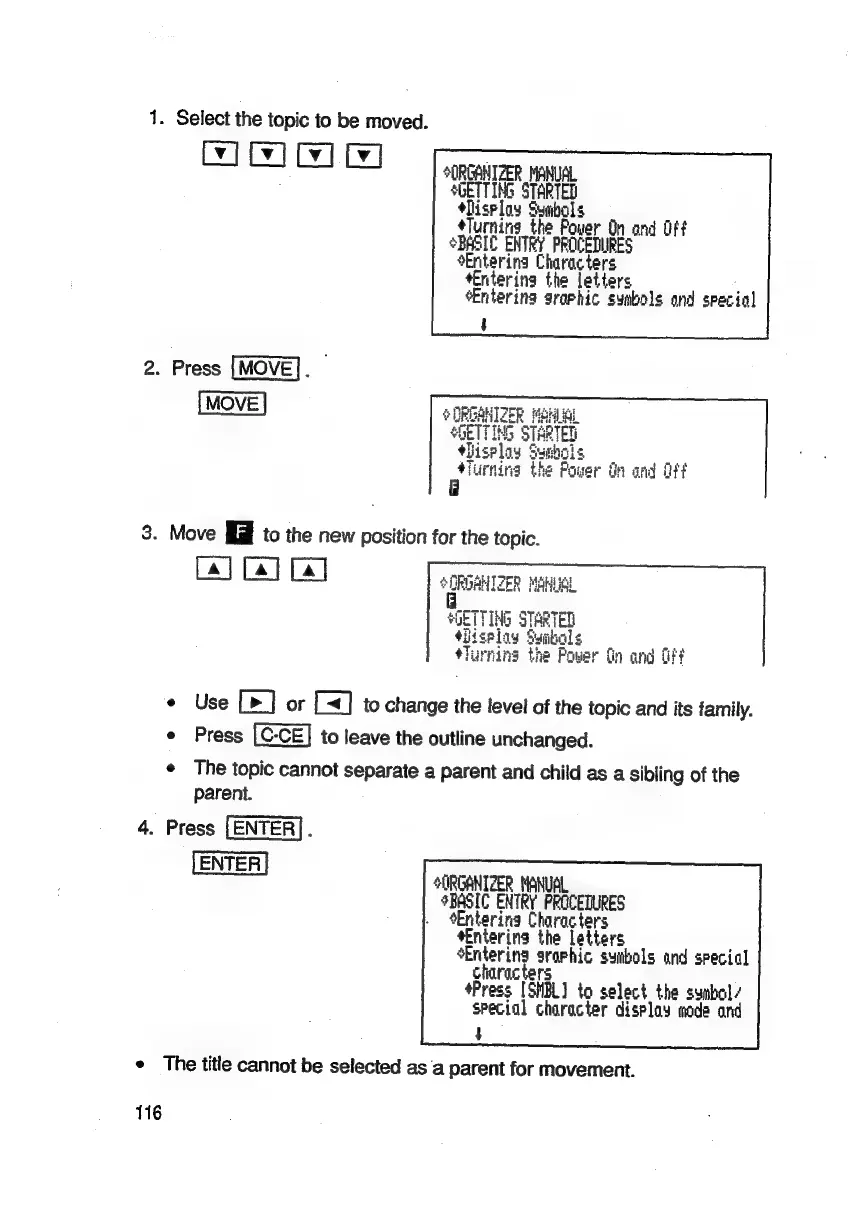
1.
Select
the
topic
to
be
moved.
Cy]
[x]
ty]
SORGANIZER
MANUAL
SGETTING
STARTED
shisrloy
Symbols
-
*Turning
the
Power
On
and Off
BASIC
ENTRY
PROCEDURES
‘Entering
Characters
sEntering
the
letters
:
Entering
araphic
symbols
and
special
2.
Press
[MOVE].
3.
Move
fil
to
the
new
position
for
the
topic.
[a] [4] [4]
SORDAHIZER
MAHUSL
F
SOETTING
STARTED
4itselay
Ssaibols
Le
*Turning
the
Power
fin
and
fff
¢
Use
[>]
or
to
change
the
level
of
the
topic
and
its
family.
e
Press
to
leave
the
outline
unchanged.
¢
The
topic
cannot
separate
a
parent
and
child
as
a
sibling
of
the
parent.
4.
Press
[ENTER].
ENTER
SURGANIZER
MANUSL
BASIC
ENTRY
PROCEDURES
Entering
Characters
*Enterins
the
letters
sEntering
sraphic
sybols
and
special
characters
*Press
[SHBL]
to
select
the
symbol
special
character
display
mode
and
$
¢
The
title
cannot
be
selected
as
a
parent
for
movement.
116

Related product manuals