EasyManua.ls Logo

Sharp ZQ-6100M - Page 114

Sharp ZQ-6100M
194 pages
Print Icon
To Next Page IconTo Next Page
To Previous Page IconTo Previous Page
Loading...
Adding
topics
To
add
a
topic
to
the
end
of
an
outline,
simply
press
[vy]
until
you
Pass
the
bottom
and
a
diamond
is
displayed
awaiting
your
entry.
Topics
can
also
be
easily
inserted.
Press
[INS]
and
a
flashing
[i
will
appear.
Use
the
cursor
keys
to
change
the
insertion
point
or
fevel,
and
then
type
in
the
new
topic.
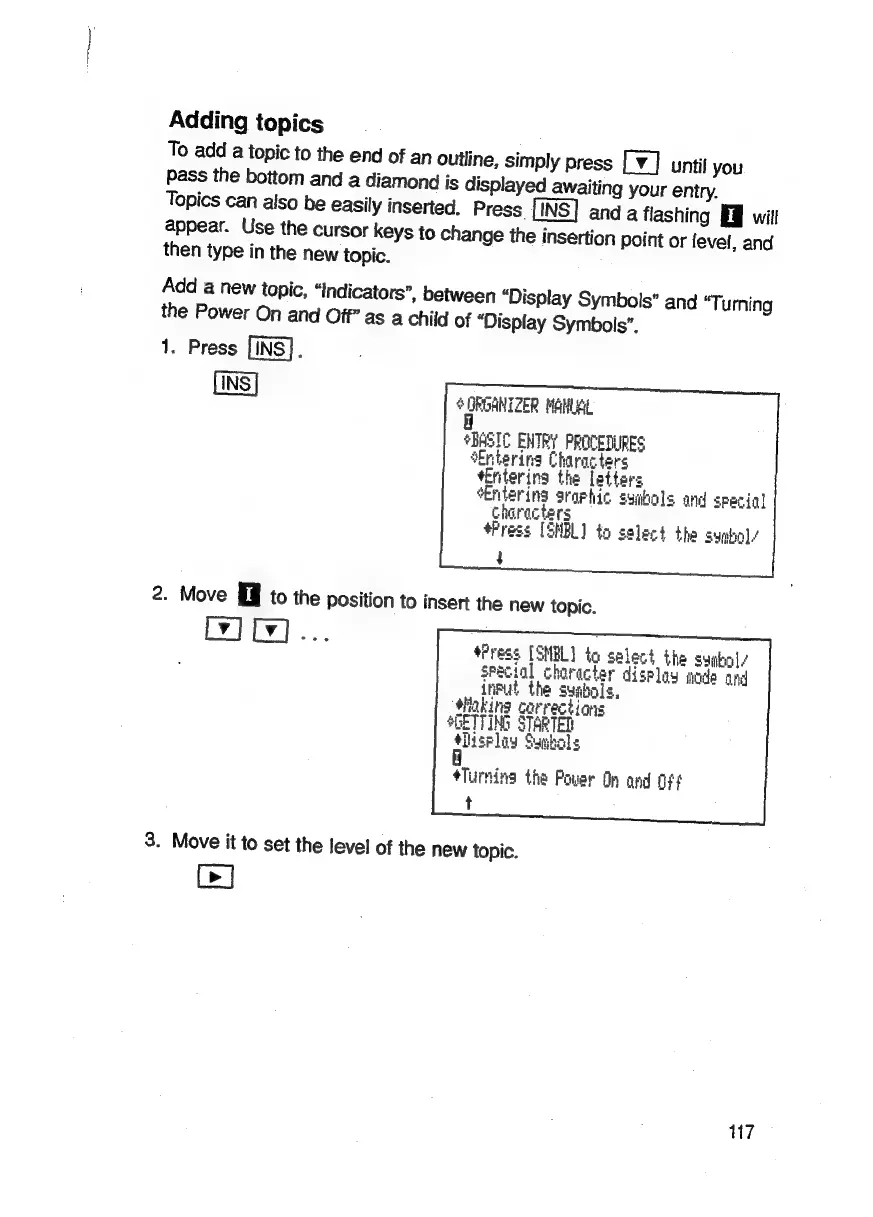
Add
a
new
topic,
“Indicators”,
between
“Display
Symbols”
and
“T;
urning
the
Power
On
and
Off’
as
a
child
of
“Display
Symbols”.
1.
Press
[INS].
$
frorhlZeR
MONA
*BASIC
ENTRY
PROCEDURES
‘Entering
Characters
*Enterina
the
letters
Entering
sraphic
syibels
and
specigl
characters
#Press
[3NBL)
to
select
the
suabol/
t
2.
Move
to
the
position
to
insert
the
new
topic.
fPress
[SMBL]
to
select
the
sugbol/
sPecial
character
display
oda
and
_infut
the
symbols,
Hiaking
corrections
GETTING
STARTED
#iiselay
Smbols
I
Turning
the
Pover
Op
and
Ft
t
3.
Move
it
to
set
the
level
of
the
new
topic.
Ce]
17

Related product manuals