EasyManua.ls Logo

Sharp ZQ-6100M - Page 133

Sharp ZQ-6100M
194 pages
Print Icon
To Next Page IconTo Next Page
To Previous Page IconTo Previous Page
Loading...
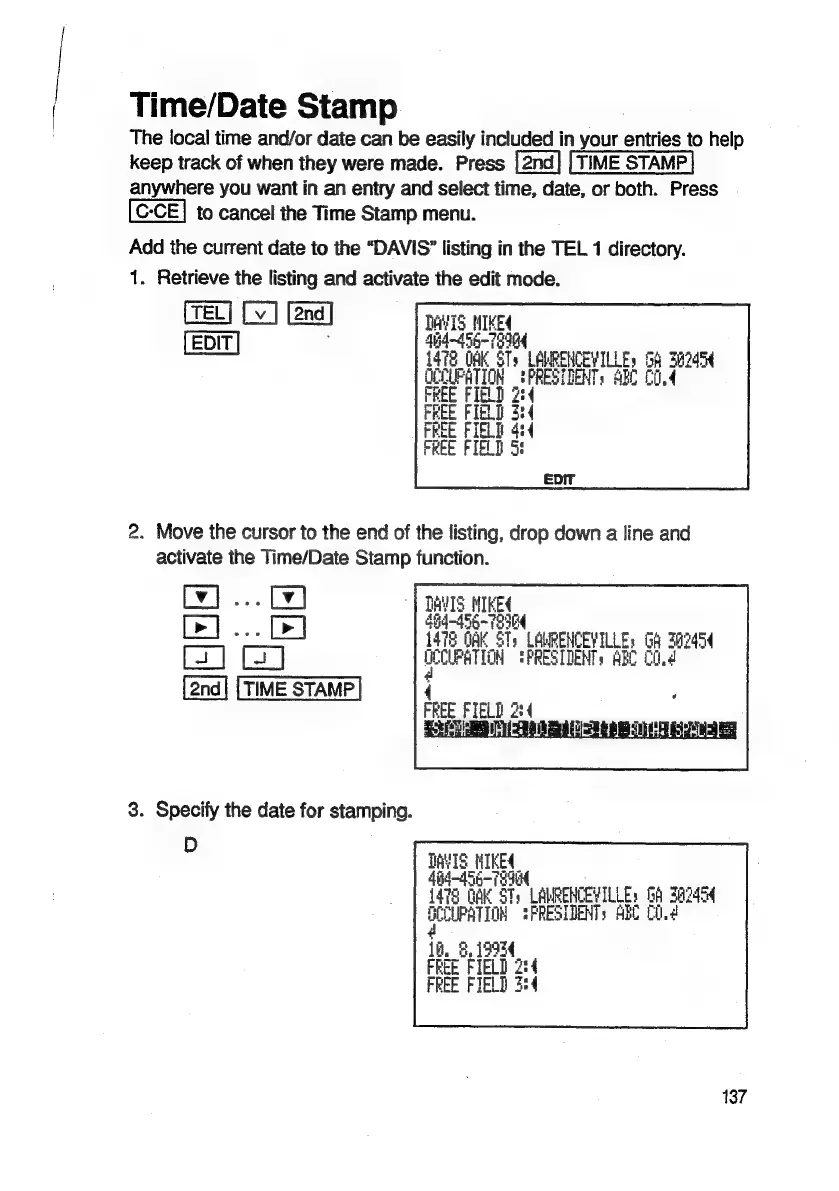
Time/Date
Stamp
The
local
time
and/or
date
can
be
easily
included
in
your
entries
to
help
keep
track
of
when
they
were
made.
Press
[2nd]
[TIME
STAMP]
anywhere
you
want
in
an
entry
and
select
time, date,
or
both.
Press
to
cancel
the
Time
Stamp
menu.
Add
the
current
date
to
the
“DAVIS”
listing
in
the
TEL
1
directory.
1.
Retrieve
the
listing
and
activate
the
edit
mode.
[TEL]
[v]
[v
|
[2nd]
TAVIS
MIKE
[EDIT
|
$h4~455-
79904
pit
i472
OAK
STs
LAWRENCEVILLEs
G6
382454
ue
uf
a
a
SPRESTDENTs
ABC
CO.4
2.
Move
the
cursor
to
the
end
of
the
listing,
drop
down
a
line
and
activate
the
Time/Date
Stamp
function.
Cy]
...
Cy)
1
Le]
...
fe)
1476
CR
STs
LORENCEVILLE,
GA
3aD454
OCCUPATION
TPRESIDENTs
ABC
Cd
TIME
STAMP
;
CEE
FIELD
4
3.
Specify
the
date
for
stamping.
p
TAVIS.
NIKE
He
ba
St
eURENCEVILLE
Gh
A245
gu
4
LO?
IaH
Si
sath
PRESIDENTS
ARC
C.d
A.
5,
19924
18,
FREE
FIELD
2:4
FREE
FIELD
34
137

Related product manuals