EasyManua.ls Logo

Sharp ZQ-6100M - Page 138

Sharp ZQ-6100M
194 pages
Print Icon
To Next Page IconTo Next Page
To Previous Page IconTo Previous Page
Loading...
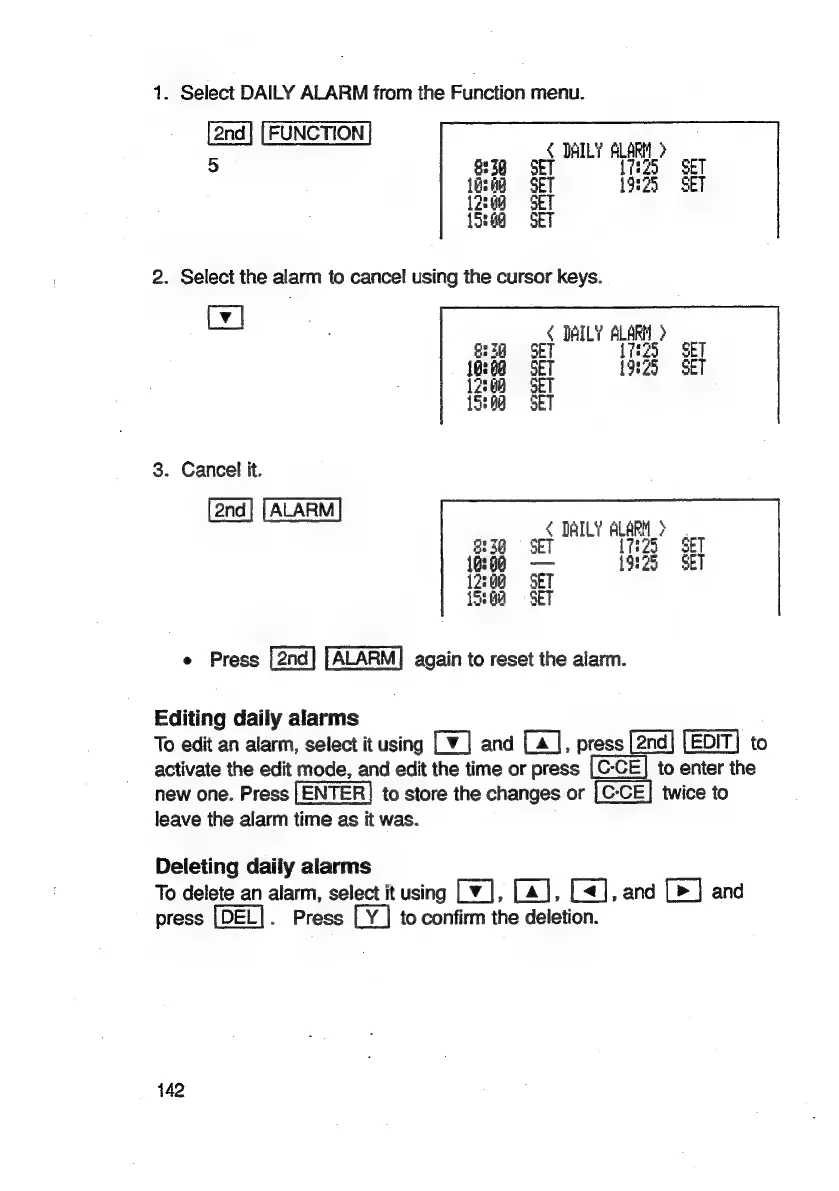
1.
Select
DAILY
ALARM
from
the
Function
menu.
FUNCTION
Fe
DAILY
ALARM
>
)
3g
Zo
SET
19325
SET
<
DAILY
ALARM
>
SET
[725
§
SET
1325
SET
3.
Cancel
it.
ALARM
DAILY
ALARM
>
8339
©
SET
17:25
|
SET
16:68
19:25
SET
12:08
SET
{3:6
©
SET
e
Press
ALARM]
again
to
reset
the
alarm.
Editing
daily
alarms
To
edit
an
alarm,
select
it
using
Lv]
and
[a],
Pies
[2nd]
[EDIT]
|EDIT}
to
activate
the
edit
mode,
and
edit
the
time
or
press
to
enter
the
new
one.
Press
to
store
the
changes
or
twice
to
leave
the
alarm
time
as
it
was.
Deleting
daily
alarms
To
delete
an
alarm,
select
it
using
Lv],
[a], [<],
and
[>]
and
press
[DEL].
Press
LY]
to
confirm
the
deletion.
142

Related product manuals