EasyManua.ls Logo

Sharp ZQ-6100M - Page 140

Sharp ZQ-6100M
194 pages
Print Icon
To Next Page IconTo Next Page
To Previous Page IconTo Previous Page
Loading...
These
entries
will
be
stored
on
the
M
and
N
pages.
An
entry
can
be
up
to
32
characters
long.
After
all
entries
have
been
made,
press
to
return
to
the
User
dictionary
menu,
and
again
to
exit
the
user
dictionary
function.
e
Entering
anything
into
the
user
dictionary
twice
will
create
two
identical
entries
unnecessarily
using
up
memory.
Recalling
dictionary
entries
Press
any
time
when
making
or
editing
an
entry
to
recall
an
item
from
the
dictionary.
Use
and
to
step
through
pages
until]
you
reach
the
entry
you
want,
and
press
the
number
corresponding
to
the
entry.
Alternatively,
press
a
letter
key
to
jump
to
the
first
page
of
that
letter
directly.
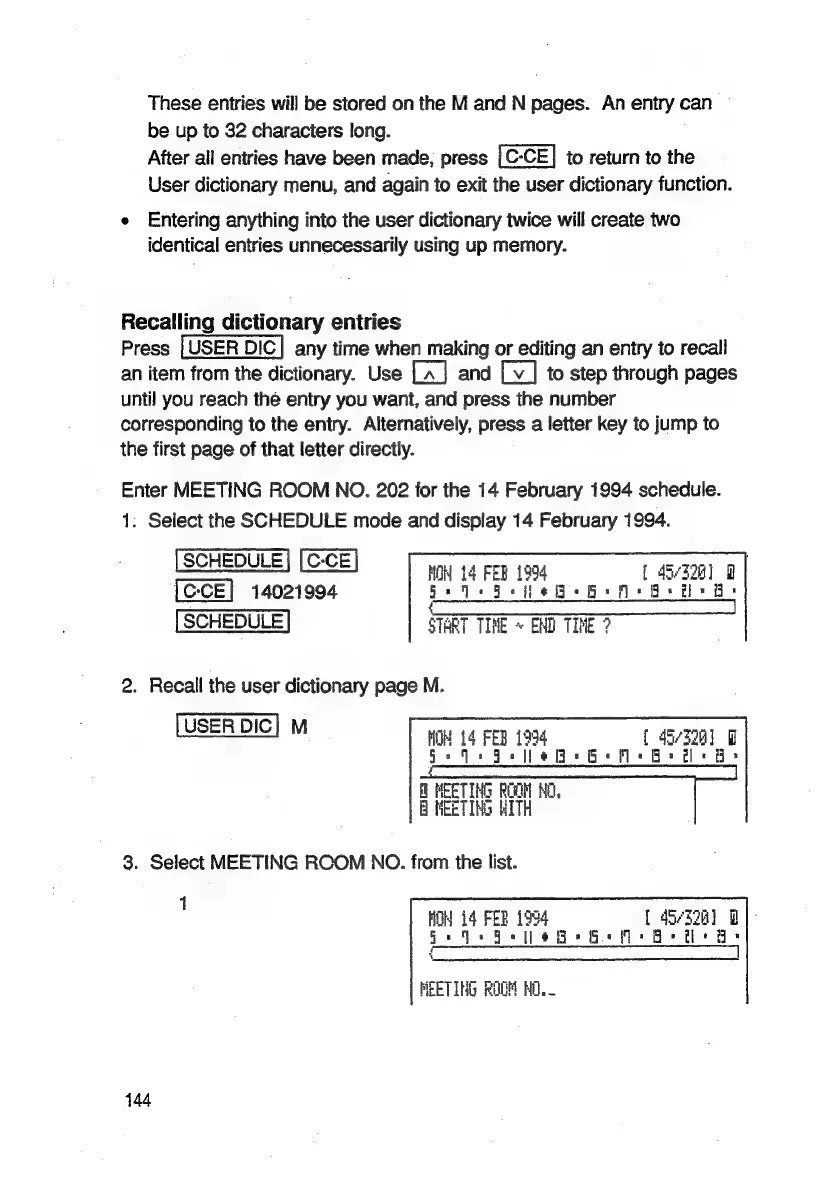
Enter
MEETING
ROOM
NO.
202
for
the
14
February
1994
schedule.
1.
Select
the
SCHEDULE
mode
and
display
14
February
1994.
[CCE]
14021994
MH
FEB
1994
[
4-328]
Uo
heb
Bes
Bsa
START
TIME
«
EMD
TIME
?
na
‘]
2.
Recall
the
user
dictionary
page
M.
st
NOH
14
FEB
1994
[
4i/328)
Wl
ss
a
0
A
=
=
OD
=
MEETING
ROOM
HO.
8
MEETING
WITH
3.
Select
MEETING
ROOM
NO.
from
the
list.
1
HON
i4
FER
1994
{
45328]
D2]:
a
A
I”
>
A
4
MEETING
ROOM
HO.
144

Related product manuals