EasyManua.ls Logo

Sharp ZQ-6100M - Page 143

Sharp ZQ-6100M
194 pages
Print Icon
To Next Page IconTo Next Page
To Previous Page IconTo Previous Page
Loading...
Use
[¥]
and
[4
]
to
highlight
the
date
or
calendar
format
in
reverse,
and
[>|
or
[<]
to
switch
between
options.
Press
to
exit
when
you
finish.
Start-up
display
By
defining
the
start-up
display,
your
Organizer
will
announce
your
name,
address
and
telephone
number
every
time
it
is
turned
on.
If
you
choose,
the
Organizer
will
ask
for
the
secret
entry
password
before
permitting
access
to
any
function.
'
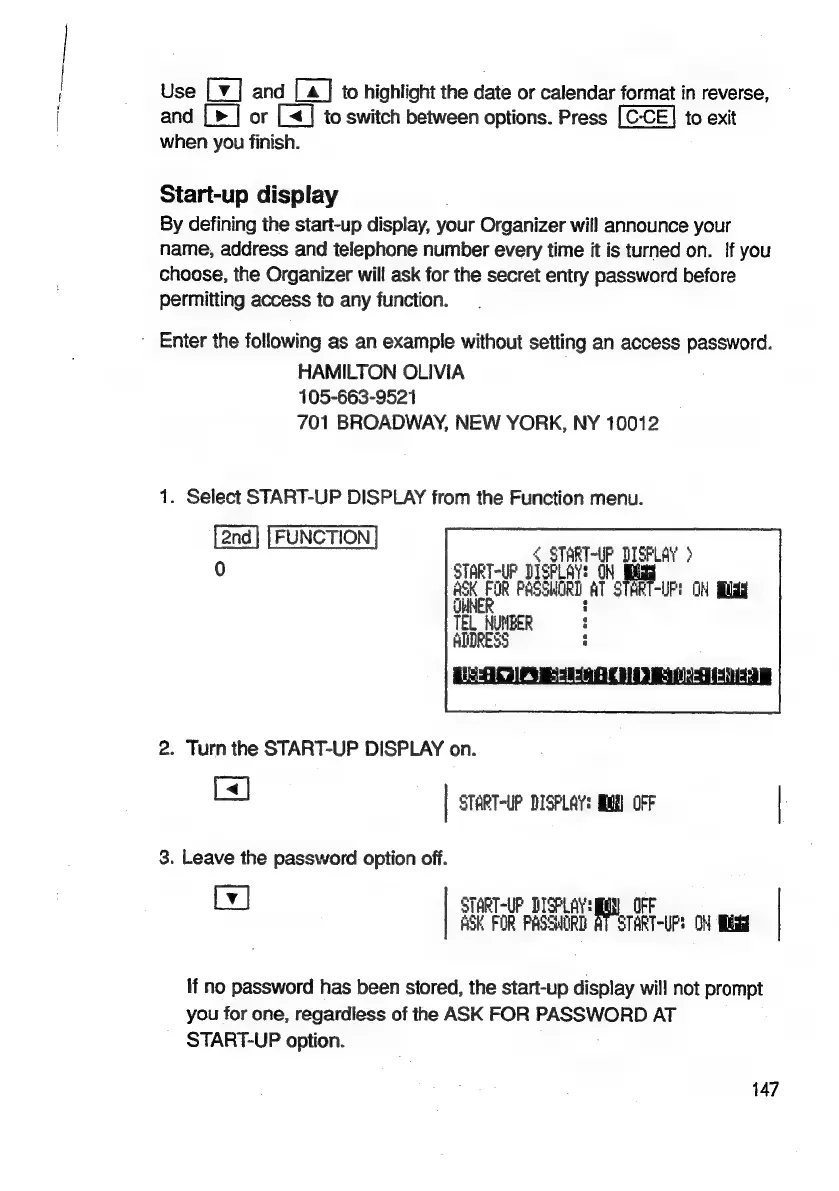
Enter
the
following
as
an
example
without
setting
an
access
password.
HAMILTON
OLIVIA
105-663-9521
701
BROADWAY,
NEW
YORK,
NY
10012
1.
Select
START-UP
DISPLAY
from
the
Function
menu.
[2nd]
[FUNCTION
|
<
START-UP
DISFLAY
>
0
START-UP
DISPLAY:
9)
ad
ASK
FOR
PASSWORD
AT
START-UP!
OM
fidgy
ul
TEL
NUMBER
ADDRESS
2.
Turn
the
START-UP
DISPLAY
on.
Cs]
|
START-UP
DISPLAY:
MN)
OFF
|
3.
Leave
the
password
option
off.
Ly]
START-UP
DISPLAY:
al
OFF
ASK
FOR
PASSHORD
AT
START-UP:
OM
Sidi
If
no
password
has
been
stored,
the
start-up
display
will
not
prompt
you
for
one,
regardless
of
the
ASK
FOR
PASSWORD
AT
START-UP
option.
147

Related product manuals