EasyManua.ls Logo

Sharp ZQ-6100M - Page 144

Sharp ZQ-6100M
194 pages
Print Icon
To Next Page IconTo Next Page
To Previous Page IconTo Previous Page
Loading...
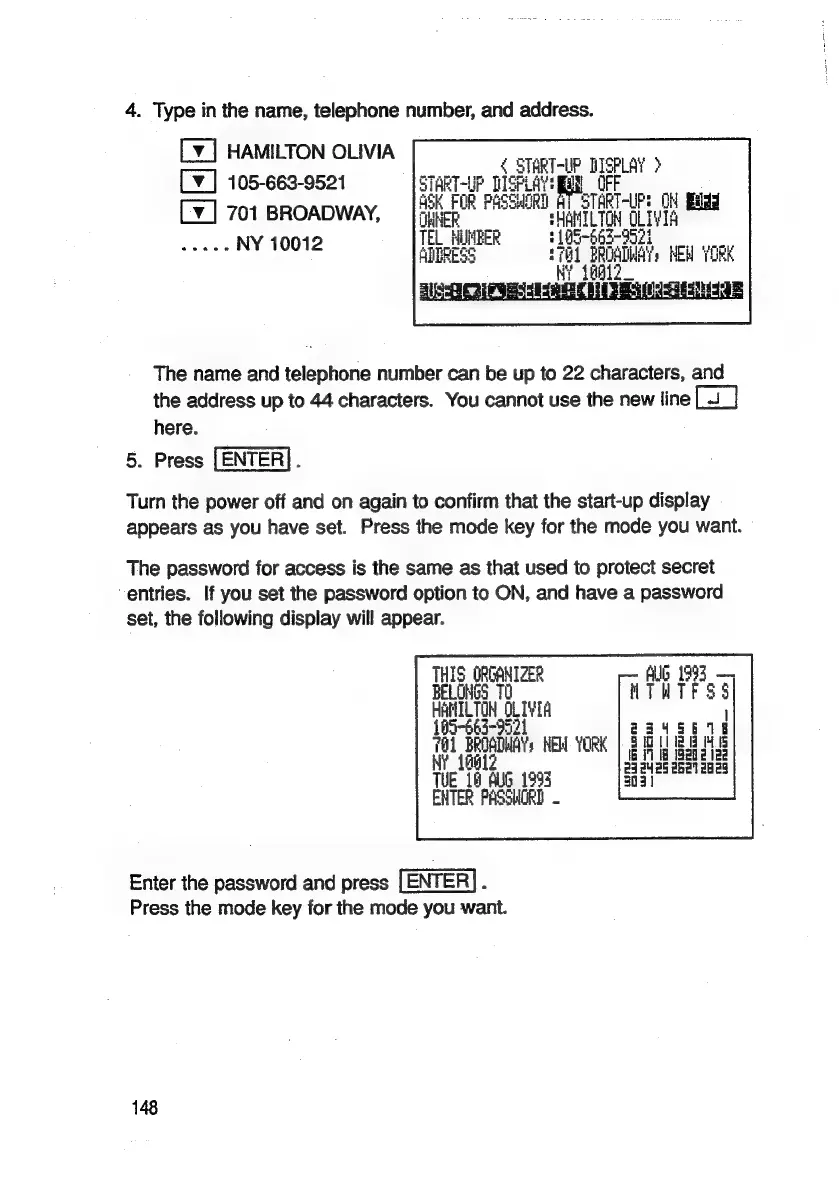
4.
Type
in
the
name,
telephone
number,
and
address.
Ly]
HAMILTON
OLIVIA
[Lv]
105-663-9521
rAer-UP:
CN
Bly
Cy]
701
BROADWAY,
ie
:
ee
OLIvia
seid
ee
NY
10012
4
ep.
-|
LF
HISPLAY
>
|
OFF
9521
a
Heal
NEW
YORK
Y
48812
The
name
and
telephone
number
can
be
up
to
22
characters,
and
the
address
up
to
44
characters.
You
cannot
use
the
new
line
here.
5.
Press
|ENTER}.
Turn
the
power
off
and
on
again
to
confirm
that
the
start-up
display
appears
as
you
have
set.
Press
the
mode
key
for
the
mode
you
want.
The
password
for
access
is
the
same
as
that
used
to
protect
secret
entries.
If
you
set
the
password
option
to
ON,
and
have
a
password
set,
the
following
display
will
appear.
THIS
ORGANIZER
HTL
TN
OLIVIA
Tal
Broa
HEM
YORK
NY
1ag12
TUE
18
AUG
1995
ENTER
PASSHORD
-
Enter
the
password
and
press
[ENTER].
Press
the
mode
key
for
the
mode
you
want.
148

Related product manuals