EasyManua.ls Logo

Sharp ZQ-6100M - Page 149

Sharp ZQ-6100M
194 pages
Print Icon
To Next Page IconTo Next Page
To Previous Page IconTo Previous Page
Loading...
|
|
However
there
are
a
few
restrictions
when
exchanging
with
a
different
model:
e
The
mode
from
which
entries
are
to
be
transferred
must
be
supported
by
the
receiving
Organizer.
e
TEL
and
BUSINESS
CARD
free
field
names
cannot
be
transferred.
e
As
the
line
lengths
are
different,
the
layout
of
data
transferred
between
this
Organizer
and
the
1Q-7000,
ZQ-5000
or
ZQ-2000
series
Organizer
will
change.
Edit
them
afterwards
to
format
to
your
liking.
For
details,
see
“Data
Transfer
Restrictions”
on
page
179.
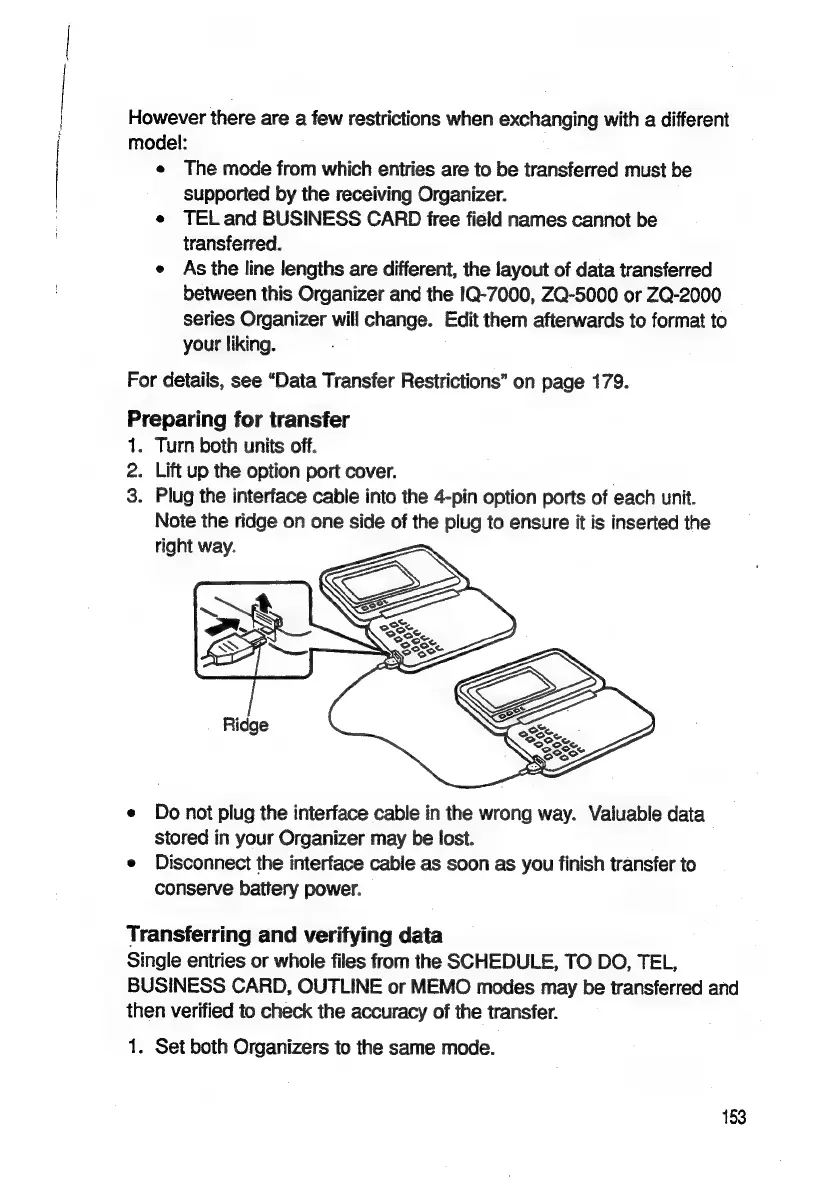
Preparing
for
transfer
i
2.
3.
Turn
both
units
off.
Lift
up
the
option
port
cover.
Plug
the
interface
cable
into
the
4-pin
option
ports
of
each
unit.
Note
the
ridge
on
one
side
of
the
plug
to
ensure
it
is
inserted
the
right
way.
Do
not
plug
the
interface
cable
in
the
wrong
way.
Valuable
data
stored
in
your
Organizer
may
be
lost.
Disconnect
the
interface
cable
as
soon
as
you
finish
transfer
to
conserve
battery
power.
Transferring
and
verifying
data
Single
entries
or
whole
files
from
the
SCHEDULE,
TO
DO,
TEL,
BUSINESS
CARD,
OUTLINE
or
MEMO
modes
may
be
transferred
and
then
verified
to
check
the
accuracy
of
the
transfer.
1.
Set
both
Organizers
to
the
same
mode.
153

Related product manuals