EasyManua.ls Logo

Sharp ZQ-6100M - Page 159

Sharp ZQ-6100M
194 pages
Print Icon
To Next Page IconTo Next Page
To Previous Page IconTo Previous Page
Loading...
{
DIALING
DIRECTORY
>
4
1200-241
{2H0-CHt
{200-BHt
12h0-ENi
{20-ENt
(ohd-BHt
7]
7
ey
es
ett
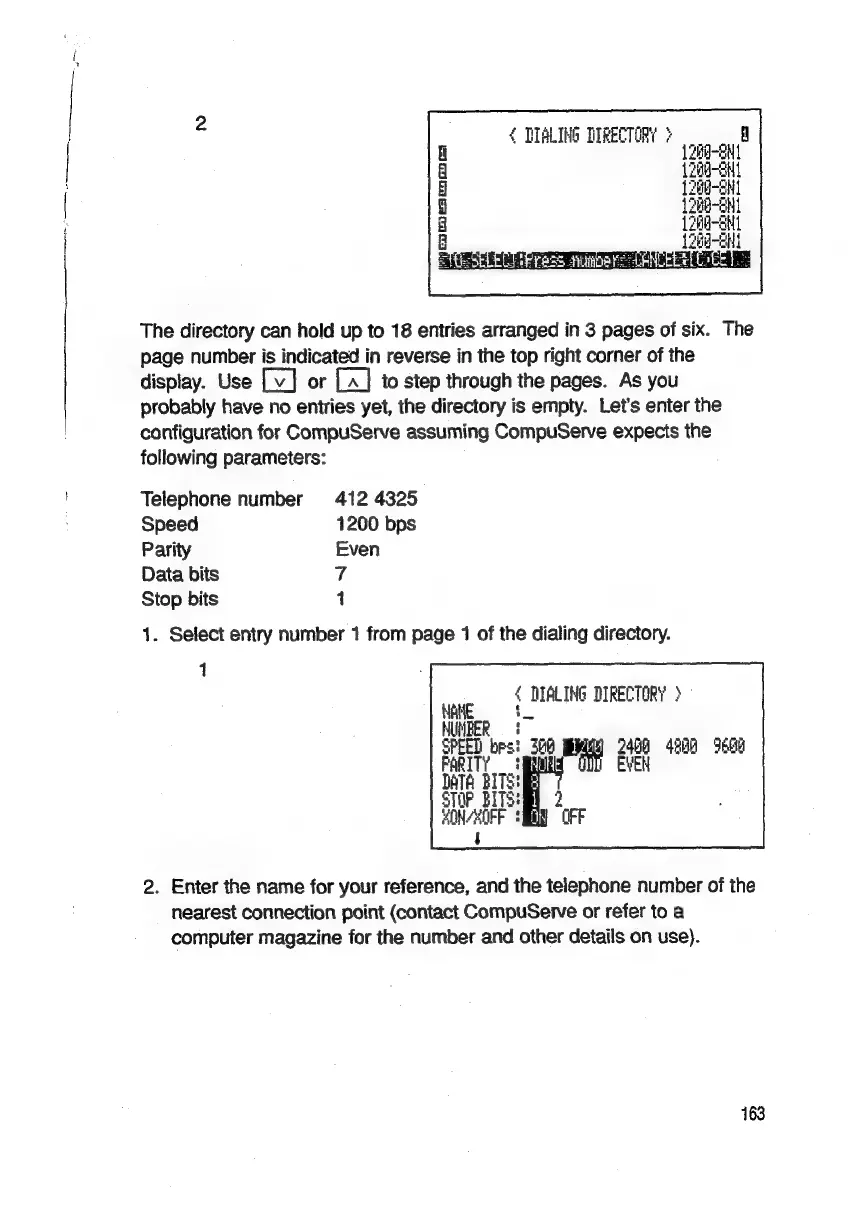
The
directory
can
hold
up
to
18
entries
arranged
in
3
pages
of
six.
The
page
number
is
indicated
in
reverse
in
the
top
right
corner
of
the
display.
Use
or
to
step
through
the
pages.
As
you
probably
have
no
entries
yet,
the
directory
is
empty.
Let’s
enter
the
configuration
for
CompuServe
assuming
CompuServe
expects
the
following
parameters:
Telephone
number
412
4325
Speed
1200
bps
Parity
Even
Data
bits
7
Stop
bits
1
1.
Select
entry
number
1
from
page
1
of
the
dialing
directory.
{
DEALING
DIRECTORY
>
HUMBER
=
§
SPEED
bps:
FARIT?
3
DATA
BITS!
STOP
BITS:
HONCHOPF
$
2
(FF
3h
2400
4200
9600
QC
EVEN
2.
Enter
the
name
for
your
reference,
and
the
telephone
number
of
the
nearest
connection
point
(contact
CompuServe
or
refer
to
a
computer
magazine
for
the
number
and
other
details
on
use).

Related product manuals