EasyManua.ls Logo

Sharp ZQ-6100M - Page 160

Sharp ZQ-6100M
194 pages
Print Icon
To Next Page IconTo Next Page
To Previous Page IconTo Previous Page
Loading...
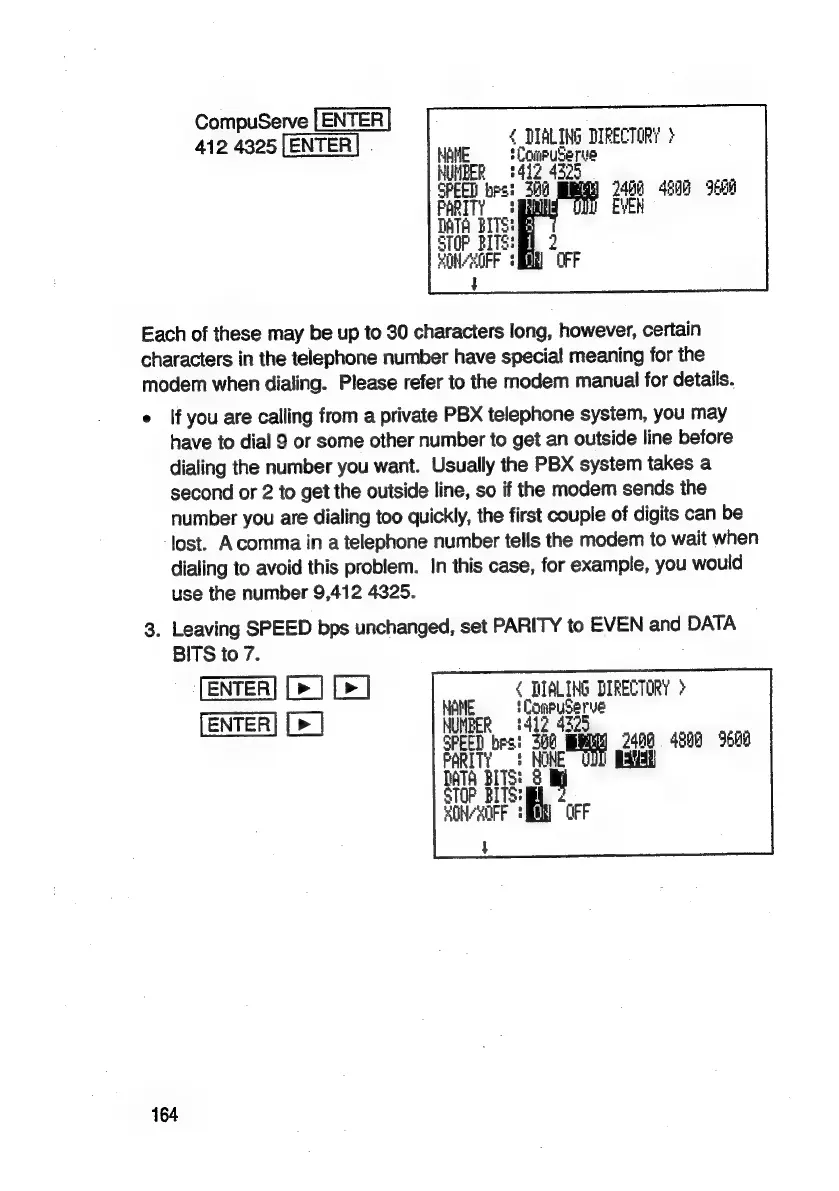
CompuServe
[ENTER
.
{
DIALING
DIRECTORY)
412
4325
[ENTER]
|
Hat
‘Coupuserve
2
ee
2408
4900
9608
|
EVEN
“OFF
Each
of
these
may
be
up
to
30
characters
long,
however,
certain
characters
in
the
telephone
number
have
special
meaning
for
the
modem
when
dialing.
Please
refer
to
the
modem
manual
for
details.
e
{f
you
are
calling
from
a
private
PBX
telephone
system,
you
may
have
to
dial
9
or
some
other
number
to
get
an
outside
line
before
dialing
the
number
you
want.
Usually
the
PBX
system
takes
a
second
or
2
to
get
the
outside
line,
so
if
the
modem
sends
the
number
you
are
dialing
too
quickly,
the
first
couple
of
digits
can
be
lost.
Acomma
in
a
telephone
number
tells
the
modem
to
wait
when
dialing
to
avoid
this
problem.
In
this
case,
for
example,
you
would
use
the
number
9,412
4325.
3.
Leaving
SPEED
bps
unchanged,
set
PARITY
to
EVEN
and
DATA
BITS
to
7.
[ENTER]
[>]
[>]
7
ie
DIRECTORY
>
:
io
4
oa
[>]
MBER
sree)
best
a
or
2408
4800
9600
ie
A
BITS:
8
aa
i
OFF
5

Related product manuals