EasyManua.ls Logo

Sharp ZQ-6100M - Page 164

Sharp ZQ-6100M
194 pages
Print Icon
To Next Page IconTo Next Page
To Previous Page IconTo Previous Page
Loading...
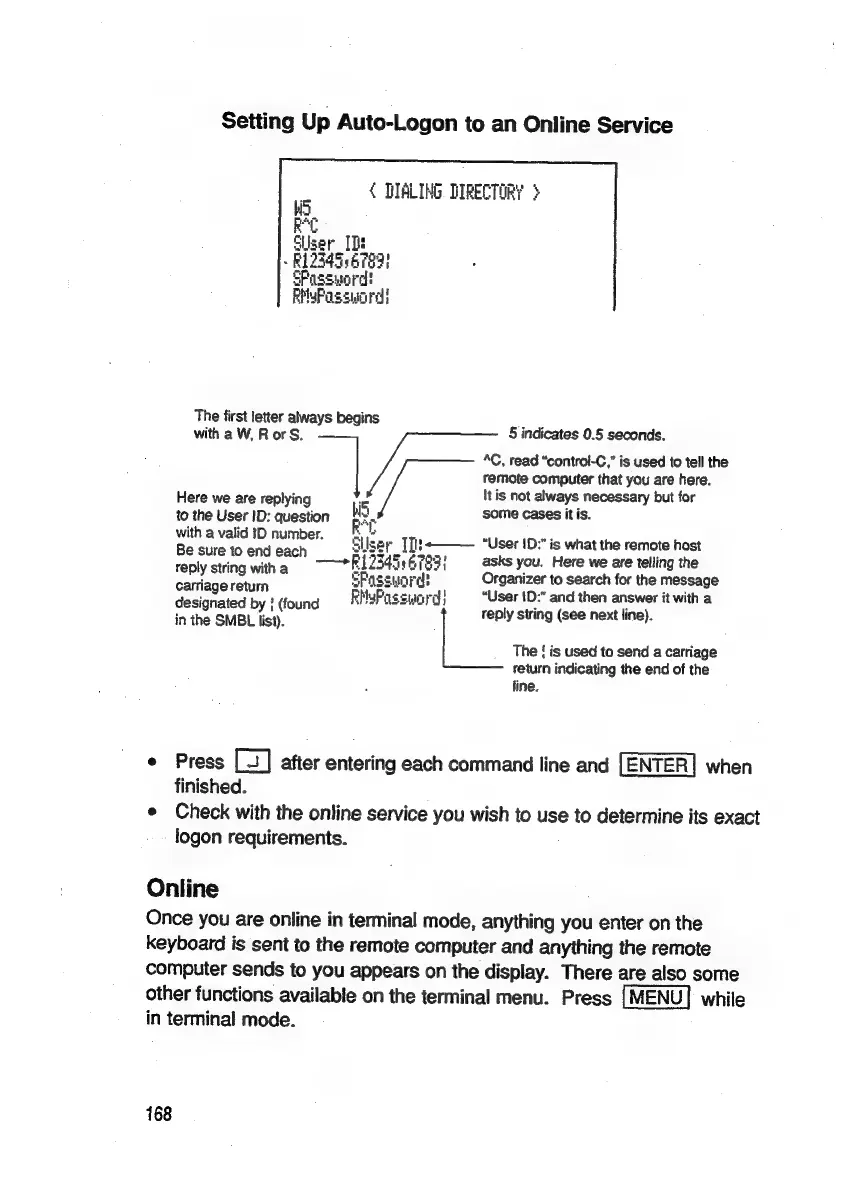
Setting
Up
Auto-Logon
to
an
Online
Service
«
DALING
DIRECTORY
}
RC
Suiser_
IDs
»
R12345
6789)
SFassuord
PMyPassucrd!
The
first
letter
always
begins
A
with
a
W,
Ror
S.
§
indicates
0.5
seconds.
4C,
read
“contral-C,”
is
used
to
tell
the
remote
computer
that
you
are
here.
Here
we
are
replying
iis
Itis
not
always
necessary
but
for
to
the
User
ID:
question
some
cases
itis.
a
with
a
valid
ID
number.
r
\Iser
[]l}+———
“User
1D:"
is
what
the
remote
host
ee
epi
akab
lice
—+P12545
Sy
6783}
asks
you.
Here
we
are
telling
the
reply
sting
wie
ePassunn
H
Organizer
to
search
for
the
message
carage
return
FMuPassunrd!
“User
!D:”
and
then
answer
it
with
a
designated
by
}
(found
:
4
:
in
the
SMBL
list).
reply
string
(see
next
line).
The
!
is
used
to
send
a
carriage
return
indicating
the
end
of
the
line.
°
Press
after
entering
each
command
line
and
when
finished.
e
Check
with
the
online
service
you
wish
to
use
to
determine
its
exact
logon
requirements.
Online
Once
you
are
online
in
terminal
mode,
anything
you
enter
on
the
keyboard
is
sent
to
the
remote
computer
and
anything
the
remote
computer
sends
to
you
appears
on
the
display.
There
are
also
some
other
functions
available
on
the
terminal
menu.
Press
while
in
terminal
mode.
168

Related product manuals