EasyManua.ls Logo

Sharp ZQ-6100M - Page 176

Sharp ZQ-6100M
194 pages
Print Icon
To Next Page IconTo Next Page
To Previous Page IconTo Previous Page
Loading...
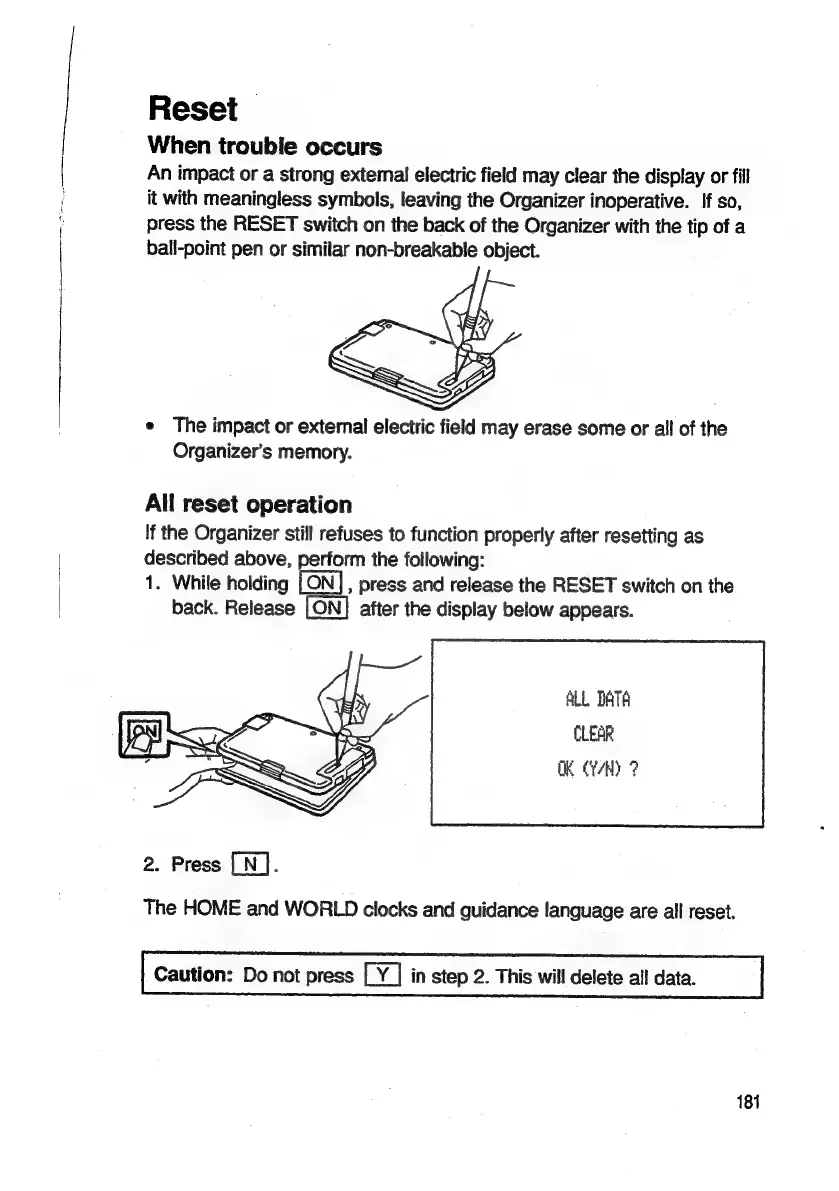
Reset
When
trouble
occurs
An
impact
or
a
strong
external
electric
field
may
clear
the
display
or
fill
it
with
meaningless
symbols,
leaving
the
Organizer
inoperative.
If
so,
press
the
RESET
switch
on
the
back
of
the
Organizer
with
the
tip
of
a
ball-point
pen
or
similar
non-breakable
object.
e
The
impact
or
extemal
electric
field
may
erase
some
or
all
of
the
Organizer’s
memory.
All
reset
operation
If
the
Organizer
still
refuses
to
function
properly
after
resetting
as
described
above,
perform
the
following:
1.
While
holding
ea
press
and
release
the
RESET
switch
on
the
back.
Release
LON]
after
the
display
below
appears.
ALL
DATA
CLEAR
OK
rH
7
2.
Press
[N].
The
HOME
and
WORLD
clocks
and
guidance
language
are
all
reset.
Caution:
Do
not
press
in
step
2.
This
will
delete
all
data.
181

Related product manuals