EasyManua.ls Logo

Sharp ZQ-6100M - Page 27

Sharp ZQ-6100M
194 pages
Print Icon
To Next Page IconTo Next Page
To Previous Page IconTo Previous Page
Loading...
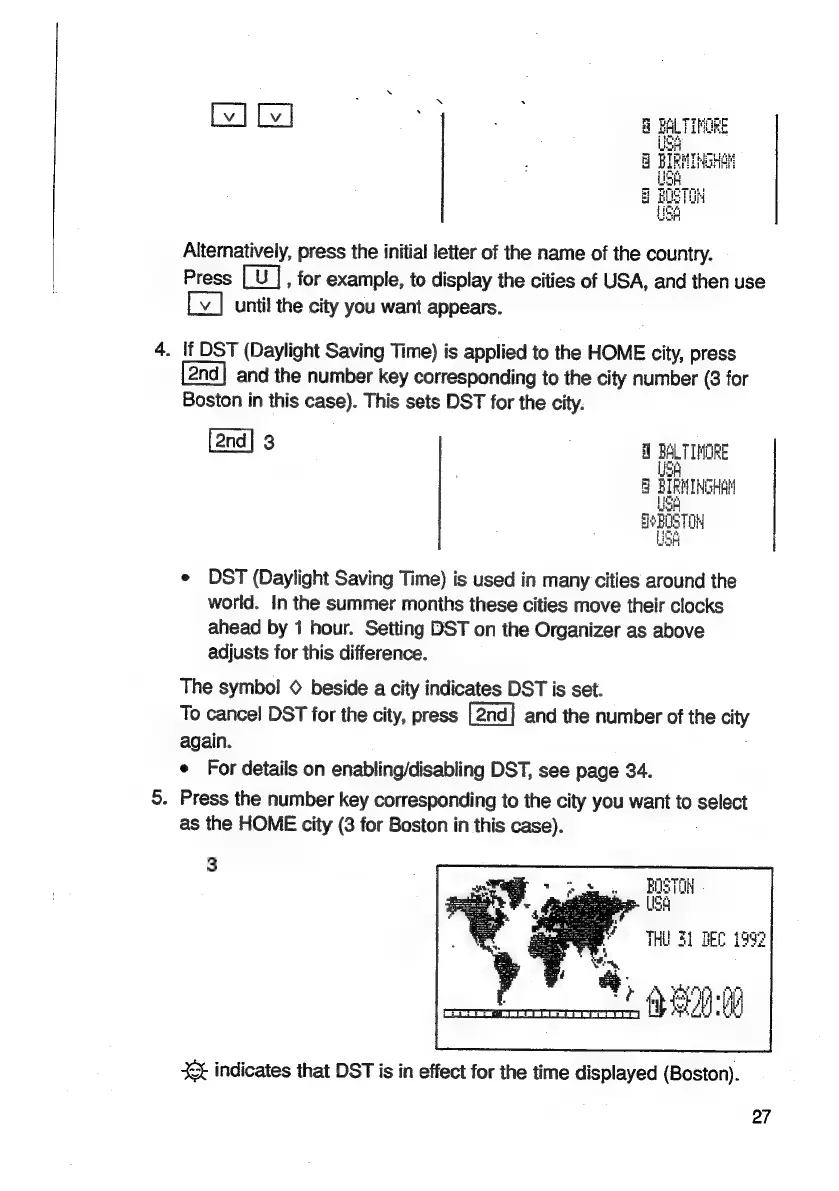
Alternatively,
press
the
initial
letter
of
the
name
of
the
country.
Press
,
for
example,
to
display
the
cities
of
USA,
and
then
use
until
the
city
you
want
appears.
-
If
DST
(Daylight
Saving
Time)
is
applied
to
the
HOME
city,
press
and
the
number
key
corresponding
to
the
city
number
(3
for
Boston
in
this
case).
This
sets
DST
for
the
city.
[2nd]
3
e
DST
(Daylight
Saving
Time)
is
used
in
many
cities
around
the
world.
In
the
summer
months
these
cities
move
their
clocks
ahead
by
1
hour.
Setting
DST
on
the
Organizer
as
above
adjusts
for
this
difference.
The
symbol
©
beside
a
city
indicates
DST
is
set.
To
cancel
DST
for
the
city,
press
and
the
number
of
the
city
again.
e
For
details
on
enabling/disabling
DST,
see
page
34.
.
Press
the
number
key
corresponding
to
the
city
you
want
to
select
as
the
HOME
city
(3
for
Boston
in
this
case).
3
BOSTOM
Ber
(166
THU
31
BEC
1992
*
B90
+
indicates
that
DST
is
in
effect
for
the
time
displayed
(Boston).
27

Related product manuals