EasyManua.ls Logo

Sharp ZQ-6100M - Page 50

Sharp ZQ-6100M
194 pages
Print Icon
To Next Page IconTo Next Page
To Previous Page IconTo Previous Page
Loading...
Setting
schedule
alarms
Aschedule
alarm
can
be
set
during
the
input,
recalling,
or
editing
of
an
entry
by
pressing
[2nd]
[ALARM].
The
symbol
J
appears
to
the
left
of
the
starting
time
for
the
entry
on
the
display,
indicating
an
alarm
has
been
set.
Press
while
i
is
displayed
to
cancel
an
alarm.
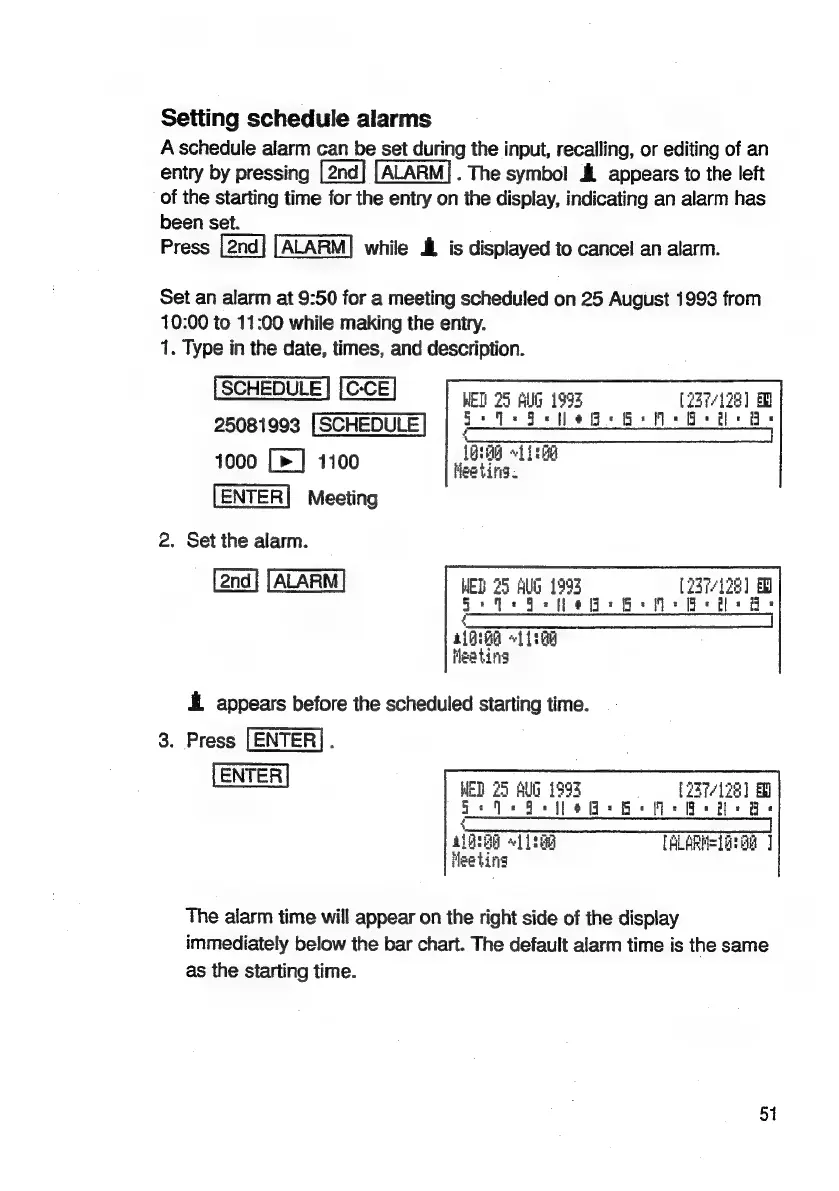
Set
an
alarm
at
9:50
for
a
meeting
scheduled
on
25
August
1993
from
10:00
to
11:00
while
making
the
entry.
1.
Type
in
the
date,
times,
and
description.
SCHEDULE:
WET!
25
Allg
199%
[237/128]
25081993
[SCHEDULE
=
0
©
=
©
fe
eg
ee
ee
a,
ae
rae
CHS
mo
eels
a
1000
[>]
1100
Meeting.
ENTER|
Meeting
2.
Set
the
alarm.
MED
25
AG
1995
(237/128)
©
Bete
ote:
GMs
ee
Bs
slik
BA
«11:88
Heating
EL
appears
before
the
scheduled
starting
time.
3.
Press
[ENTER].
ENTER
MED
75
AG
193
(37/198)
ae
ee
ee
=
{
alQIOG
«112g
[ALARN=LatG8
]
Meeting
The
alarm
time
will
appear
on
the
right
side
of
the
display
immediately
below
the
bar
chart.
The
default
alarm
time
is
the
same
as
the
starting
time.
51

Related product manuals