EasyManua.ls Logo

Sharp ZQ-6100M - Page 60

Sharp ZQ-6100M
194 pages
Print Icon
To Next Page IconTo Next Page
To Previous Page IconTo Previous Page
Loading...
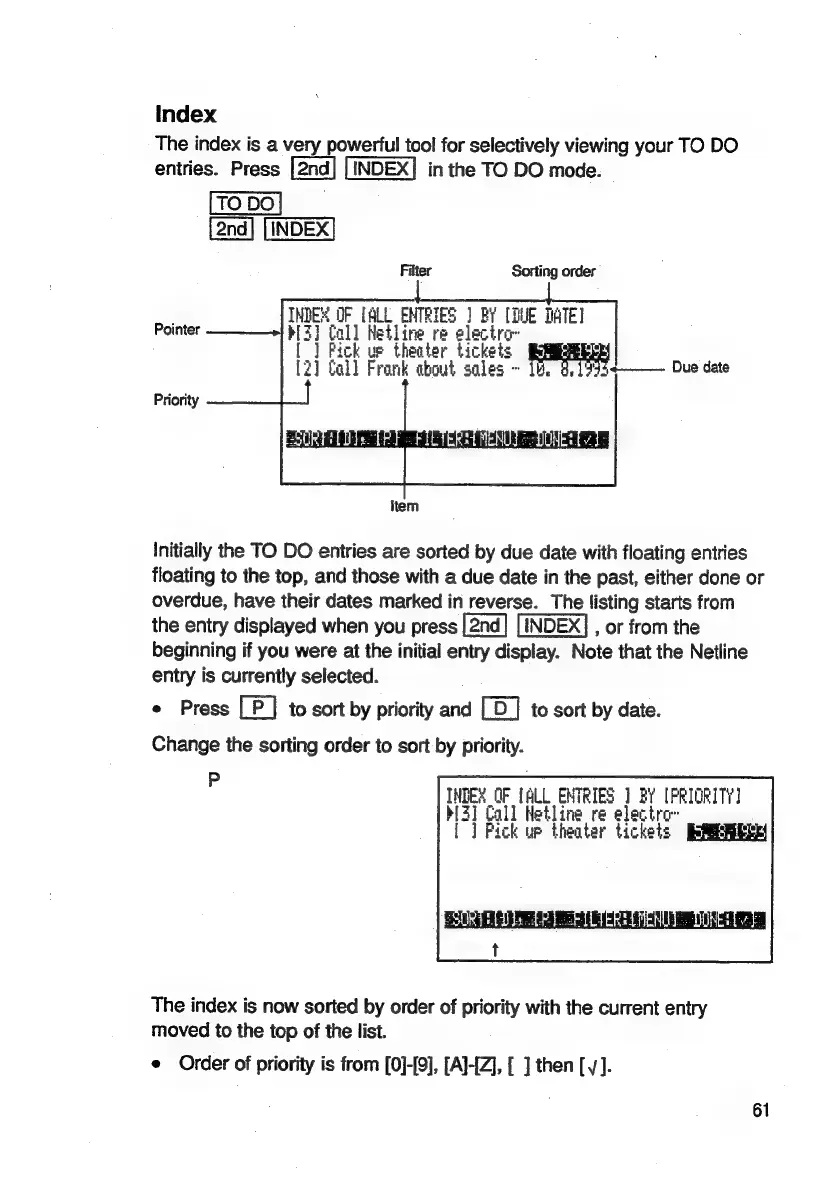
index
The
index
is
a
very
powerful
tool
for
selectively
viewing
your
TO
DO
entries.
Press
[INDEX]
in
the
TO
DO
mode.
[TO
DO]
[2nd]
[INDEX|
Filter
Sorting
order
TALL
ENTRIES
}
&
nl
Netline
re
ele
ick
ue
theater
tic
1
Frank
about
5a
(DUE
DATE!
Pointer
______,.
re
=
ts
5
ar
i«—_—_—
Due
date
Priority
item
Initially
the
TO
DO
entries
are
sorted
by
due
date
with
floating
entries
floating
to
the
top,
and
those
with
a
due
date
in
the
past,
either
done
or
overdue,
have
their
dates
marked
in
reverse.
The
listing
starts
from
the
entry
displayed
when
you
press
[2nd]
[INDEX]
,
or
from
the
beginning
if
you
were
at
the
initial
entry
display.
Note
that
the
Netline
entry
is
currently
selected.
e
Press
LP]
to
sort
by
priority
and
[D]
to
sort
by
date.
Change
ihe
sorting
order
to
sort
by
priority.
P
{ALL
ENTRIES
]
BY
[PRIGRITY!
Hetline
re
electro
u
iy
ei
we
theater
tickets
[RABEBIEEE
M3]
Ca
[
Ps
oF
]
t
]
k
The
index
is
now
sorted
by
order
of
priority
with
the
current
entry
moved
to
the
top
of
the
list.
e
Order
of
priority
is
from
[0]-[9],
[Al-{Z],
[
]
then
[vy].
61

Related product manuals