EasyManua.ls Logo

Sharp ZQ-6100M - Page 63

Sharp ZQ-6100M
194 pages
Print Icon
To Next Page IconTo Next Page
To Previous Page IconTo Previous Page
Loading...
[TO
DO]
Gall
Frank
abet
sales
meetinad
EDIT
|
PRIORETYEO4
feetinsd
ane
call4
4
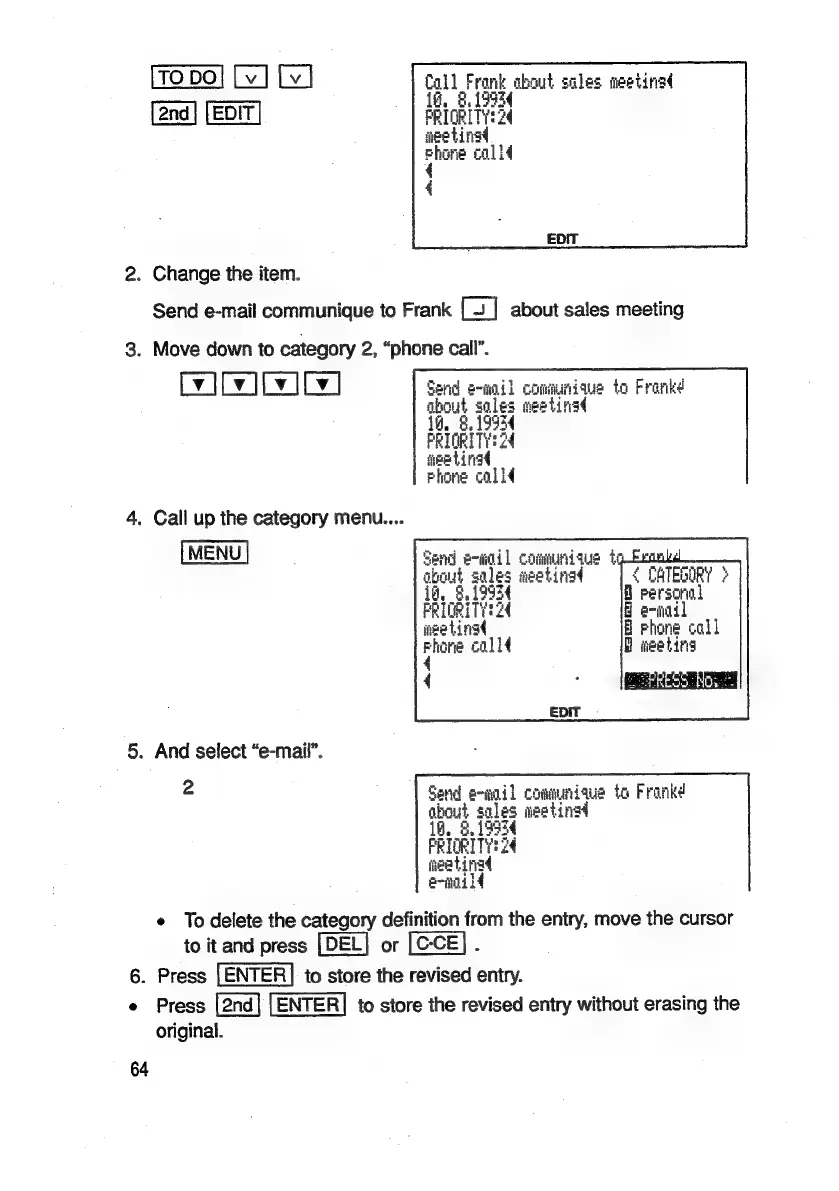
2.
Change
the
item.
Send
e-mail
communique
to
Frank
about
sales
meeting
3.
Move
down
to
category
2,
“phone
call”.
WIT
ty
ICv]
Send
e-mail
communique
to
Frankd
about
soles
ee
Lira
if,
ce
PRIORITY
neetinat
Phone
colld
4.
Call
up
the
category
menu....
MENU
Send
etigd]
commundaus
te
about
sales
aeetinad
¢
CATED
MORY
>
14,
ah
a
personal
PRIORETII?
8
e-mail
nee
tingd
B
rhone
call
a
colld
BD
meetin
4
,
acess!
5.
And
select
“e-mail”.
2
Send
e-mail
communique
to
Franke
about
sale¢
aipeting
18.
Fe
toe
it:
2
34
it@atingd
e-moild
e
To
delete
the
category
definition
from
the
entry,
move
the
cursor
to
it
and
press
or
6.
Press
to
store
the
revised
entry.
e
Press
to
store
the
revised
entry
without
erasing
the
original.
64

Related product manuals