EasyManua.ls Logo

Sharp ZQ-6100M - Page 73

Sharp ZQ-6100M
194 pages
Print Icon
To Next Page IconTo Next Page
To Previous Page IconTo Previous Page
Loading...
THE
TELEPHONE
DIRECTORY
The
Organizer
features
3
separate
telephone
directories
each
of
which
can
be
used
to
store
names,
telephone
numbers,
and
addresses,
plus
up
to
5
additional
fields
of
your
choice.
In
this
way,
business-related
listings
can
be
kept
separate
from
private
listings,
for
example.
Press
repeatedly
to
step
through
the
3
directories.
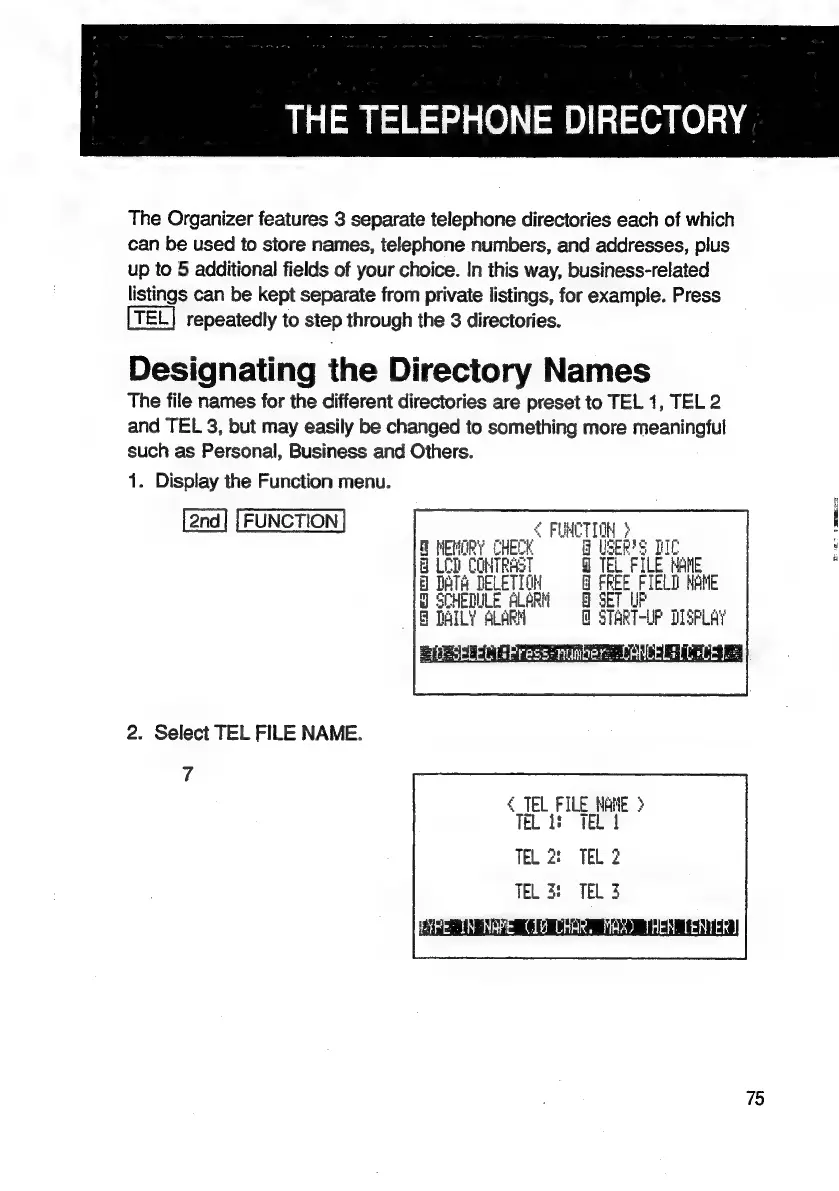
Designating
the
Directory
Names
The
file
names
for
the
different
directories
are
preset
to
TEL
1,
TEL
2
and
TEL
3,
but
may
easily
be
changed
to
something
more
meaningful
such
as
Personal,
Business
and
Others.
1.
Display
the
Function
menu.
FUNCTION
{
FUMCTION
}
MEMORY
CHECK
9
U8
sis
qe
8
LOD
CONTRAST
Q@
TEL
FILE
MAME
8
DATH
Tae
J
er
FIELD
MANE
acd
@
STAR
Tel
IF
DISPLAY
2.
Select
TEL
FILE
NAME.
7
4
TEL
FILE
HANE
>
TeLods
TEL
TEL
2:
TEL
2
TEL
3:
TEL
3
75

Related product manuals