EasyManua.ls Logo

Sharp ZQ-6100M - Page 74

Sharp ZQ-6100M
194 pages
Print Icon
To Next Page IconTo Next Page
To Previous Page IconTo Previous Page
Loading...
3.
Type
in
the
directory
names
(up
to
10
characters
each).
Personal
Business
[ENTER]
Others
e
Press
twice
to
exit
when
you
finish
renaming.
Using
the
Free
Fields
In
addition
to
the
3
standard
fields,
name,
number,
and
address,
you
can
define
up
to
5
other
fields
for
data
input
in
each
directory.
The
Organizer
will
only
prompt
you
during
entry
for
the
fields
that
you
define.
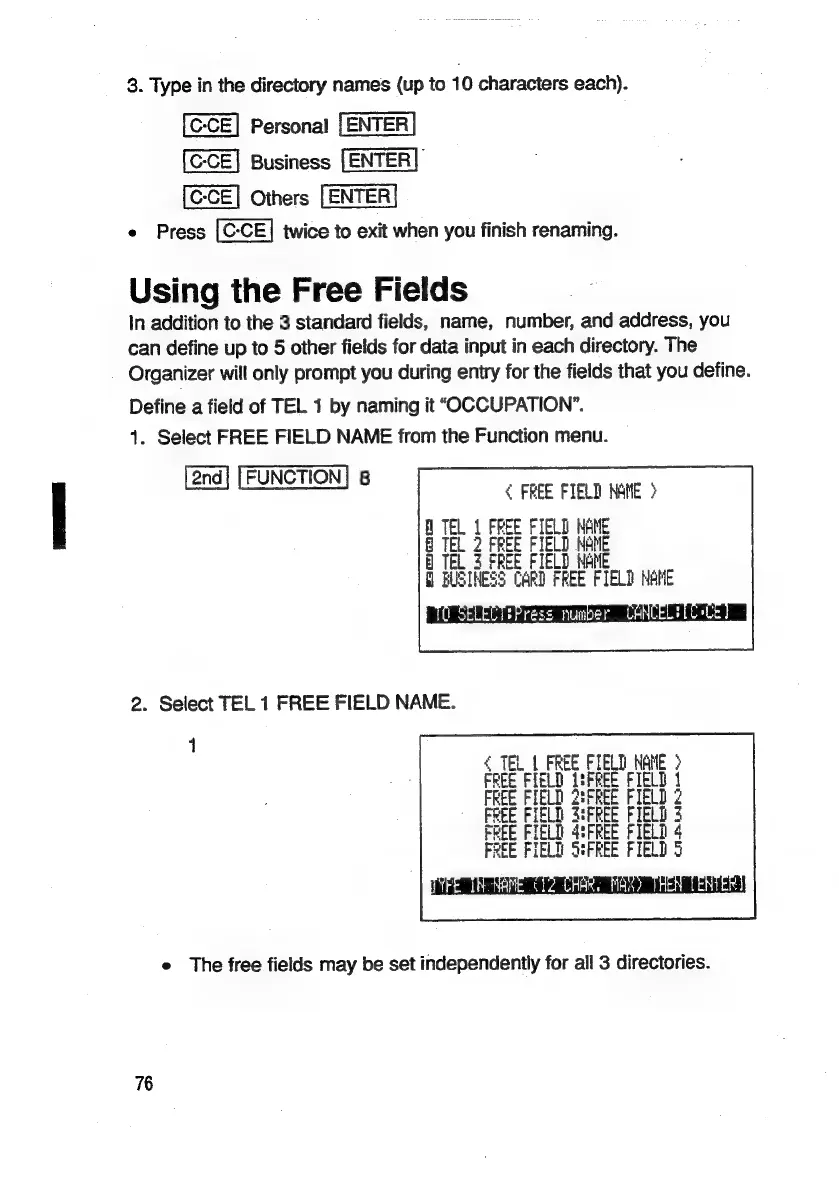
Define
a
field
of
TEL
1
by
naming
it
“OCCUPATION”.
1.
Select
FREE
FIELD
NAME
from
the
Function
menu.
[2nd]
[FUNCTION]
8
<
FREE
FIELD
NAME
>
FIELD
NANE
LD
Hs
At
2.
Select
TEL
1
FREE
FIELD
NAME.
<
TEL
|
FREE
FIELD
ae
E>
1
FIELD
ER
FIELD
2
ELD
S:FREE
FIELD
3
14
15
FREE
FIELD
HE
FIEL
e
The
free
fields
may
be
set
independently
for
all
3
directories.
76

Related product manuals