EasyManua.ls Logo

Sharp ZQ-6100M - Page 95

Sharp ZQ-6100M
194 pages
Print Icon
To Next Page IconTo Next Page
To Previous Page IconTo Previous Page
Loading...
Keyword
search
The
keyword
search
will
return
each
and
every
memo
containing
a
specified
keyword.
As
for
the
direct
search,
enter
the
keyword,
but
then
press
or
[A].
Repeated
pressing
of
[2nd]
or
will
retrieve
each
subsequent
entry
containing
the
keyword
until
the
end
of
the
list
is
reached.
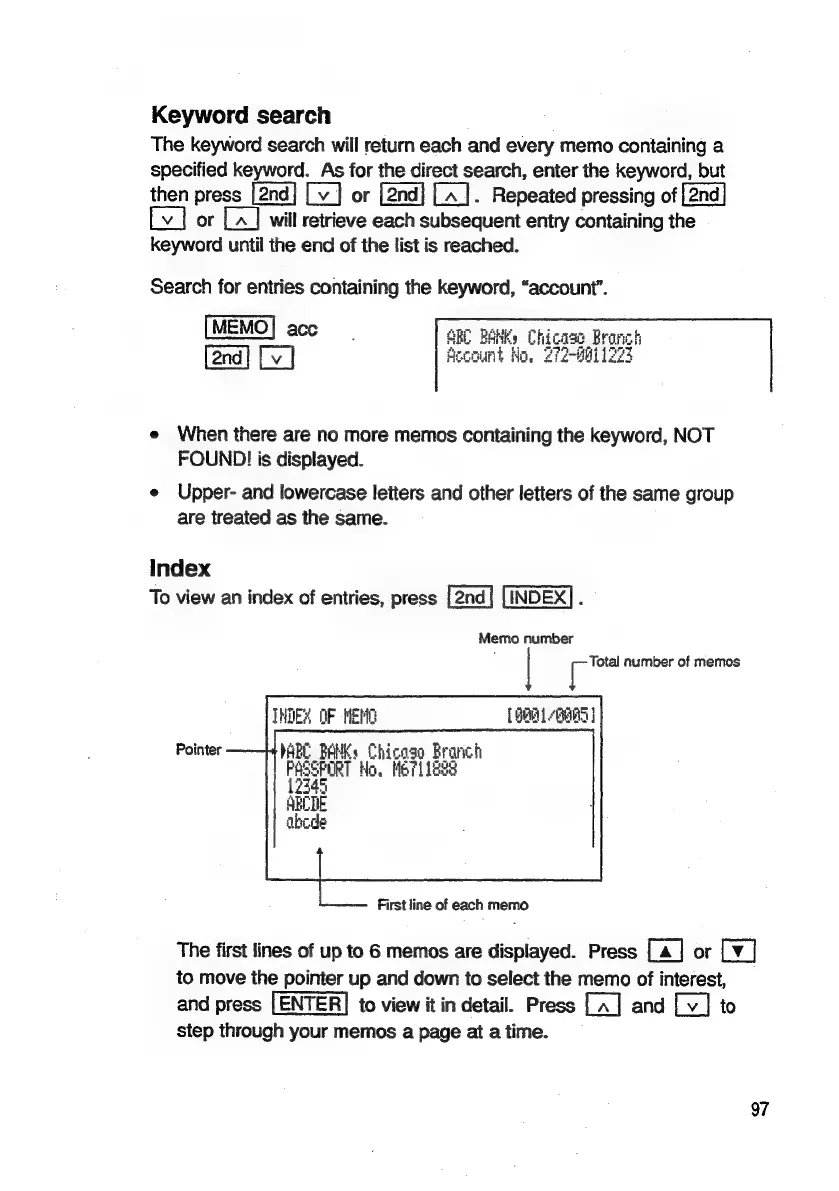
Search
for
entries
containing
the
keyword,
“account”.
ow
2
ARE
BANK)
Chi
Account
Ho.
21
e
When
there
are
no
more
memos
containing
the
keyword,
NOT
FOUND!
is
displayed.
e
Upper-
and
lowercase
letters
and
other
letters
of
the
same
group
are
treated
as
the
same.
Index
To
view
an
index
of
entries,
press
INDEX]
.
Memo
number
Total
number
of
memos
INDEX
OF
NENG
1901
PARC
BAMKs
Chicago
Branch
a
Ho.
Me?1
1888
SBCTE
abode
Pointer
First
line
of
each
memo
The
first
lines
of
up
to
6
memos
are
displayed.
Press
[a]
or
[¥]
to
move
the
pointer
up
and
down
to
select
the
memo
of
interest,
and
press
LENTER|
to
view
it in
detail.
Press
and
to
step
through
your
memos
a
page
at
a
time.
97

Related product manuals