6 7
Battery Precautions
• Useonlythesizeandtypeofbatteriesspecied.
• Wheninstallingbatteries,observeproper+/-polarities.Incorrectinstallationof
battery may cause damage to the unit.
• Donotmixdifferenttypesofbatteriestogether(e.g.,alkalinewithcarbon-zinc
oroldbatterieswithnewones).
• Iftheunitisnotgoingtobeusedforalongperiodoftime,removebatteriesto
prevent damage due to possible battery leakage.
• Donotdisposeofbatteriesinre.Batteriesmayexplodeorleak.
POWER:
Plugadapterintoa120VACoutletandplugthereceptacleendintotheinput
jack on the back of the unit. Press the POWER
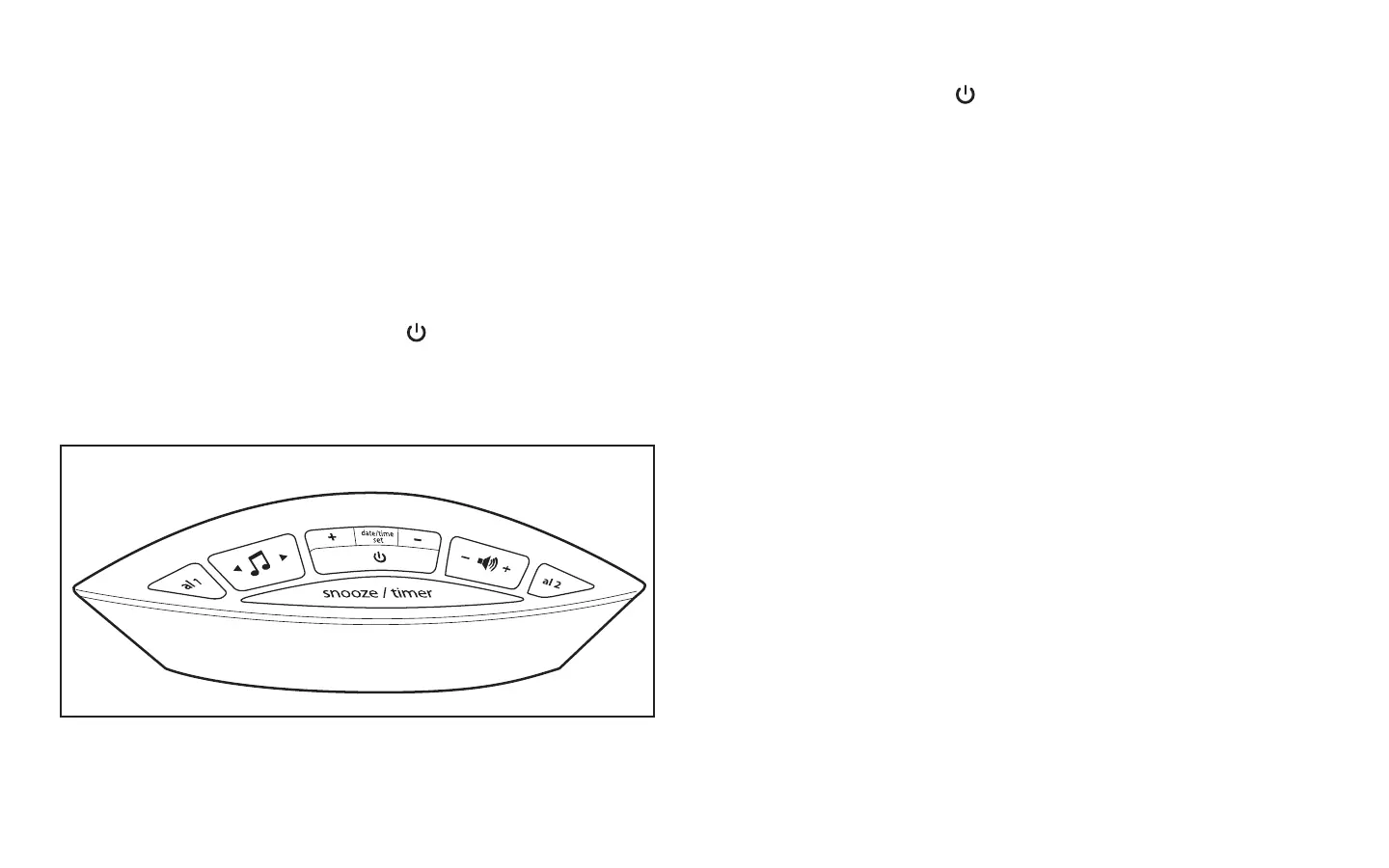
button(locatedcenteroftop
panel)toturntheunitonoroff.
Choosing the Sound Selection:
1. Press the POWER button.
2. PresstherightsideoftheMUSICALNOTE“>”buttonforthenextnature
sound(shortpress).Pressandholdtofastforward.
3. PresstheleftsideoftheMUSICALNOTE“<”buttonforpreviousnaturesound
(shortpress).Pressandholdtorewind.
(Refer to Fig.2)
NOTE: The digital display should show the sound number with the respective
sound name.
Volume Control:
• Press“+”toincreasethevolumelevel.
• Press“-“todecreasethevolumelevel.
Setting the Clock:
1. PressandholdtheDATE/TIMESETbutton(formorethan3seconds)and
press“+”and“-“to“INCREASE”(+)and“DECREASE”(-)tothetimeyou
desire.PressitagainoncetosetYear>Month>Day>Hour>Minute>Exit.
NOTE:AM/PMchoicewillbemadeatthistime.
2. ShortpressDATE/TIMESETbuttononce,itwilldisplaythedate.Presstwice,
itwilldisplaythetime.Normaltimedisplaywillreturnafter5seconds.
(Refer to Fig.2)
EC-B100_Buttons.ai 6/29/09 3:48:12 PM
Fig. 2


 To Next Page