- 6 -
RCC FUNCTION
(
CONT.
)
BACKLIGHT
LOW BATTERY INDICATOR
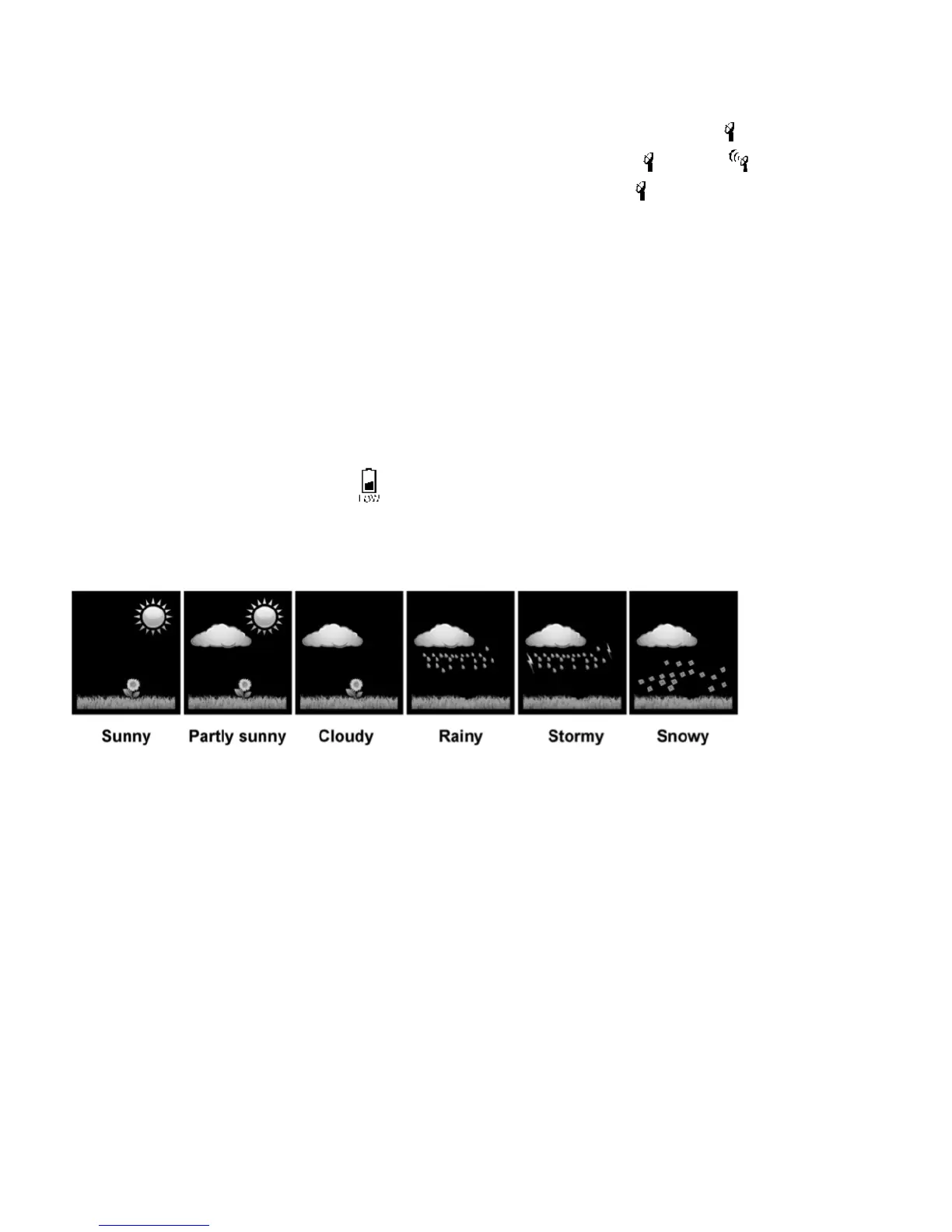
WEATHER FORECAST GRAPHICS
BAROMETER UNITS
• When the device receives an RCC signal, the symbol of antenna tower flashes. ;
If receiving is successful, the symbol of the antenna tower changes from to .
• The device will display this symbol in DST (Daylight Savings Time):
TIP: If your time display is off by an hour, be sure the time zone and the DST are set correctly.
• When powered by AC adapter, the backlight will always be on.
• Press the “SNZ / LIGHT” button to switch the brightness from High >> Low >> OFF.
• When powered by battery only, the backlight will be off (to conserve power).
Press the “SNZ / LIGHT” button to active the backlight for 10 seconds.
The main unit and sensor will show when the battery is low. Please replace battery
as soon as possible.
TIP: The Color Weather Station requires approximately 12 hours to become familiar with your
elevation and barometric pressure. Please allow at least 12 hours for it to provide its first forecast.
Additionally, please keep in mind that this device provides the forecast for the NEXT 12 hours. The
graphic icon may not match the current conditions outside.
• This device can predict the coming weather by sensing changes in barometric pressure.
• The default barometer unit is hPa (hectopascals)
• To switch the barometer from hPa to inHg (inches of mercury):
- When you are in setting mode, press the “MODE” button to find the setting
barometer units (hPa/inHg).
- Press “UP” or “DOWN” to change the unit.
• If the barometer rises or drops 2 hPa within one hour, the unit will display an up or down arrow.
If the barometer changes less than 2 hPa, the unit displays a horizontal arrow.



 To Next Page