
 Need help?
Do you have a question about the Sharper Image DigitNow and is the answer not in the manual?
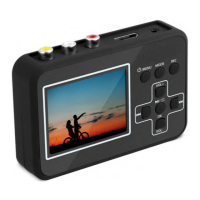
The primary video recording device included in the package.
Includes the 5V power adapter and USB data/power cable.
Details the HDMI, RCA, and AV cables for connecting video sources and TVs.
Includes the user manual and an 8.4G TF card.
Emphasizes reading and retaining the user manual for proper operation and reference.
Covers reading the manual, cleaning, and avoiding heat/moisture.
Addresses unplugging during storms and preventing electrical shock.
Discusses repairs by qualified personnel and audio input connection restrictions.
Details the initial and subsequent charging times for the device battery.
Details charging the device using the power adapter and wall socket.
Details charging the device using a USB connection to a computer.
Provides instructions on how to gently remove the memory card.
Describes controls for navigating files, playback, and volume adjustment in play mode.
Details controls for recording, taking snapshots, and recording without sound.
Details the information shown on the screen, such as SD-card status, video mode, time, and battery status.
Describes using VOL+/- to scroll and OK to confirm/save settings within the menus.
Explains how to record without sound and take snapshots during recording.
Lists available settings in play mode, such as delete, protect, format, and volume.
Explains the meaning of various icons and symbols displayed on the device screen.
 General
| Brand | Sharper Image |
|---|---|
| Model | DigitNow |
| Category | Recording Equipment |
| Language | English |

 To Next Page