4 Shelly GAS User guide 5
Installation Instructions
!CAUTION - Before beginning the installation please read
the accompanying documentation carefully and com-
pletely. Failure to follow recommended procedures could
lead to malfunction, danger to your life or violation of the
law. Allterco Robotics is not responsible for any loss or
damage in case of incorrect installation or operation of
this device.
!CAUTION - Use the Device only with power grid which
complies with all applicable regulations. Short circuit in
the power grid may damage it.
!CAUTION - Do not allow children to play with the device,
especially with the Power Button. Keep the devices for re-
mote control of Shelly (mobile phones, tablets, PCs) away
from children.
Initial Inclusion
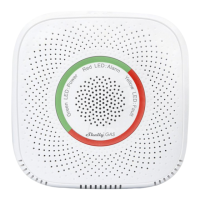
Place Shelly into the power socket, in the room where you
want to use it. For LPG gas detection the unit is best to be
placed 15-30cm above the oor and for natural gases the
unit is best to be placed 2-3m above the oor. The device
will make a self test, and in the rst 3 minutes the LED ring
should turn in a sequence: green->orange->red. After the
self test is nished, the LED ring should turn green and the
WiFi LED should be blinking, once per second. This means
that the device is calibrated and is in AP mode.
Factory Reset
You can return your Shelly Gas to its Factory Settings by
pressing and holding the reset button for 10 seconds.
Upon successful factory reset the WiFi LED will blink once
per second.
Introduction to Shelly®
Shelly® is a family of innovative devices, which allow re-
mote control of electric appliances through mobile phone,
PC or home automation system. Shelly® uses WiFi to con-
nect to the devices controlling it (mobile phones, tablets
etc.). They can be in the same WiFi network or they can
use remote access (through the Internet - Shelly Cloud).
Shelly® has an integrated web server, through which the
User may adjust, control and monitor the Device. An API
can be provided by the Manufacturer. The User can reg-
ister and access the Shelly Cloud, using either Android or
iOS mobile applications, or any internet browser and the
web site: https://my.shelly.cloud/.
Control your home with your voice
All Shelly devices are compatible with Amazons’ Alexa and
Googles’ assistant. Please see our step-by-step guides on:
https://shelly.cloud/compatibility/Alexa
https://shelly.cloud/compatibility/Assistant


 To Next Page
 Loading...