
 Need help?
Do you have a question about the Shelly GAS and is the answer not in the manual?
Details electrical requirements, radio protocols like WiFi, and signal power.
Lists directives and standards the device adheres to for market access.
Covers detected gas types, operating temperature, range, and alarm sound.
Provides physical size specifications and power usage details.
Describes LED behavior in STA and AP modes for connection status.
Details audible alerts for device warm-up, faults, self-tests, and gas leaks.
Crucial warnings regarding proper installation, power grid use, and handling.
Recommendations for optimal placement and the initial device self-test sequence.
Instructions to restore the device to its original factory default settings.
Overview of Shelly as a brand for remote home control devices.
Information on compatibility with voice assistants like Alexa and Google.
Details the Shelly Cloud app's purpose and how to install it from app stores.
Guides on creating an account to manage Shelly devices via the mobile app.
Steps to recover a lost password for the Shelly Cloud account.
Explains the expected Wi-Fi LED behavior during the inclusion process.
Instructions on connecting your phone/tablet to the device's Wi-Fi network.
Selecting discovered devices, setting names, rooms, and pictures.
Steps to activate remote control and monitoring via Shelly Cloud service.
Overview of managing and automating devices within the Shelly app.
How to perform a self-test and mute active alarms on the device.
Configuring Wi-Fi modes, backup, and restricting login access.
Adjusting alarm volume, time zone, and accessing device information.
How to change the device name, assign it to a room, or update its picture.
Instructions on how to access the device's web UI via a browser.
Details the information displayed on the device's main web page.
Covers Wi-Fi modes, login restrictions, and SNTP server settings.
Explores developer settings, cloud connection, and time zone configuration.
Procedures for updating firmware and restarting the device.
Accessing device ID, Wi-Fi name, and signal strength.
Understanding control via HTTP, REST protocol, and developer contacts.
The Shelly Gas is an innovative Wi-Fi combustible gas sensor designed to enhance safety in environments where LPG (liquefied petroleum gas) or natural gas is used. Its primary function is to detect gas leakages and alert users through a sound alarm, providing an essential layer of protection for homes and businesses. This device can operate as a standalone unit or seamlessly integrate into a broader home automation system, offering flexibility in its application.
The core function of the Shelly Gas sensor is to continuously monitor the surrounding air for the presence of combustible gases. Upon detecting a leakage, it triggers an audible alarm, ensuring that occupants are promptly notified of potential danger. The device is powered directly from the electrical grid, eliminating the need for battery replacements and ensuring continuous operation. Its Wi-Fi connectivity allows for remote monitoring and control through a dedicated mobile application or a web interface, making it a smart addition to any modern home.
The sensor's operation includes several distinct states, each indicated by specific sound alarms and LED behaviors. When the device is first powered on, it undergoes a "sensor warm up" sequence, accompanied by short sounds, indicating that it is preparing for operation. A successful warm-up is confirmed by a single long sound. In the event of a "sensor fault," a continuous long sound will be emitted until the sensor recovers, signaling a potential issue with the device itself. A "device self-test" is indicated by three short sounds, confirming its operational integrity.
For gas detection, the Shelly Gas differentiates between "mild gas leak" and "heavy gas leak" scenarios. A mild gas leak triggers a long sound that continues until the leakage is no longer present or escalates to a heavy leakage. A heavy gas leak, a more critical situation, results in a distinct long sound alarm (5 seconds on, 1 second off) that persists until the gas leakage is resolved, ensuring immediate and unmistakable awareness of a severe threat. After a successful self-test, a single long sound confirms the sensor's readiness.
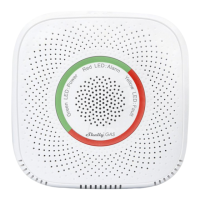
The device's LED indicators provide visual feedback on its status. A green LED signifies power, a red LED indicates an alarm, and a yellow LED signals a fault. During initial inclusion and calibration, the LED ring cycles through green, orange, and red, eventually settling on green with a blinking Wi-Fi LED (once per second) to indicate AP mode and successful calibration.
The Shelly Gas sensor is designed for ease of use and integration into various smart home ecosystems.
The Shelly Gas includes features to ensure its long-term reliability and allow for easy management.
In summary, the Shelly Gas sensor is a comprehensive and user-friendly device that prioritizes safety through reliable gas detection and flexible control options. Its integration with smart home platforms, remote management capabilities, and maintenance features make it a valuable asset for any environment where combustible gases are present.
 General
| Alarm Sound Level | 85 dB |
|---|---|
| Valve Control | Yes |
| Radio Signal Power | 1mW |
| Type | Gas Detector |
| Gas | LPG |
| Wi-Fi | Yes |
| Operating Temperature | -10°C to +50°C |
| Operational Range | Up to 50 m outdoors and up to 30 m indoors |
| Power Consumption | < 1.5 W |
| Output | Relay NO/NC |
| Humidity Range | 10% to 90% RH |

 To Next Page