Need help?
Do you have a question about the Sherwood AX-3030R and is the answer not in the manual?
Details specific operating requirements for units distributed in Europe.
Connects turntable ground lead to amplifier to minimize hum and ensure proper grounding.
Input for turntables with magnetic or variable-reluctance cartridges, recommends short shielded cables.
Connects the output of a matching Sherwood tuner to the amplifier's tuner inputs.
Provides an additional stereo input for high-level sources like CD players or VTRs.
Connects the audio output from a CD player to the amplifier's dedicated CD inputs.
Receives output from a tape deck for listening; can connect to audio processors.
Outputs signal to a tape deck for recording; tone controls do not affect output except selector.
Connects to other Sherwood components for system control and remote operation via DIGI-LINK.
Links to cassette deck pause input for logic control or remote data input for mechanical decks.
Connects main left and right speakers, ensuring correct phasing and impedance matching.
Connects the amplifier to a standard AC wall outlet for power.
Allows control of power for other system components connected to this outlet.
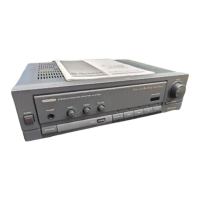
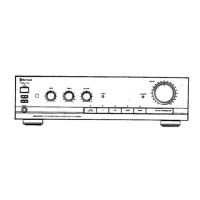
Turns the amplifier on and off; also functions as the main system power switch.
Activates connected speakers (A, B, or A+B) and specifies minimum impedance for A+B.
Allows private listening via stereo headphones; requires setting speaker switches to OFF.
Receives infrared signals from the remote control; filters out interfering light.
Adjusts low-frequency sound levels by ±10dB to suit taste and room acoustics.
Adjusts high-frequency sound levels by ±10dB to suit taste and room acoustics.
Adjusts relative sound volume between left and right speakers for stereo balance.
Bypasses tone controls for a direct signal path, enhancing frequency response and phase.
Displays the currently selected input source mode (PHONO, CD, TUNER, AUX, TAPE).
Boosts low frequencies at low listening levels to compensate for Fletcher-Munson curve.
Adjusts the overall listening volume for both channels by rotating clockwise.
Enables tape deck playback monitoring or recording quality check.
Selects the desired audio input source for playback from available options.
Emits infrared beam for remote control signals; requires clear line of sight to receiver.
Turns the amplifier system power on or off remotely.
Used for preset tuning, track selection, and cassette program number input.
Controls CD playback functions like play, pause, stop, search, random, and repeat.
Controls compatible cassette deck functions: play, pause, stop, record, rewind, fast forward.
Controls connected optional equalizers for TAPE-M, PRESET, and USER modes.
Selects program sources and can auto-switch amplifier function via DIGI-LINK.
Includes volume adjustment and a MUTE function for temporary silencing.
Compartment for power source (AAA batteries) for the remote commander.

 To Next Page
 General