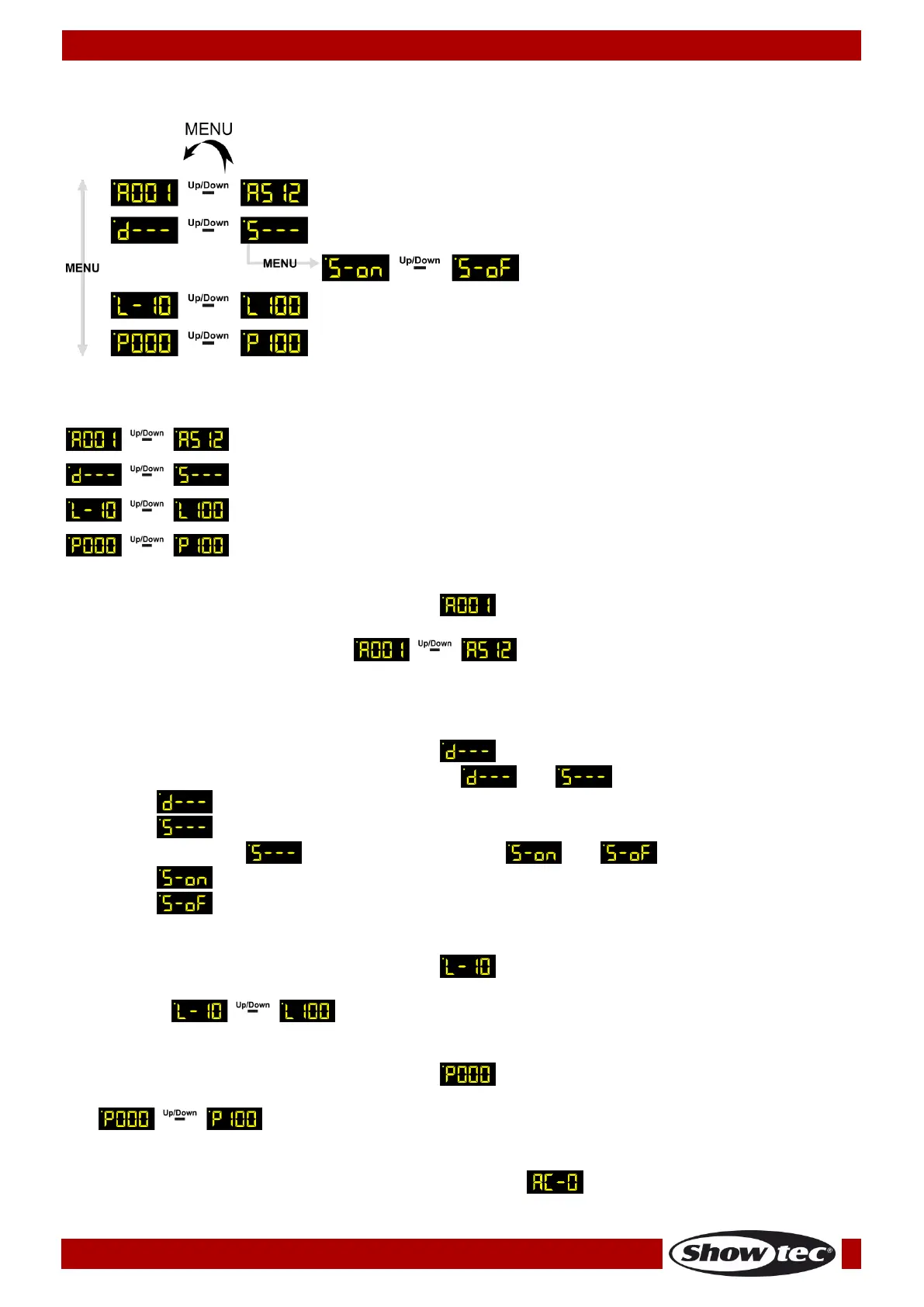
1. DMX Addressing
01) Press the MENU button until the display shows .
02) Press the UP/DOWN buttons to choose the desired DMX address.
03) The adjustment range is between .
04) Press and hold down the UP/DOWN buttons for fast DMX address selection.
05) The currently selected DMX address will be automatically saved.
2. Dimmer/Switch
01) Press the MENU button until the display shows .
02) Press the UP/DOWN buttons to choose between and .
03) If set to , then the device is a dimmer.
04) If set to , then the device is a switch.
05) In the switch mode you can choose between and .
06) If set to , you can switch on the connected light fixture.
07) If set to , you can switch off the connected light fixture.
3. Dimmer Limit
01) Press the MENU button until the display shows .
02) Press the UP/DOWN buttons to set the desired maximum dimming limit value. The adjustment range is
between .
4. Dimmer Preset
01) Press the MENU button until the display shows .
02) Press the UP/DOWN buttons to set the desired dimmer value. The adjustment range is between
, from dark to brightest.
5. Power not Stable (AC-0)
01) If the power frequency is not stable, the display will show . You will have to connect the
device to a stable power source or wait until the power becomes stable at the currently used outlet.













 To Next Page