Shure Incorporated
16/36
Equalizer, Limiter, and Compressor
Fine tune your equalizer, limiter, and compressor settings. Change the preset modes to hear the DSP changes,
and adjust individual settings to dial in your sound.
Note: Equalization within presets will not be displayed. However, the EQ icon in the Mic Setup screen displays
user-selected equalization.
EQ persists between preset mode changes.
Choose no compression, or select light, medium, or heavy settings.
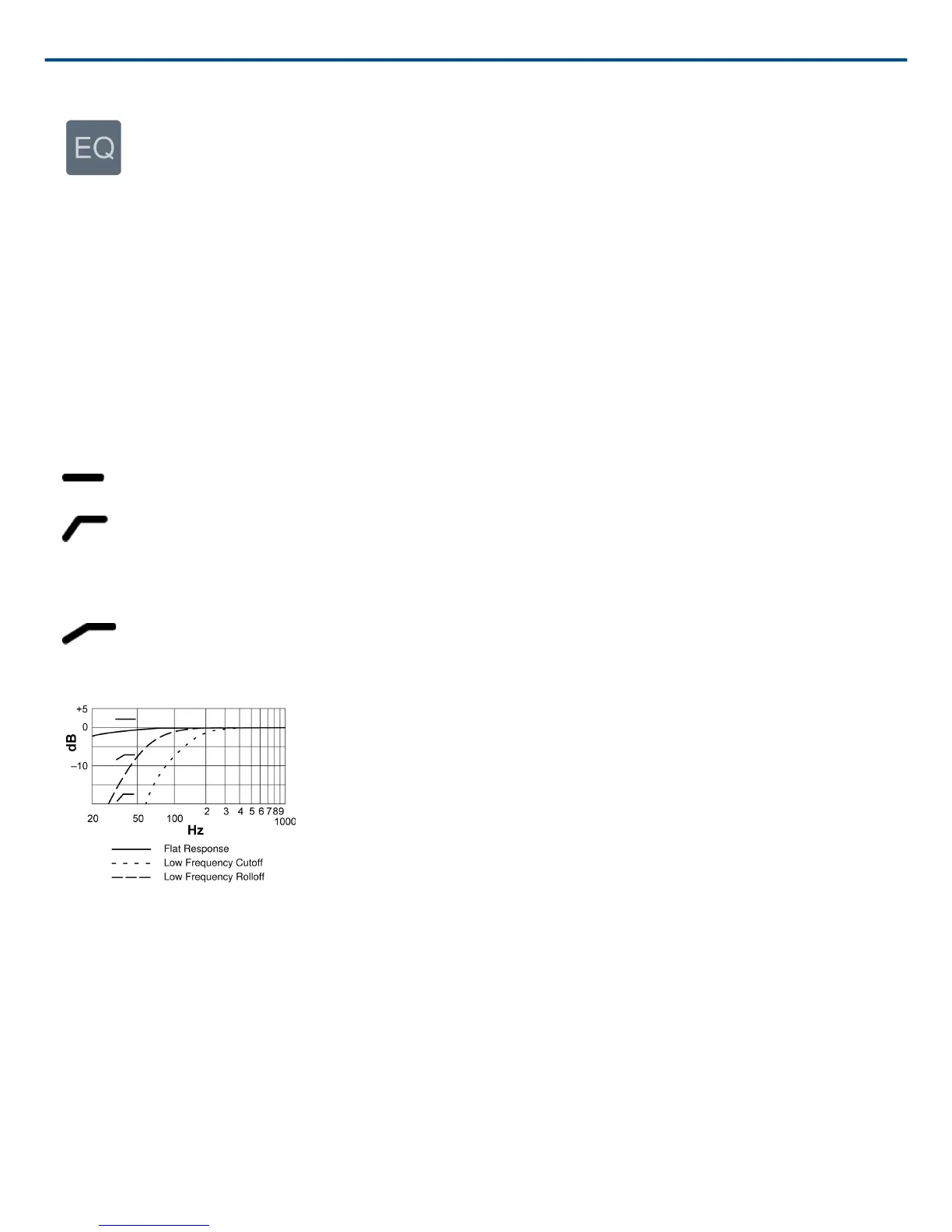
Selecting Low-Frequency Response
A threeposition switch on the back of the microphone lets you adjust the lowfrequency response. Use the lowfre
quency filter to reduce wind noise, room noise, or proximity effect.
Flat response. Provides the most natural sound in most applications.
Low frequency cutoff. Provides a 6 dBperoctave cutoff at 75 Hz. Helps eliminate floor rumble and lowfrequen
cy room noise from heating and air conditioning systems. This setting may also be used to compensate for proxim
ity effect or to reduce low frequencies that make an instrument sound dull or muddy.
Low frequency rolloff. Provides a 6 dBperoctave rolloff filter at 150 Hz. Use this to compensate for proximity ef
fect or to reduce low frequencies that could make an instrument sound dull or muddy.



 To Next Page