EasyManua.ls Logo

Shure MV5C - User Manual

Shure MV5C
10 pages
Print Icon
To Next Page IconTo Next Page
Loading...
MV5C
Home Office Microphone
The Shure USB home conference microphone, MV5C, user guide.
Version: 1.0 (2020-K)

Other manuals for Shure MV5C

Question and Answer IconNeed help?

Do you have a question about the Shure MV5C and is the answer not in the manual?

Summary

Shure MV5 C Home Office Microphone Overview

General Description

MV5 C Features

Quick Setup Guide

Connections and Controls

Device Controls

Includes Mode Selection, Mute Button, and Headphone Volume controls.

Ports and Indicators

Covers Headphone Output, Micro USB Port, and LED status indicators.

Preset Modes Explained

Microphone Placement

Adjusting Audio Levels

Accessing the Control Panel

Monitoring Options

Computer Output Monitoring

Listen through computer speakers or headphones for audio playback.

Direct Monitoring

Listen to a blend of microphone and computer audio via headphone output.

Troubleshooting Common Issues

System Requirements

Technical Specifications

Product Dimensions and Weight

Included Accessories

Summary

Shure MV5 C Home Office Microphone Overview

General Description

MV5 C Features

Quick Setup Guide

Connections and Controls

Device Controls

Includes Mode Selection, Mute Button, and Headphone Volume controls.

Ports and Indicators

Covers Headphone Output, Micro USB Port, and LED status indicators.

Preset Modes Explained

Microphone Placement

Adjusting Audio Levels

Accessing the Control Panel

Monitoring Options

Computer Output Monitoring

Listen through computer speakers or headphones for audio playback.

Direct Monitoring

Listen to a blend of microphone and computer audio via headphone output.

Troubleshooting Common Issues

System Requirements

Technical Specifications

Product Dimensions and Weight

Included Accessories

Overview

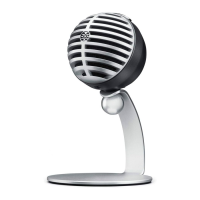
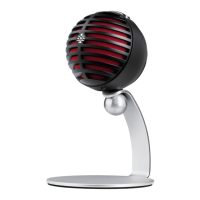
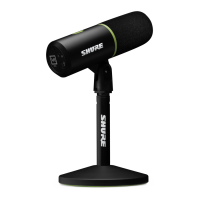
The Shure MV5C is a compact and convenient USB home conference microphone designed to provide clear vocal reproduction for conferencing applications. It connects directly to a computer via a USB connection and automatically becomes the active audio input device upon plugging in. The MV5C features a preset speech mode that optimizes gain, equalization, and compression for speech, minimizing setup time.

Function Description

The MV5C serves as a dedicated microphone for home office and conferencing environments. Its primary function is to capture clear audio input for virtual meetings, online calls, and other speech-based applications. The microphone is designed for plug-and-play operation, making it easy to integrate into existing computer setups. When connected, it automatically configures itself as the audio input device, while the audio output typically remains with the computer's built-in speakers or headphone output.

A key feature of the MV5C is its preset DSP (Digital Signal Processing) mode, specifically tailored for speech. This mode automatically adjusts several audio parameters—gain, equalization, and compression—to enhance voice clarity and tone. This intelligent processing helps to reduce sibilance (harsh "S" sounds) and ensures that your voice is consistently clear and easy to understand during conferences. For users who prefer an unprocessed signal for post-recording adjustments, a "Flat" mode is also available, providing a completely raw audio signal without any equalization or compression settings.

The MV5C also offers flexible monitoring options. Users can choose to listen to audio playback through their computer's built-in speakers or headphones. Additionally, the microphone features a headphone output for direct monitoring. When enabled, this output provides an equal blend of the direct microphone signal (your voice) and audio playback from the computer (e.g., your conference call), allowing for convenient real-time adjustment of both levels using the MV5C's thumbwheel. This direct monitoring capability is particularly useful for ensuring your voice sounds natural and balanced within the context of the conference.

Usage Features

The MV5C is designed for ease of use with several intuitive features:

  • Plug and Play: Simply connect the MV5C to your computer using the provided USB-A or USB-C cable. The microphone will automatically be detected and set as the primary audio input device. A green status LED indicates a successful connection.
  • Speech Mode: The microphone includes a dedicated MODE button. Pressing this button toggles the speech mode on and off. When speech mode is active, a green speech icon LED illuminates, indicating that the microphone is optimizing your voice for clarity with its built-in gain, compression, and EQ presets.
  • Headphone Output Activation: To enable the MV5C's headphone output for direct monitoring, hold the MODE button while connecting the microphone to your computer. The headphone LED will turn green, confirming that the headphone output is active. This ensures that your audio playback is not interrupted by the microphone's output by default.
  • Headphone Volume Control: An integrated thumbwheel allows for easy adjustment of the headphone volume when the MV5C headphone output is enabled. This control simultaneously adjusts the levels of both your direct microphone signal and the computer's audio playback, providing a balanced listening experience.
  • Mute Function: A dedicated mute button allows you to quickly mute the microphone input. When muted, all MV5C LEDs will turn red, providing a clear visual indication of the microphone's status.
  • Placement: For optimal performance in conferencing applications, it is recommended to place the MV5C 12-18 inches (30-46 cm) away from your face. Positioning the microphone just to the left or right of your keyboard, with the circular Shure logo pointed towards your mouth, ensures proper orientation for the best sound pickup.
  • Adjusting Microphone Level: While the MV5C's automatic processing often negates the need for manual gain adjustment, users can fine-tune the microphone level (gain) through their computer's audio or sound control panel if distortion is heard or the audio is too low.
  • Compatibility: The MV5C is compatible with Windows 7 and higher, as well as OS X Lion 10.7 and higher, requiring a minimum of 64 MB RAM and a USB 2.0 port.

Maintenance Features

The MV5C is designed for durability and minimal maintenance, focusing on reliable performance in a home office setting.

  • Durable Design: The microphone features a sleek and durable design, making it suitable for regular use. It can be mounted on the included MV5C desktop stand or any stand with a 1/4" threaded adapter, offering flexibility in setup.
  • Troubleshooting Guide: The user guide provides a comprehensive troubleshooting section to address common issues such as low audio, poor sound quality, distorted audio, or device not working with a USB hub. Solutions include checking connections, verifying computer sound control panel settings, adjusting volume levels, and restarting applications or the computer.
  • Support: In case of persistent issues, users are advised to contact Shure Service and Repair, ensuring professional assistance for any complex problems.
  • Cleanliness: As with most electronic devices, keeping the MV5C clean and free from dust will help maintain its performance and longevity. A soft, dry cloth is typically sufficient for cleaning the exterior. Avoid using harsh chemicals or abrasive materials that could damage the microphone's finish or components.
  • Cable Management: Proper handling and storage of the included USB-A and USB-C cables will prevent wear and tear, ensuring a consistent and reliable connection. Avoid sharp bends or excessive pulling on the cables.

The MV5C is a user-friendly and effective solution for enhancing audio quality in virtual communication, offering a blend of automatic processing and manual control to suit various conferencing needs.

Shure MV5C Specifications

General IconGeneral
Microphone TypeCondenser
Polar PatternCardioid
Frequency Response20 Hz - 20 kHz
ConnectivityUSB
Sample Rate48 kHz
Bit Depth16-bit
Adjustable Gain Range0 to +36 dB
Headphone Output3.5mm
CompatibilityMac, Windows, iOS
Included AccessoriesUSB Cable
Max SPL130 dB SPL

Related product manuals