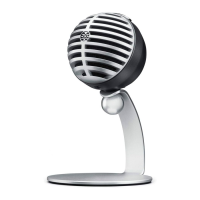
The Shure MV5 is a digital condenser microphone designed for home recording and podcasting, offering plug-and-play convenience with computers and mobile devices. It connects directly via USB or Lightning cable, making it compatible with a wide range of operating systems including macOS (10.13 to 10.15), Windows (10), iOS (14 and higher), and Android (Pie 9.0 and higher). The microphone is MFi certified, ensuring compatibility with Apple products like iPhone (6s and higher), iPod Touch (7th gen), iPad (5th gen and higher), and iPad Mini (4th gen and higher). For Android devices, it requires USB Host Power of ≥100 mA and USB Audio Class 1.1 support.
Function Description:
The MV5 functions as a versatile digital condenser microphone, capturing audio for various applications such as voice recording, podcasting, music, singing, and acoustic instruments. It features preset DSP modes (Voice, Instrument, Flat) that automatically adjust gain, equalization, and compression to optimize sound characteristics for different recording needs. The microphone also offers advanced mic settings, including a limiter, compressor, and equalizer, allowing users to fine-tune their sound.
Important Technical Specifications:
- Cartridge Type: Electret Condenser (16 mm)
- Polar Pattern: Unidirectional (Cardioid)
- Bit Depth: 16-bit/24-bit
- Sampling Rate: 44.1/48 kHz
- Frequency Response: 20 Hz to 20,000 Hz
- Adjustable Gain Range: 0 to +36 dB
- Sensitivity: -40 dBFS/Pa at 1 kHz (at minimum gain, flat mode)
- Maximum SPL: 130 dB SPL (at minimum gain, flat mode)
- Headphone Output: 3.5 mm (1/8")
- Power Requirements: Powered through USB or Lightning connector
- Mute Switch Attenuation: Yes
- Housing: PC/ABS
- Net Weight: 0.09 kg (3.17 oz.) without mounting stand; 0.16 kg (5.64 oz.) with mounting stand
- Dimensions: 66 x 67 x 65 mm (H x W x D); 89 x 142 x 97 mm (H x W x D) with stand
- Cable: 1 m Lightning cable (for LTG models only) and 1 m USB cable (included).
- Stand Adapter: 1/4 inch 20 thread (standard tri-pod mount)
Usage Features:
The MV5 is designed for ease of use with its plug-and-play functionality.
- Connections and Controls:
- Mode Selection Button: Switches between preset modes.
- Mute Button: Mutes the microphone input.
- Headphone Volume Control: Adjusts headphone volume.
- Headphone Output: 3.5 mm (1/8 inch) connector for headphones.
- Micro USB Port: Connects to a computer or mobile device using the appropriate cable.
- Voice Mode LED: Illuminates when Voice mode is selected.
- Instrument Mode LED: Illuminates when Instrument mode is selected (Flat Mode is engaged when both mode LEDs are off).
- Status Indicator (Green): Indicates active USB or Lightning connection.
- Status Indicator (Flashing Red - all 3 LEDs): Indicates muted microphone.
- Quick Setup:
- Connect the microphone to a computer or mobile device using the appropriate cable.
- Confirm MV5 is the selected audio device (most devices detect it automatically).
- Select a preset mode using the MODE button.
- Select MV5 as the input source in your recording application.
- Begin recording.
- Preset Modes:
- Voice Mode: Emphasizes clarity and fullness, with gentle compression and a de-esser for speech and vocals.
- Instrument Mode: Provides transparent compression and equalization to emphasize detail for acoustic instruments and live music.
- Flat Mode: Offers an unprocessed signal for maximum flexibility in post-recording audio processing.
- Advanced Mic Settings:
- Limiter: Prevents distortion from volume peaks.
- Compressor: Controls dynamic range (no, light, or heavy compression).
- Equalizer: Boosts or cuts frequency bands to improve sound clarity. These settings are retained in the microphone.
- Microphone Placement:
- Podcast and Voice Recording: Speak directly into the front, 2-12 inches (5-30 cm) away, using Voice mode.
- Music, Singing, and Acoustic Instruments: Aim directly at the source, 6-12 inches (15-30 cm) away for single sources, or 2-10 feet (0.6-3 m) for small groups, using Instrument mode.
- Bands and Louder Sources: Aim towards the group, 6-15 feet (1.83-4.6 m) away, using Instrument mode. For electric guitar amplifiers, aim at the center of the speaker, 0-18 inches (0-45 cm) away.
- Adjusting Microphone Level: Adjust gain in the computer's Audio or Sound control panel if audio is too low or distorted.
- Adjusting Headphone Level: Use the thumbwheel on the MV5 for comfortable monitoring. The headphone output blends direct microphone signal and computer playback.
- Sampling Rate and Bit Depth: Configurable in the computer's audio control panel to suit recording needs (e.g., lower for podcasts, higher for music).
Maintenance Features:
- Troubleshooting: The manual provides solutions for common issues such as the display not illuminating, low audio, distorted audio, unnatural/jittery audio, no signal registration, and device not working with a USB hub.
- Certifications: The MV5 complies with FCC Rules (Part 15, Class B digital device) and Industry Canada ICES-003. It also meets Essential Requirements of relevant European directives and is CE marked.
- Furnished Accessories: Includes an MV5 Desktop Stand, a 1 m USB cable, and a 1 m Lightning cable, ensuring users have the necessary components for immediate use and basic maintenance.

 Need help?
 General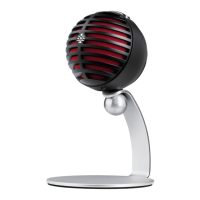

 To Next Page