6
Battery and Charging
Installation
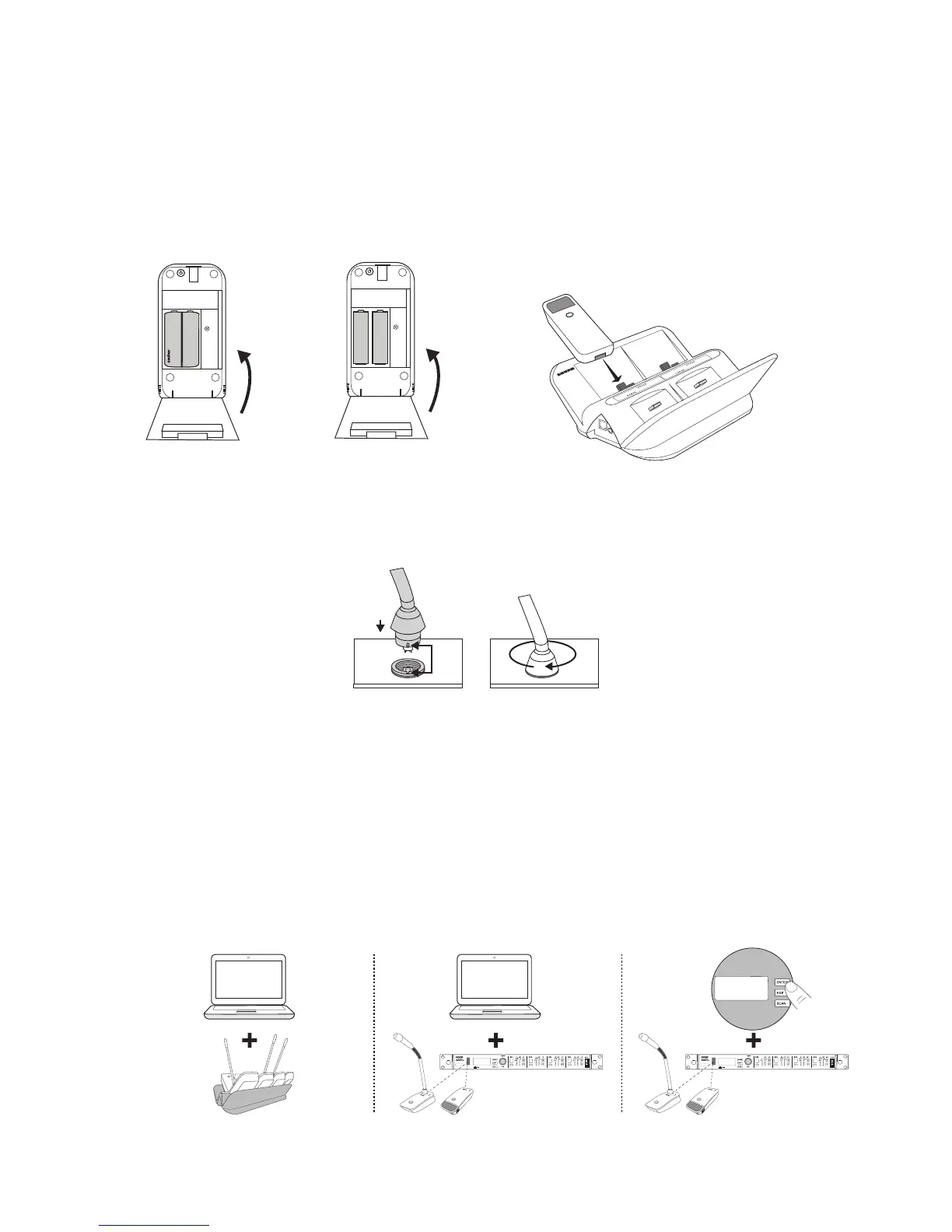
1. Open the battery compartment.
2. Insert one SB900 battery or two AA
batteries. Align +/- terminals on batteries
as shown.
3. Close battery door until it latches.
+
+
-
-
+
+
Battery Information
See the receiver front panel or the
microphone properties on Wireless
Workbench for detailed battery information.
Charging
Charge transmitters with Shure rechargeable
batteries in networked charging station.
Connecting Gooseneck Microphone to ULXD8 Base
ULXD8 bases fit 5", 10", and 15" Microflex series gooseneck microphones. Connect
microphone to base as shown.
Changing Transmitter Settings
Modify the transmitter's mute/active button behavior, status LED behavior, high-pass filter,
and encryption settings to fit your setup. There are three different ways to change transmitter
settings:
1. Change settings in Wireless Workbench and send to all transmitters on a networked
charger
2. Change settings in Wireless Workbench, send settings to each receiver, and perform an
IR sync between each receiver and transmitter pair
3. Change settings for each transmitter from ULXD receiver front panel and perform an IR
sync
RF
A B



 To Next Page