14
Use and maintenance Manual AUTOMATIC GENSET CONTROL PANEL with GC310/GC350
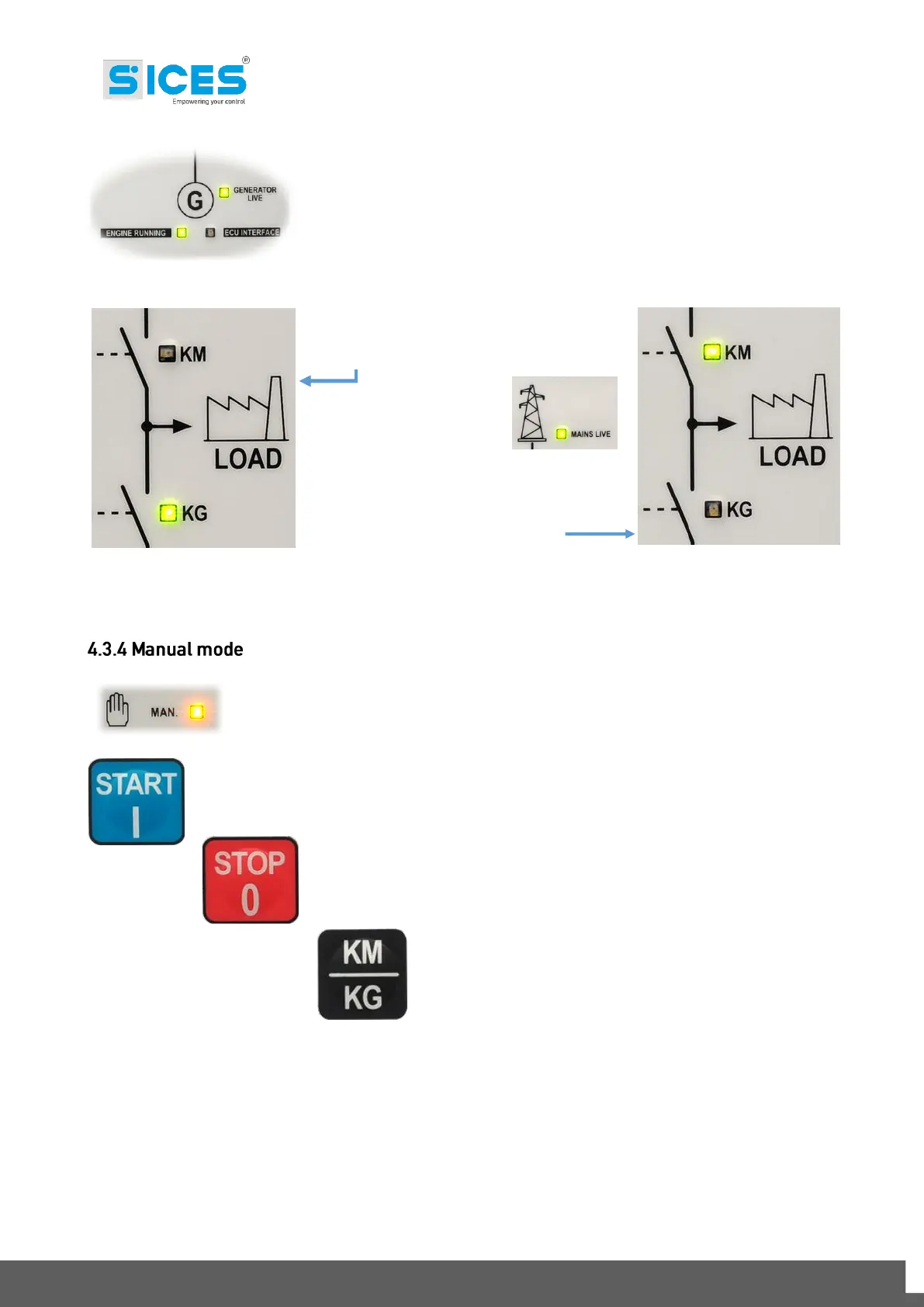
After the genset start-up, the controller GC310/GC350 measures the
genset voltage value.
The controller GC310/GC350 controls the
status switch, from MAINS to GENSET, in
order to supply the load.
When the mains voltage
comes back to the
threshold values set,
GC310/GC350 produces a reverse
sequence to the previous cycle and brings
the system supply back to Mains,
disconnecting the Genset.
Set the GC310/GC350 controller in MAN. mode, using the selection arrows.
Manual start-up control of the Genset
Manual stop control of the Genset
In MAN mode, by pressing this button it is possible to
change the switch position MAINS/GENSET (the
controller must have the start-up control of the genset
and measure the start-up genset voltage).
This operation cycle is managed with times and thresholds settable in the GC310/GC350 controller.
All these values are changeable by the user and can be consulted in the controller manual.
Note: Please remember that with Mains live and GC310/GC350 in OFF mode, the switch is
commanded to close always in MAINS position.



 To Next Page