Model 275 Universal Hart Communicator UMSITRPDS3-1
November 2010
2-2
MG00360a
HART Communicator
I
O
F1 F2 F3 F4
13
4
5
6
78
9
0
# % &
S T U
J K L
A B C D E F G H I
M N O P Q R
V W X Y Z /
< >
.
*
_
2
:
+
1
2
3
4
5
6
7
8
9
10
11
12
1
2
3
4
5
6
7
8
9
10
11
12
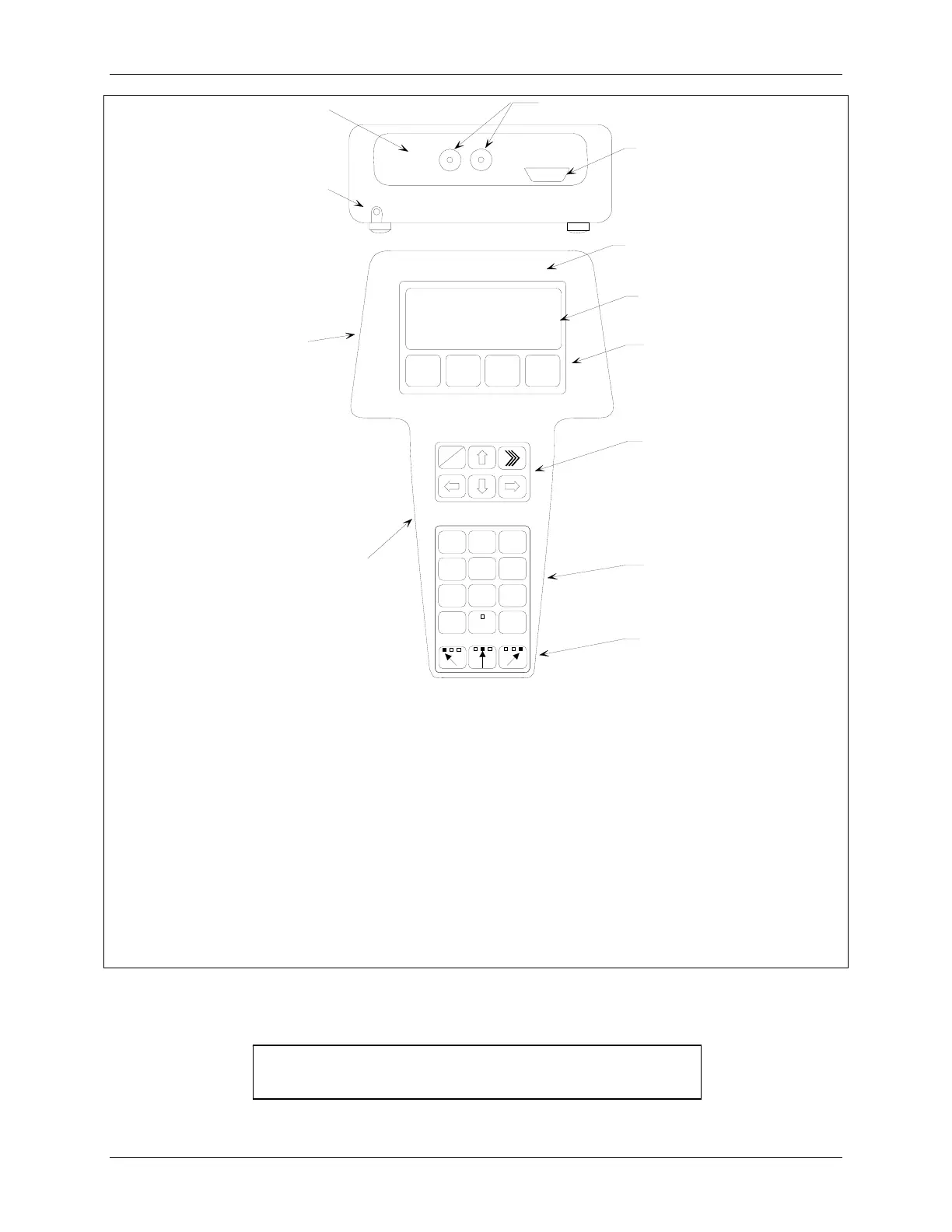
Model 275 Universal HART Communicator
Liquid Crystal Display (LCD), 8 lines, 21 characters per line
Function Keys (softkeys), software defined
Action Keys – ON/OFF (I/O), Up Arrow, Quick Access Key (>>>), Previous Menu (Back, left arrow),
Down Arrow, Select (Forward, right arrow)
Alphanumeric Keys (keypad number sequence may be different from that shown)
Shift Keys – Use to select alphabetic and other characters above a number, period, or dash.
Communicator Nameplate – On back of device. See nameplate for certifications and approvals
before connecting in a hazardous location.
Communicator model number and serial number on back
Connection panel.
Non-polar loop connection; dual banana plug
Serial port for PC connection; DB9
NiCad Charger Jack, optional
FIGURE 2-1 Model 275 Universal HART Communicator
Note: If using a Model 375 Field Communicator, see the
inside of the front cover of this manual.






 To Next Page