EasyManua.ls Logo

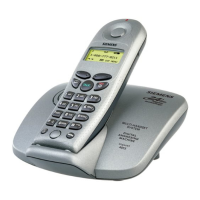
Siemens Gigaset 4015 - User Manual

Siemens Gigaset 4015
77 pages
Print Icon
To Next Page IconTo Next Page
Loading...
s
Gigaset 4015 Classic, GBR, A31008-G4015-B101-1-7619
4015cover vor-
14.09.01
Be inspired
Operating instructions
and safety precautions
!

Table of Contents

Other manuals for Siemens Gigaset 4015

Questions and Answers

  • W
    William DayAug 14, 2025
    What to do if my Siemens Cordless Telephone has no radio connection and all displays are flashing?
    • N
      Noah GriffinAug 14, 2025
      If your Siemens Cordless Telephone shows all displays flashing, indicating no radio connection to the base station, the issue might be due to several reasons: * You may be too far from the base station. Try moving closer. * The handset might not be registered. * The base station could be off. Check the power connector at the base station.
  • C
    cunninghambrianAug 17, 2025
    Why is there no display on my Siemens Gigaset 4015?
    • C
      Christopher TateAug 17, 2025
      If there is no display on your Siemens Cordless Telephone, it could be due to the following reasons: * The handset may not be turned on. To resolve this, hold down the end call key for 1 second. * The batteries may be empty. In this case, charge or replace the batteries.
  • J
    Joe SchultzAug 21, 2025
    What to do if Siemens Gigaset 4015 generates error beep?
    • N
      Nina OwensAug 21, 2025
      If your Siemens Cordless Telephone is generating an error beep (descending tone sequence), it indicates a wrong input. Repeat the procedure, carefully noting the display.
  • D
    Danielle BlackAug 25, 2025
    Why does the Siemens Gigaset 4015 Cordless Telephone answering machine announce 'PIN is incorrect'?
    • W
      Wayne NewmanAug 25, 2025
      If the answering machine on your Siemens Cordless Telephone announces 'PIN is incorrect' during remote operation, it means that the system PIN entered is incorrect. Re-enter the system PIN.
  • D
    Dr. John KellyAug 27, 2025
    Why does my Siemens Cordless Telephone answering machine message not have a time stamp?
    • G
      gomeznancyAug 27, 2025
      If an answering machine message on your Siemens Cordless Telephone does not have a time stamp, it is because the date/time has not been set.
  • A
    Amber BarreraAug 31, 2025
    Why can't my caller hear me on my Siemens Cordless Telephone?
    • B
      bradley97Aug 31, 2025
      If your caller can't hear you when using the Siemens Cordless Telephone, it might be because the INT key was accidentally pressed, which mutes the microphone. To fix this, press the GO BACK OK key to reactivate the microphone.
  • C
    Curtis BlackSep 3, 2025
    What to do if my Siemens Cordless Telephone does not ring?
    • G
      ginasimpsonSep 3, 2025
      If your Siemens Cordless Telephone isn't ringing, the ringer might be turned off. You need to activate the ringer.
  • R
    Rhonda FigueroaSep 6, 2025
    What to do if my Siemens Cordless Telephone has no reaction to keystroke?
    • L
      larry85Sep 7, 2025
      If your Siemens Cordless Telephone doesn't react when you press a key, it's possible that the keypad protection is activated. To deactivate it, hold down the key for one second.
  • T
    Terry WilliamsonSep 10, 2025
    Why is my Siemens Gigaset 4015 Cordless Telephone flashing and has no radio connection?
    • J
      Julie PottsSep 12, 2025
      If your Siemens Cordless Telephone shows all displays flashing and has no radio connection to the base station, there are several possible causes: * The handset might be out of the base station's range, so move closer. * The handset might not be registered; you need to register the handset. * The base station might not be activated; check the connector at the base station.

Summary

Safety Precautions and Warnings

General Safety Precautions

Covers essential safety guidelines for using the telephone, including power supply, battery usage, and environmental considerations.

Preparing the Telephone for Use

Package Contents and Base Station Installation

Details the items included in the package and provides instructions for installing the base station in a suitable location.

Connecting the Base Station to the Network

Instructions for connecting the base station to the analogue telephone network using the provided cables and power supply.

Operating the Handset and Charging Batteries

Guide on inserting batteries, placing the handset for charging, and initial setup for operation.

Date and Time Settings

Making and Managing Calls

Making External and Internal Calls

Guides on making calls to external numbers and internal calls between handsets, including call termination.

Answering and Displaying Caller Information

How to answer incoming calls and view caller identification (CLIP) details, including unavailable numbers.

Mailbox Features

Functions Before and During Calls

Setting call-related functions like withholding numbers, call waiting, and call diversion before or during a call.

Making Cost-Effective Calls

Network Access List for Call-by-Call Dialling

Saving and utilizing network provider prefixes for cost-effective calls via the network access list.

Automatic Preselection Configuration

Setting up automatic preselection by defining lists for numbers with and without network provider prefixes.

Operating the Answering Machine (AM)

Activating and Deactivating the Answering Machine

Enabling or disabling the answering machine function on the base station.

Managing Recorded Announcements

Recording a personal announcement, checking its quality, and managing remaining memory notifications.

Checking, Deleting, and Playing Messages

Procedures for checking, deleting, and playing back recorded messages and announcements.

Message Playback Controls and Call Pickup

Navigating through messages, deleting them, and picking up calls while the answering machine is recording.

Answering Machine Speed Dialling and Remote Operation

Setting up speed dialling for the answering machine and accessing it remotely from other telephones.

Initiating Remote Replay and Activation

Steps for initiating remote message replay and activating the answering machine remotely using the system PIN.

Registering and De-registering Handsets

Operating Several Handsets

Base Station Settings

Changing the System PIN

Modifying the system PIN for security and to enable remote answering machine operation.

Connecting the Base Station to a PABX

Answering Machine Remote Operation

Remote Operation Key Functions and PIN Entry

Explains how to perform remote operations on the answering machine using a telephone and the system PIN.

Siemens Gigaset 4015 Specifications

General IconGeneral
TypeCordless Telephone
Phonebook entries20
Talk time10 hours
Standby time100 hours
Caller IDYes
RedialYes
Handset SpeakerphoneNo
Base SpeakerphoneNo
Answering MachineNo
Headset JackNo
Color OptionsBlack
Frequency1.8 GHz - 1.9 GHz (DECT)
RangeUp to 300 meters outdoors
IntercomYes

Related product manuals