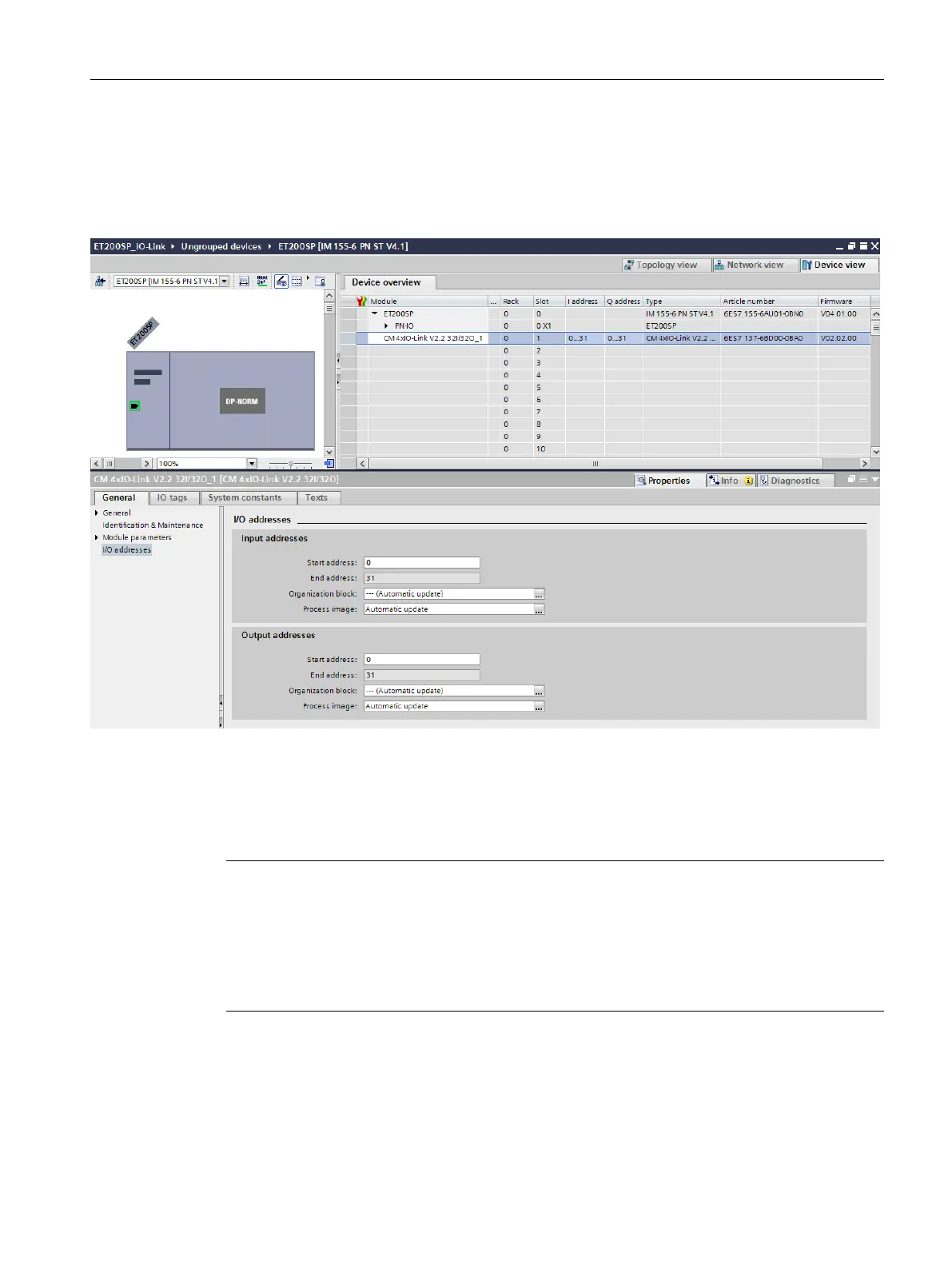
In the device view of the PROFINET device, you can:
•
Parameterize the ports
•
Specify the input and output address ranges of IO-Link for exchange of cyclic data (process
values).
Figure 3-2Device view with setting of the IO-Link address range
In addition, you can set in the module properties of the IO-Link master how the IO-Link
system is to be configured and parameterized.
In doing so, you can select whether or not you also want to work with the S7-PCT
configuration tool.
NOTE
IO data length
To ensure smooth operation, select an IO data length during configuration of the IO-Link
master that corresponds at least to the IO data length of all connected IO-Link devices. If
necessary, the IO-Link master offers the option of configuring the IO data length for each
individual port. In this case, the IO data length must at least correspond to the IO data length
of the connected IO-Link device.
19
Integration into the automation system
3.1 Configuration of the IO-Link system
IO-Link system
Function Manual, 07/2022, A5E31637677-AC







 To Next Page