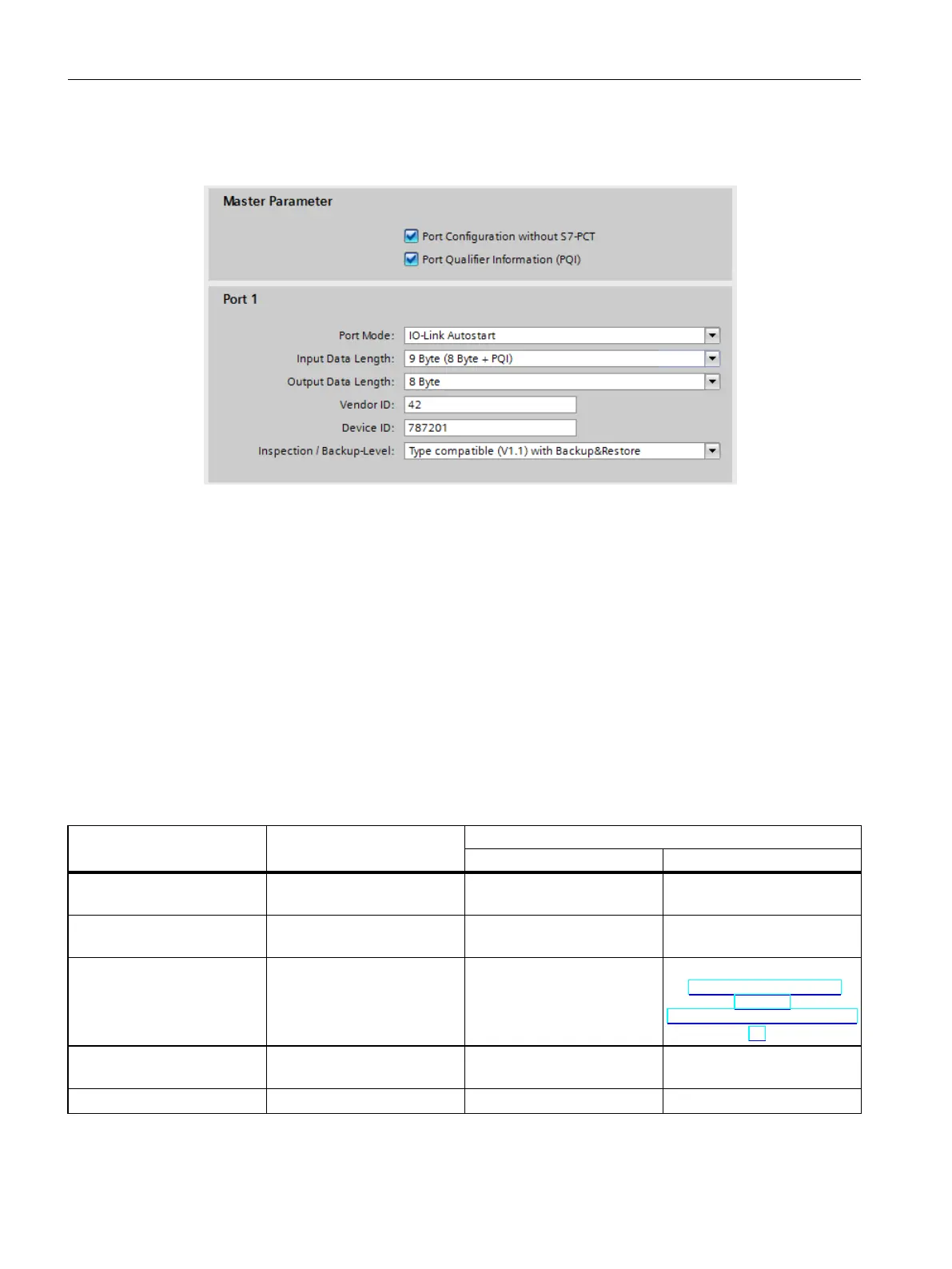
The figure below shows you an example of the settings of a port configuration in STEP 7 or
with GSD file:
Figure 3-5Settings of the port configuration in STEP 7 or with GSD file
3.1.3 Overview of configuration options
Introduction
The tables below show the configuration options offered by the SIMATIC IO-Link master with
or without S7-PCT and which FW versions of the IO-Link master support the individual
configurations.
Comparison of the configuration options
The following table provides an overview of the available options for configuration with and
without S7-PCT:
Configuration without S7-PCTRequirement Configuration with S7-PCT
IO-Link Autostart IO-Link Manual
Use of the IO-Link device
description IODD
Yes No No
Setting the length of input
and output data (per port)
Automatic Manual Manual
Assignment of the Vendor ID
and Device ID
Automatic - Manual (see FAQ
(https://support.industry.
siemens.
com/cs/ww/en/view/1097488
52))
Behavior during IO-Link device
replacement
Programmable - Programmable
Adjustable IO-Link cycle time Yes No No
24
IO-Link system
Function Manual, 07/2022, A5E31637677-AC
Integration into the automation system
3.1 Configuration of the IO-Link system







 To Next Page