You can configure the DHCP with this key.
Note: if you select "No" for DHCP, you must enter the IP address
(which must
belong to the same network as that of your PC) and sub‐
net mask manually.
7. Press this softkey to save the configuration. If you select "Yes" for
DHCP, you also need to restart the control system to activate the
network configuration.
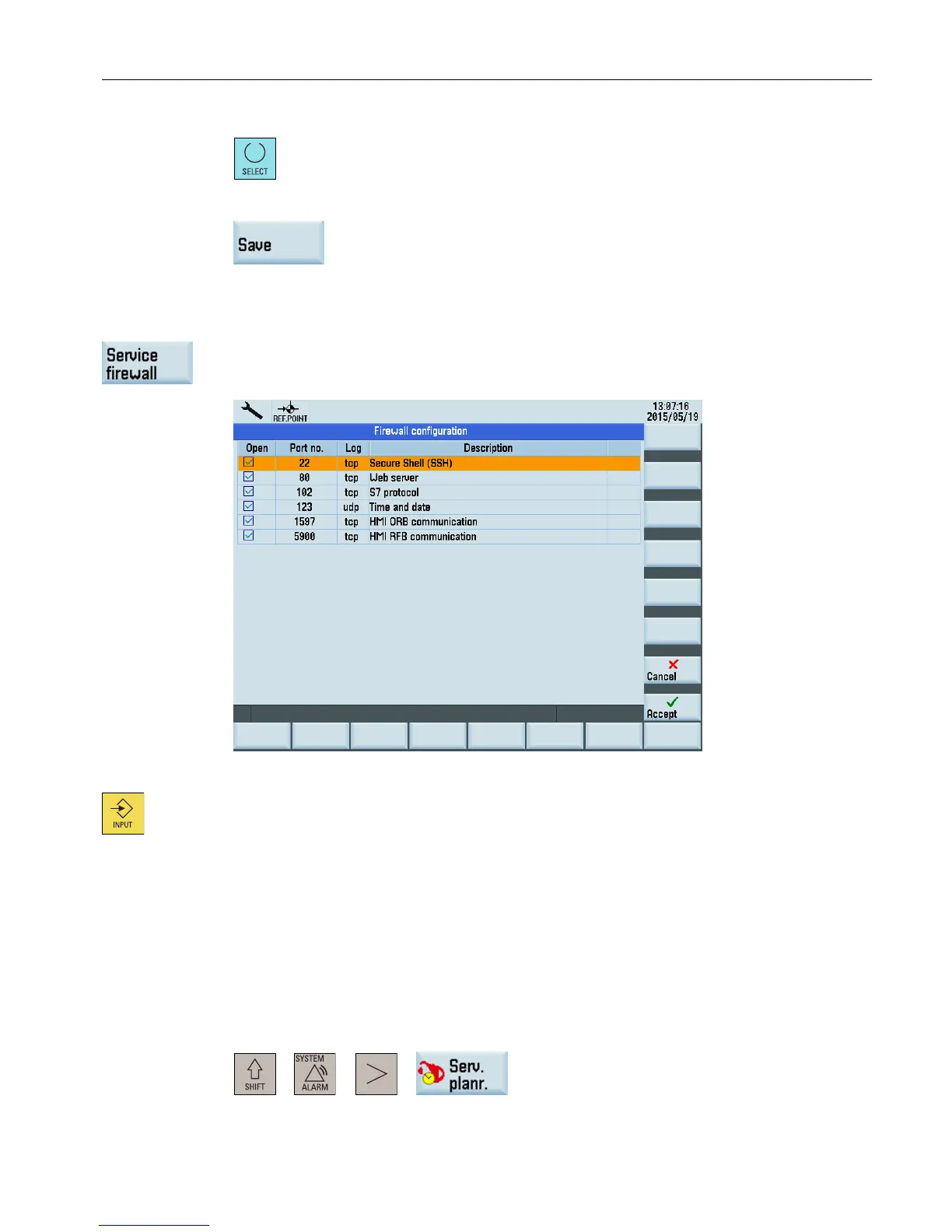
Configuring the firewall
Use this softkey to open the following window for enabling or disabling communication ports.
To ensure maximum possible safety, all ports not needed should be disabled.
The Ethernet connection requires the ports 80 and 1597 for communication.
To change
the port status, select the relevant port using the cursor and press this key to enable
or disable the port.
Enabled ports are shown in the check box with a check mark.
3.10 Defining the maintenance planner
Overview
This part introduces how to define the maintenance planner. You can enter the maintenance
planner main screen through the following operations:
+ → →
Operating in the system data management operating area
3.10 Defining the maintenance planner
Diagnostics Manual
Diagnostics Manual, 06/2015, 6FC5398-6DP10-0BA2 43


 To Next Page
 Loading...