840D/828D SINUMERIK Operate
Notes
Section 2
Operating mode “MDA“
In "MDA" mode (Manual Data Automatic), you can enter G-code com-
mands block-by-block and immediately execute them for setting up the
machine.
You can load an MDA program straight from the Program Manager into the
MDA buffer. You may also store programs which were created or modified
in the MDA operating window into any directory of the program manager.
2.1 Selecting the operating mode “MDA“
The operating mode “MDA“ can be selected as follows:
Press the “MDA”-key on the operator panel (OP).
The operating mode “MDA“ will be opened immedi-
ately.
- OR -
Press the “MENU SELECT”-key on the operator
panel.
Press the VSK 2 “MDA“ in the yellow vertical softkey
bar on the right side of the screen and the operating
mode “MDA” will be opened immediately.
Next, switch to the operating area “Machine” by
pressing the “MACHINE” key on the operator panel
or on the keyboard or press the “MENU SELECT“-
key on the operator panel and the yellow HSK 1
“Machine“.
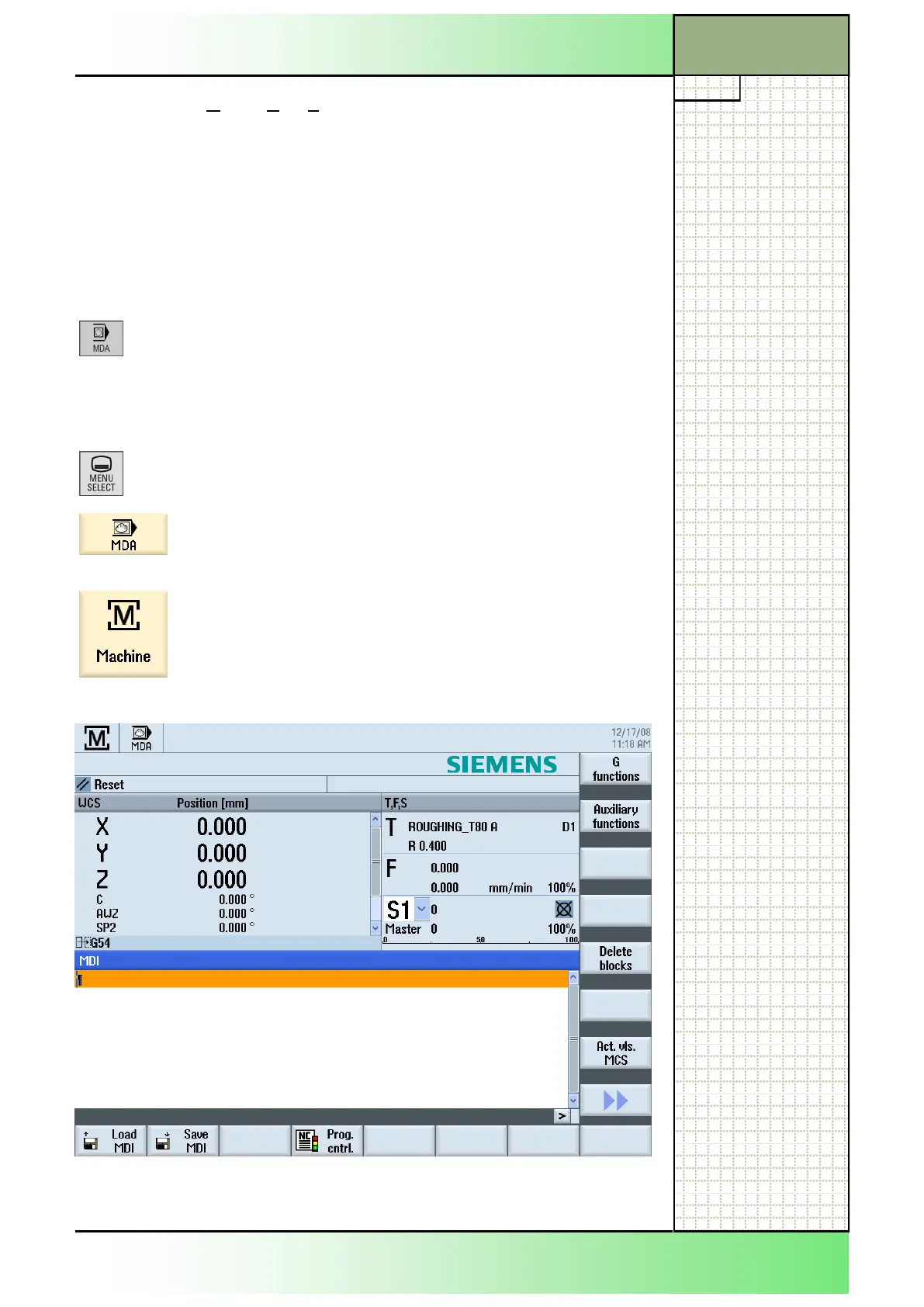
The following screen opens:
In the operating mode “MDA“ the following softkeys are shown in the hori-
zontal and vertical softkey bar of the SINUMERIK Operate:
















 To Next Page