840D/828D SINUMERIK Operate
Notes
Section 3
Save MDI
4.1 Selecting the function “Save MDI”
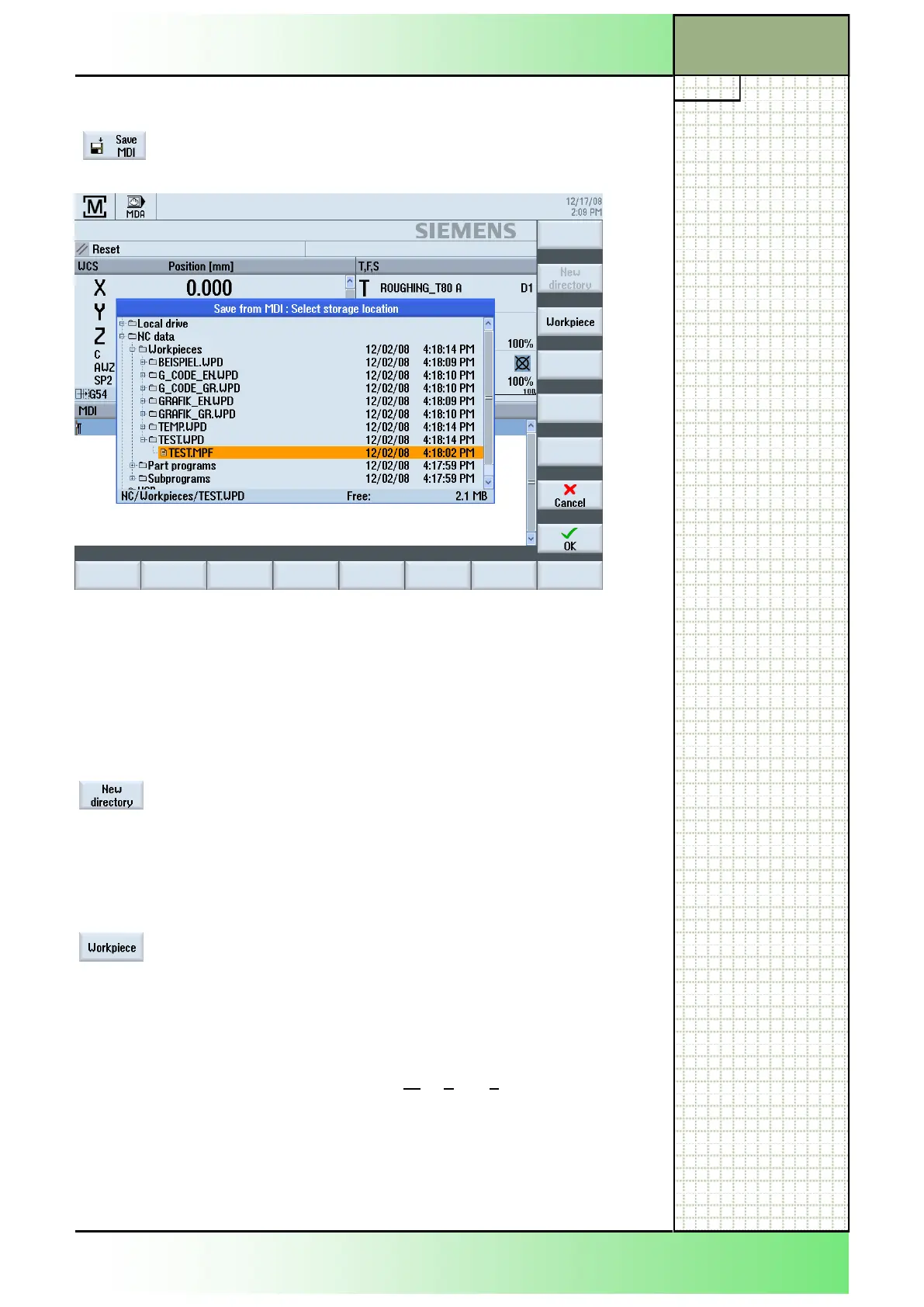
By pressing the HSK 2 “Save MDI” the “Save from
MDI : Select storage location” window opens.
Navigate through the program manager window by means of the blue
cursor-keys.
The following softkeys are available in the vertical softkey bar.
4.2 Vertical softkey bar
Display area Description
By pressing the VSK 1 “New directory“ a new direc-
tory can be created in the “Local drive” folder.
An input window opens where a name can be en-
tered for the new directory that is to be created.
Create a new directory by pressing the VSK 8 “OK”
or abort with pressing the VSK 7 “Cancel”.
The “Workpiece”-softkey only becomes active if the
cursor is placed on/in the “Workpieces” folder of the
“NC data” section.
Here, by pressing the VSK 3 “Workpiece” a new
workpiece can be created. An input window opens,
where a name can be entered for the new workpiece
that is about to be created. Create a new workpiece
of the type “*.WPD” (Workpiece directory) by press-
ing the VSK 8 “OK” or abort the action with pressing
the VSK 7 “Cancel”.
















 To Next Page