840D/828D SINUMERIK Operate
Notes
Section 4
Program control
4.1 Selecting the function “Program control”
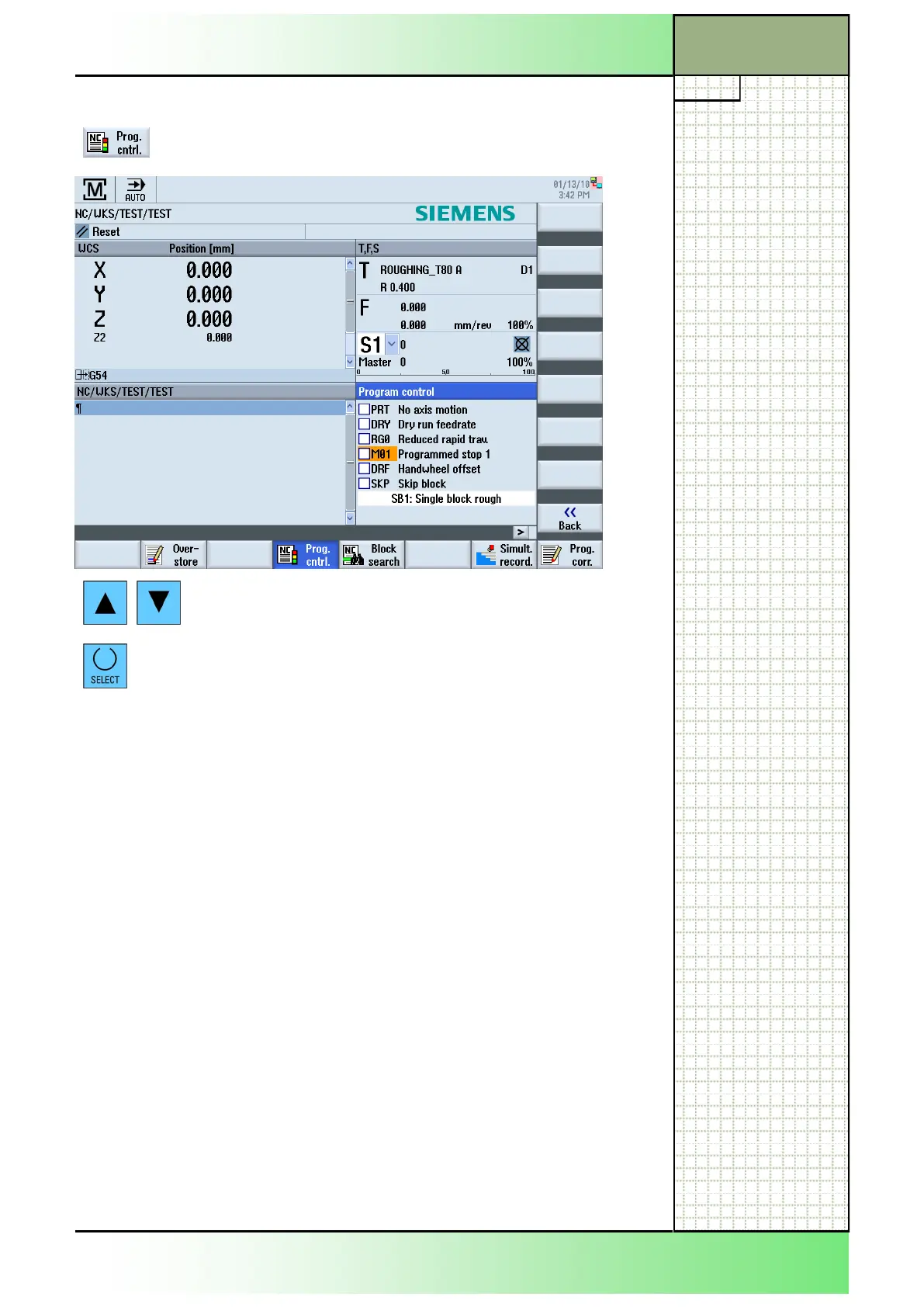
By pressing the HSK 1.4 “Prog. cntrl.“ the “Program
control” window opens like displayed below:
Navigation through the option menu takes place by
pressing the blue “Cursor-up” and “Cursor-down”
keys on the keyboard.
You can activate or deactivate an option by select-
ing the entry first and then pressing the blue
“SELECT“ key.
The following program control options are selectable:
Abbreviation/
program control
Scope
PRT
No axis motion
The program is started and executed with auxiliary
function outputs and dwell times. In this mode, the
axes are not traversed.
The programmed axis positions and the auxiliary
function outputs are controlled this way.
Note:
Program processing without axis motion can also
be activated with the function "Dry run feedrate".
DRY
Dry run feedrate
The traversing velocities programmed in conjunc-
tion with G1, G2, G3, CIP and CT are replaced by a
defined dry run feedrate. The dry run feedrate also
applies instead of the programmed revolutional
feedrate.
Caution:
Workpieces must not be machined when "Dry run
feedrate" is active because the altered feedrates
might cause the permissible tool cutting rates to be
exceeded and the workpiece or machine tool could
be damaged.
















 To Next Page