840D/828D SINUMERIK Operate
Notes
Section 3
Tool list
Column header Meaning
Pressing the VSK 2.2 “Filter” opens the screen to set
the filter options (See section 3.13 in this module)
Pressing the VSK 2.4 „Details“ opens a new softkey
bar with the functions
Tool Data
Cutting edge data
Monitoring data
The details of the tool which is selected by the cur-
sor position are listed in the next screens.
Pressing the VSK 2.8 “Back“ on the operator panel
you switch back to the vertical softkey bar 1.
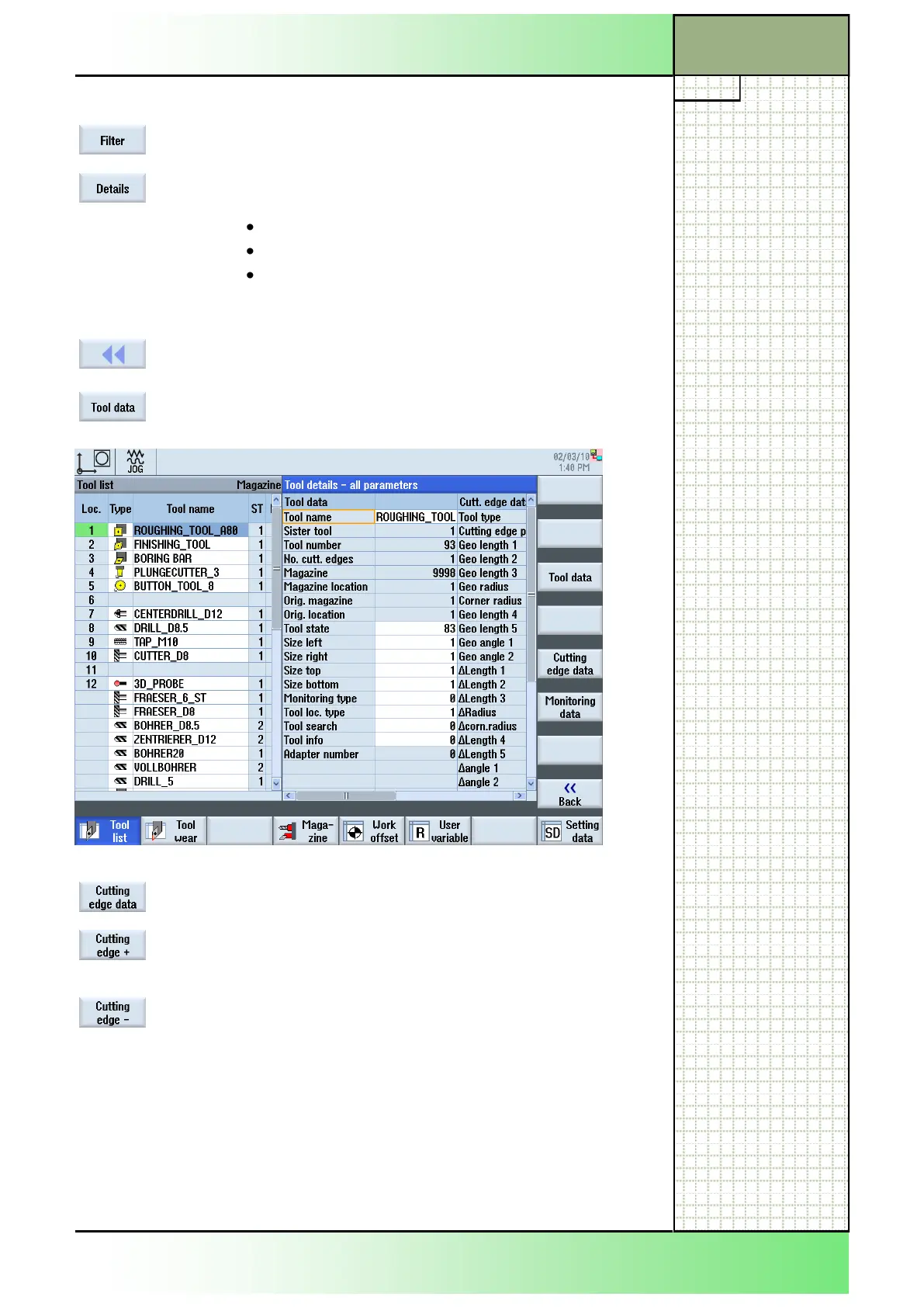
Pressing the VSK 3.3 “Tool data” opens the screen
“Tool details - all parameters”.
By pressing the VSK 3.3 “Tool data” the screen
“Tool details - all parameters” opens.
In case of tools with several cutting edges you can
select with VSK 3.1 “Cutting edge +” the next cutting
edge.
VSK 3.2 “Cutting edge -” selects the previous cutting
edge.
















 To Next Page