B523
B523 Page 14 840D/828D SINUMERIK Operate
Notes
Section 3
Tool list
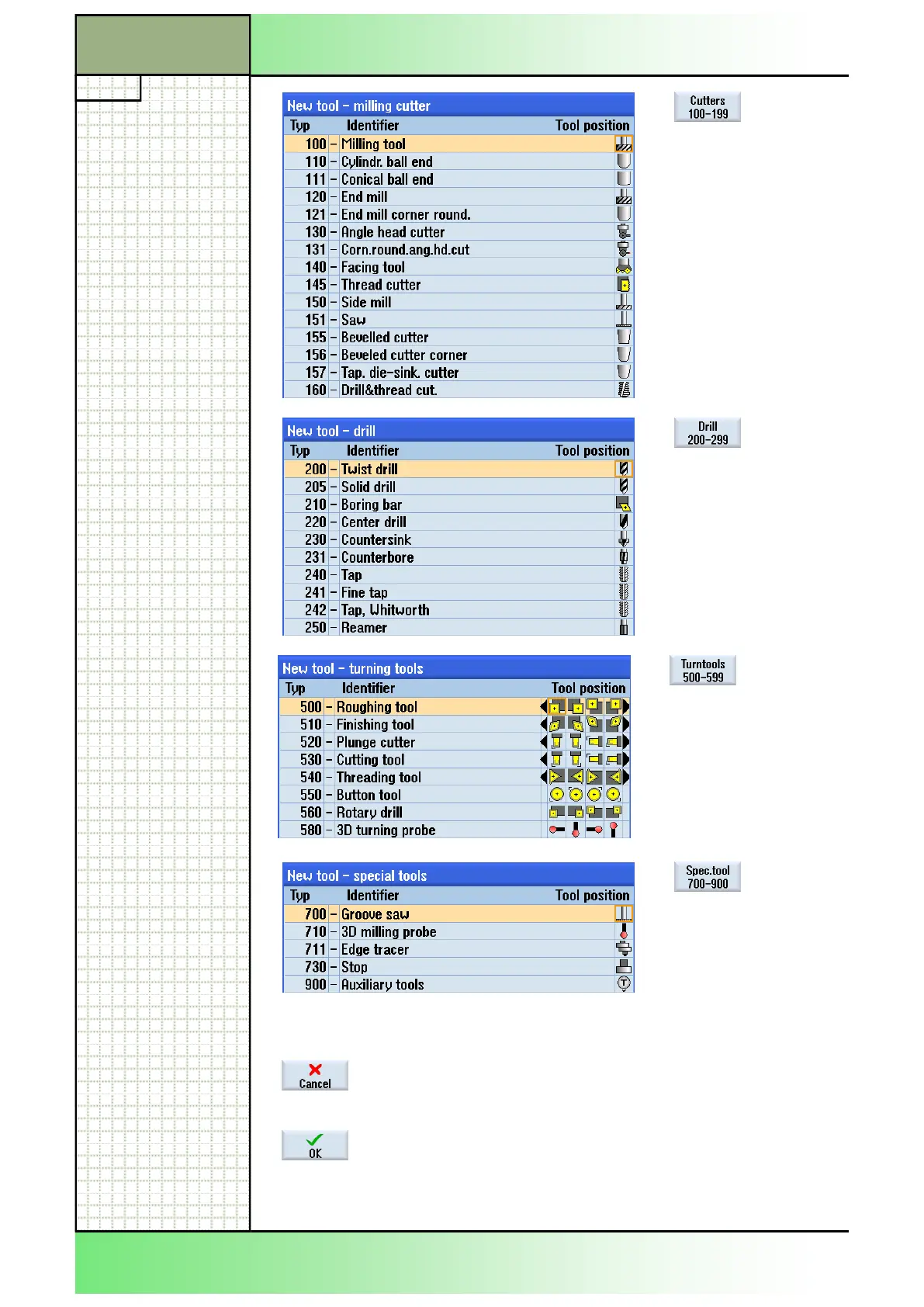
Press the VSK 2
“Cutters 100-199” to
open the “New tool -
milling cutter” list.
A list of all available
milling cutters opens.
Press the VSK 3 “Drill
200-299” to open the
“New tool - drill” list.
A list with all available
Drilling tools opens.
Press the VSK 4
“Turntools 500-599” to
open the “New tool -
turning tools” list.
A list with all available
Turning tools opens.
Press the VSK 5
“Spec.tool 700-900” to
open the “New tool –
special tools” list.
A list with special tools
opens.
Press the VSK 7 “Cancel” to reject the tool selection
and to jump back to the “Tool list” window in the op-
erating area “Parameter”.
Press the VSK 8 “OK“ to accept the selected tool
and to jump back to the “Tool list” window in the op-
erating area “Parameter”.
The selected tool will be loaded into the tool list
















 To Next Page