B523
B523 Page 18 840D/828D SINUMERIK Operate
Notes
Section 3
Tool list
3.6 New tool
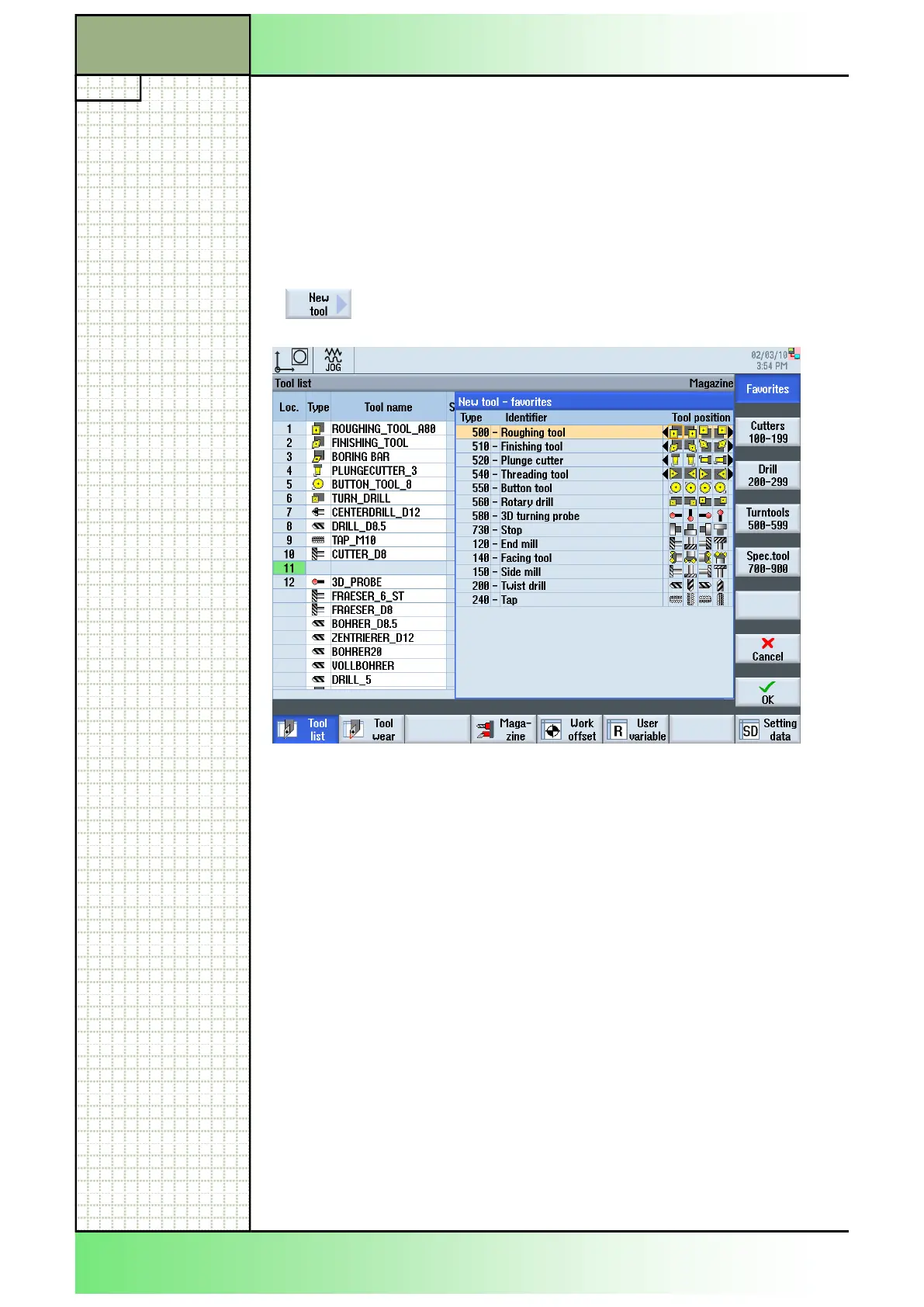
The function “New tool” lets you add a new tool to the tool list.
You can choose a new tool from a list of favorite tools (VSK 1 “Favorites”)
or select a tool from a group of cutting, drilling, turning or special tools by
pressing the corresponding vertical softkeys 2 - 5.
3.6.1 Selecting the function “New tool”
By pressing the VSK 1.2 “New tool“ the “New tool -
favorits“ window opens.
3.6.3 Creating a new tool
1. In the operating mode “JOG“, “MDA“ or “AUTO“ se-
lect the operating area “Parameter” by pressing the
“MENU SELECT“-key on the keyboard and the
HSK 2 “Parameter”. Alternatively press the
“OFFSET”-key on the keyboard.
2. Press the VSK 1 “Tool list” to open the tool manage-
ment screen.
Alternatively press the “OFFSET”-key on the key-
board.
The “Tool list” window opens directly.
3.6.2 Vertical softkey bar
Display area Description
For the softkeys see section 3.3.
















 To Next Page