B523
B523 Page 46 840D/828D SINUMERIK Operate
Notes
Work offset
Section 7
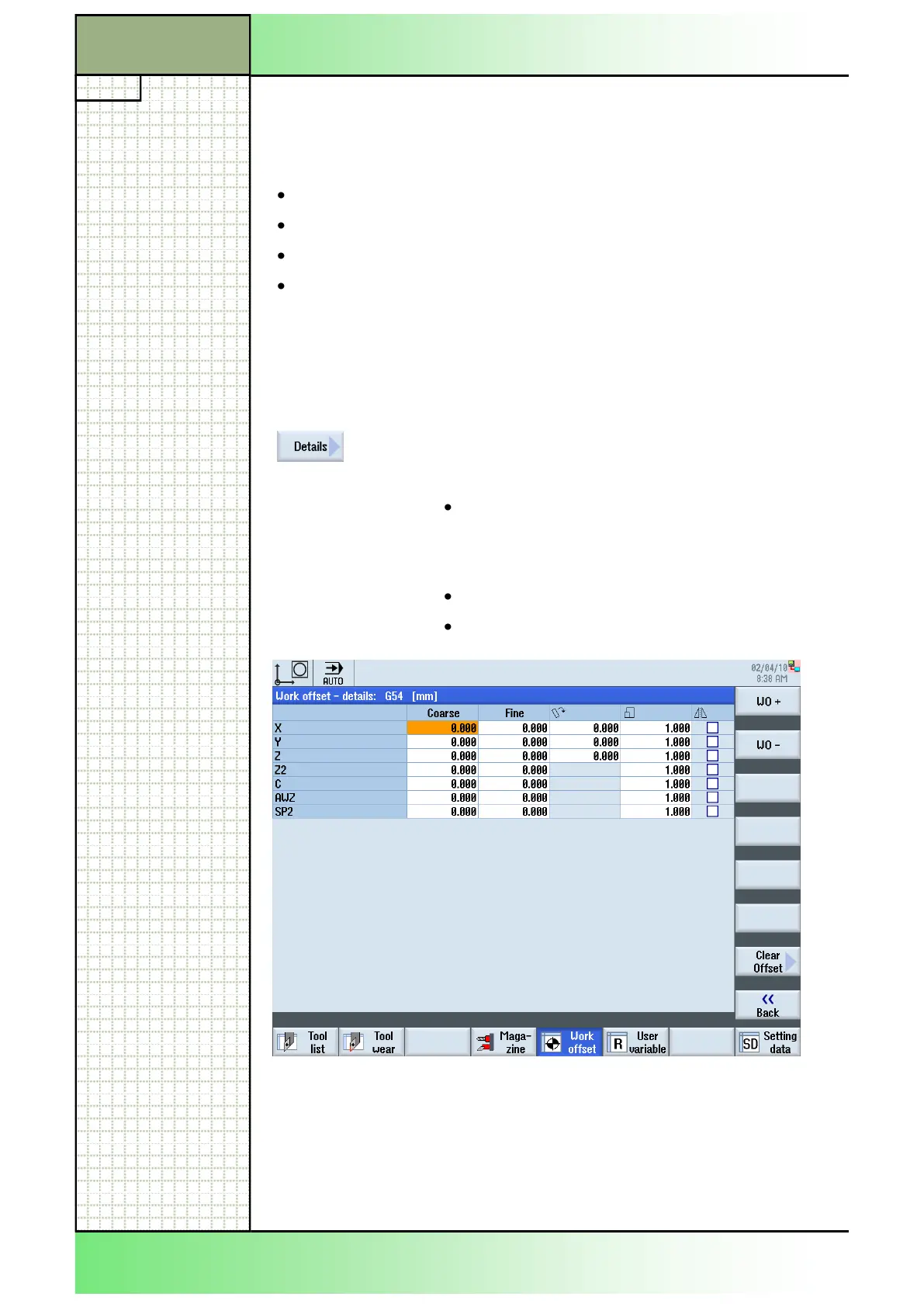
7.7 Details of the work offset
For each work offset, you can display and edit all data for all axes.
You can also delete work offsets.
For every axis, values for the following data will be displayed:
Coarse and fine offsets
Rotation
Scaling
Mirroring
Notes:
Settings for rotation, scaling and mirroring are specified here and can only
be changed here.
7.7.1 Selecting the function “Work offset - details:“
By pressing the VSK 7 “Details“ a different work off-
set window opens, depending on the work offset
(Active, Base, G54...G57) selected before:
“Work offset - details: Rotary table ref./Basic ref-
erence/Total basic WO/G54 - G55/Tool reference/
Workpiece ref./Programmed WO/Cycle reference/
Total WO“
“Work offset - details: 1. chan.-sp. Basic WO“
“Work offset - details: G54 - G57“
7.7.2 Displaying details of the work offset
1. Press the “MENU SELECT“-key on the operator
panel and the HSK 2 “Parameter” to open the oper-
ating area “Parameter”. Alternatively press the
“OFFSET”-key on the keyboard.
2. Press the HSK 5 “Work offset”.
















 To Next Page