B524
B524 Page 4 840D/828D SINUMERIK Operate
Notes
Section 2
Structure of the program editor
1
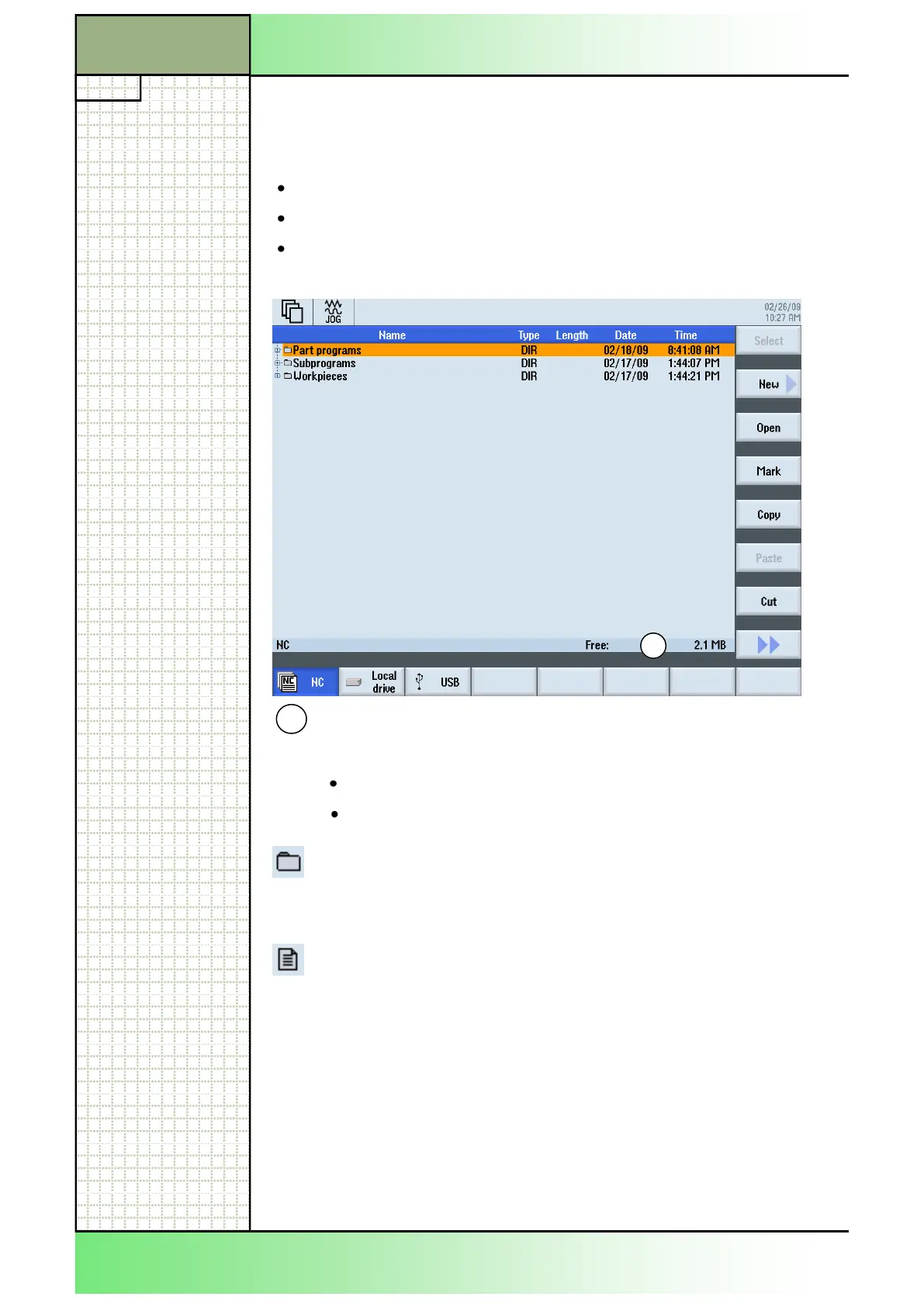
Here you can see the free available main memory on the NC.
The memory can not be fully used. If less then 0,1 MB is
avail able, more memory should be freed by:
deleting unused programs
moving unused programs to another storage (e.g. memory stick)
1
The memory structure shown in the picture below, with the 3 main directo-
ries:
Part programs
Subprograms
Workpieces
is always available on the NC, and does not have to be created.
2.2 The NC main memory
Directories:
Directories are displayed with a folder icon in the program manager
window and have the extension *.DIR (Directory) or *.WPD (work
piece directory).
Program/Data:
Programs and data are displayed with a document icon.
Used file extensions:
*.WPD = Workpiece
*.MPF = Main program file
*.SPF = Sub program file
For workpieces, a program with the same name must be stored in the
workpiece directory, which is automatically selected for machining. For ex-
ample, with selecting the workpiece TURING.WPD the main program
TURNING.MPF is selected automatically.
If an INI-file of the same name exists (e.g. TURNING.INI), it is executed
once at the start of the part program selected.
















 To Next Page