840D/828D SINUMERIK Operate
Notes
2.4 Selecting the function “Password”
The access to programs, data and functions is restricted user-oriented by
8 hierachical protection levels.
They are seperated into:
4 password levels for system, machine manufacturer, commissioner,
and user
4 key-switch positions for the end user
There are the protection leves 0 - 7, where 0 is the highest and 7 is the
lowest level.
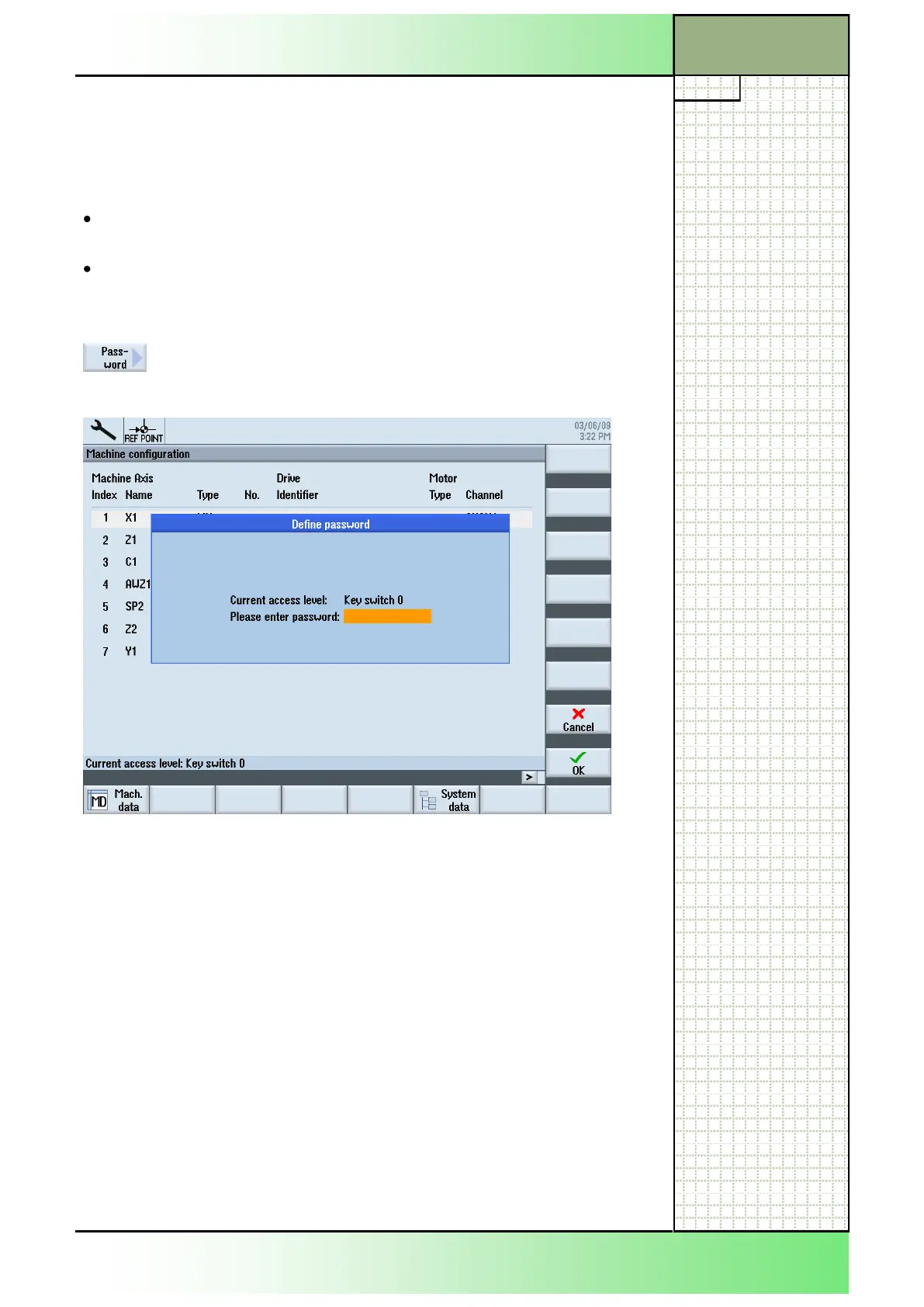
By pressing the VSK 6 “Password” an input mask
opens where you can set a new protection level by
entering a password.
2.5 Changing the protection level via password
1. Press the “MENU SELECT”-key on the operator
panel.
The yellow horizontal softkey bar opens.
2. Press the yellow HSK 6 „Start-up“.
3. Press the VSK 6 “Password”.
4. Press the VSK 1 “Set password”.
The “Define password” input mask opens.
5. Enter the password in the orange marked input field
and accept with pressing the VSK 8 “OK” or abort
with pressing the VSK 7 “Cancel”.
Note:
The additional softkeys and functions “Set pass-
word” and “Change password” are only accessible
at a higher protection level.
Start-up
Section 2
















 To Next Page