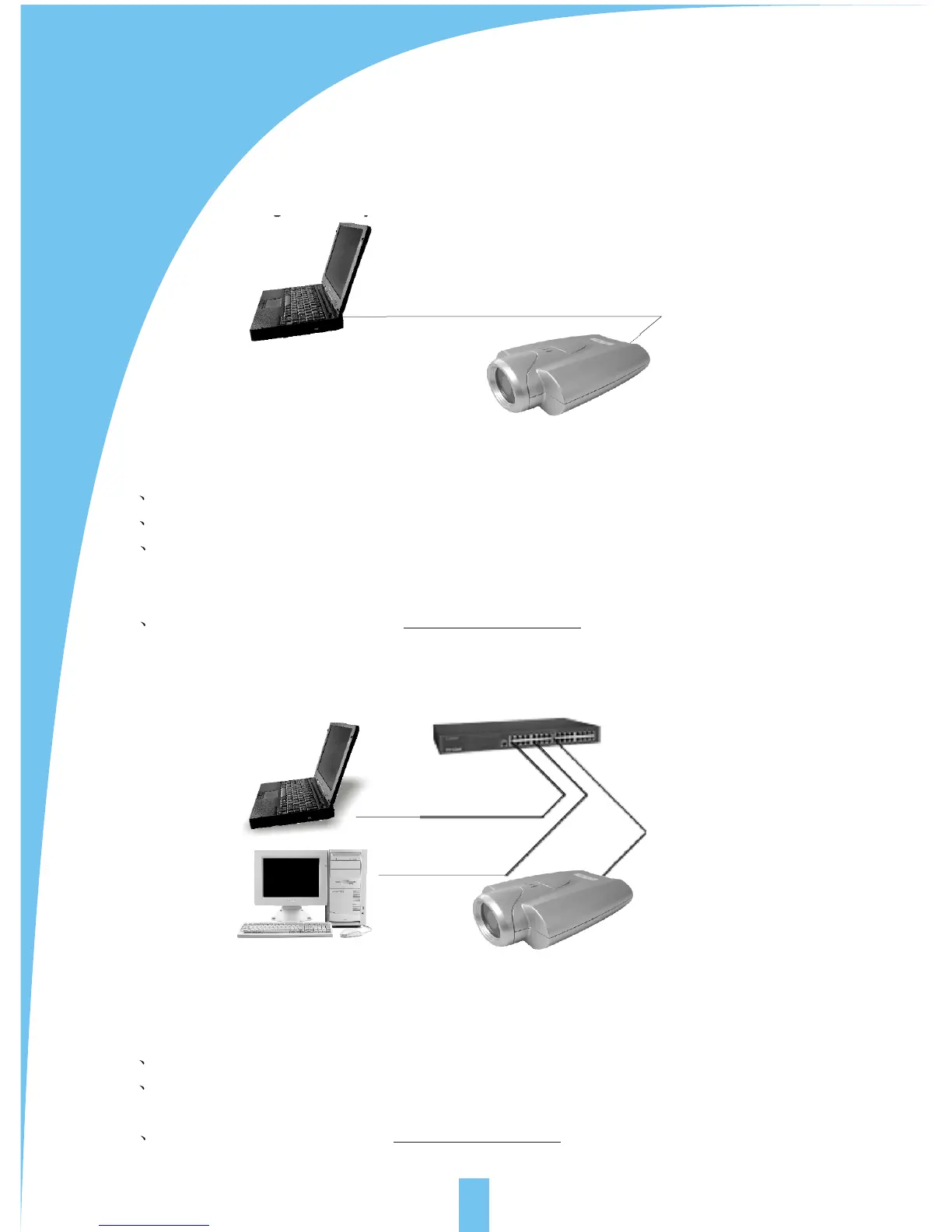
4 ILLUSTRATION FOR NET CONNECTION
5
He common connection programs for VSP-3001 network camera:
4.1 Connecting directly to PC(through category 5 cross cable)
For this program, the page browsing requires the basic configuration as below for
PC and IP camera:
A Connect correctly with the IP camera as above illustration.
B Set up the Ethernet card of the PC as auto or 10M half duplex mode.
C Set up the static IP address and the subnet masks. For example, IP address
is 192.168.1.6 and subnet masks is 255.255.255.0, and ignore other setup
of the net.
D enter the default IP address http://192.168.1.252 into the address field of the
net browser.
For this program, the page browsing requires the basic configuration as below for PC
and network camera:
A Connect correctly with the network camera as above illustration.
B Set up the static IP address and the subnet masks. For example, IP address is
192.168.1.6 and subnet masks is 255.255.255.0, and ignore other setup of the net.
C enter the default IP address http://192.168.1.252 into the address field of the net
browser.
Users
Link Builder / Switcher
Users
Record server
Reticle
Cross reticle
4.2 Connecting to Intranet through HUB/Switch



 To Next Page