AFTER SALES SUPPORT
1300 777 137
service@unclebills.com.au
MODEL: EA0863 PRODUCT CODE: 59016 12/2018
22
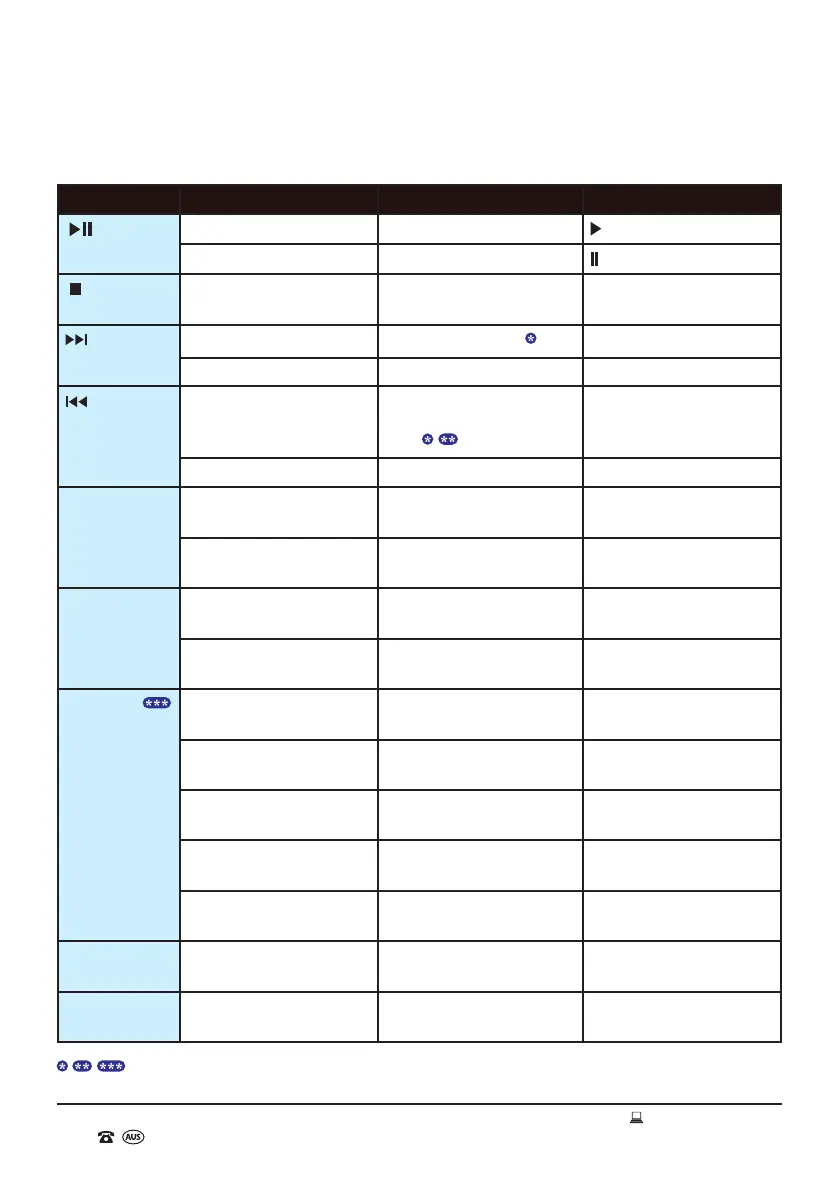
USB Flash Drive/SD Card Playback Controls
Button Action Function LCD Display
button
Short Press Once Play
Short Press Once Pause
button Short Press Once Stop Total number of tracks on
the USB ash drive/SD card
button Short Press Once
Skip to the next track
Track number
Press and Hold Fast forward within a track No change in display
button Short Press Once Restart the current playing
track or skip to the previous
track
Track number
Press and Hold Rewind within a track No change in display
F+10 button Short Press Once Skip forward 10 tracks on the
USB ash drive/SD card
Track number
Press and Hold Skip to the next folder on the
USB ash drive/SD card
Folder number
F-10 button Short Press Once Skip backward 10 tracks on
the USB ash drive/SD card
Track number
Press and Hold Skip to the previous folder on
the USB ash drive/SD card
Folder number
RPT button
Short Press Once Repeat the current playing
track
REP (ashing)
Short Press Twice Repeat all tracks in the
current playing folder
REP, FOLDER
Short Press Three Times Repeat all tracks on the USB
ash drive/SD card
REP
Short Press Four Times Play tracks in random order
(random mode)
RAN
Short Press Five Times Remove all repeat/random
functions
No change in display
VOL+ button Short Press Repeatedly or
Press and Hold
Increase Volume Volume level
VOL- button Short Press Repeatedly or
Press and Hold
Decrease Volume Volume level
Instructions (cont.)
Please see page 21 for further information.


 To Next Page