AFTER SALES SUPPORT
1300 777 137
service@unclebills.com.au
MODEL: EA0863 PRODUCT CODE: 59016 12/2018
25
Bluetooth
®
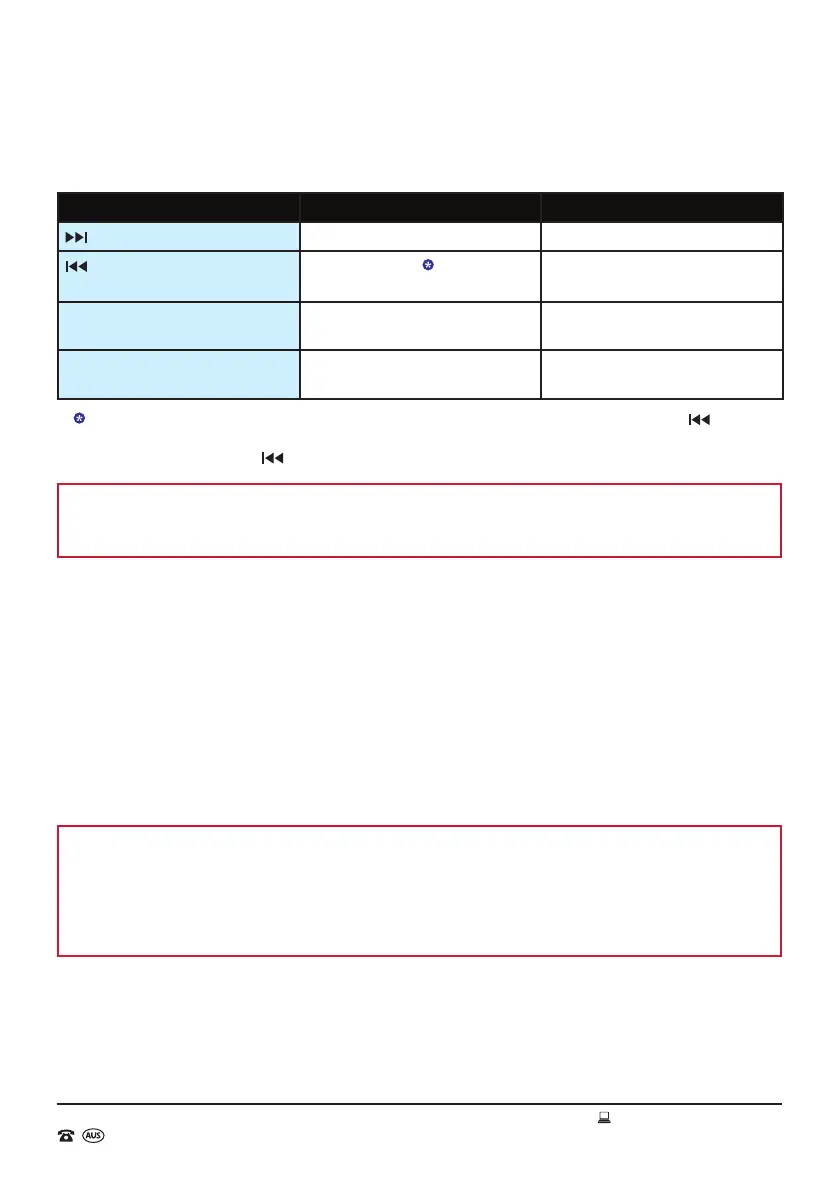
Wireless Technology Playback Controls
Button Action Function
button Short Press Once Skip to the next track
button
Short Press Once
Restart the current playing track or
skip to the previous track
VOL+ button Short Press Repeatedly or Press
and Hold
Increase Volume
VOL- button Short Press Repeatedly or Press
and Hold
Decrease Volume
If the current playing track is more than 2 seconds from the beginning, pressing the button
once will simply restart the track. If the currently playing track is less than 2 seconds from the
beginning, pressing the button once will skip to the previous track.
NOTE: When listening to tracks via Bluetooth
®
, always be aware that you may need to adjust the
volume on both the Jukebox AND the Bluetooth
®
enabled device to reach the required volume
level.
Disconnecting and Reconnecting the Bluetooth
®
Enabled Device
To end the connection between the Bluetooth
®
enabled device and the Jukebox follow the steps
below.
1. Press the MODE button to enter a different audio function on the Jukebox; or
2. Press the STANDBY button to set the Jukebox into standby mode; or
3. On the Bluetooth
®
enabled device, select “JUKE BOX” and then “Disconnect” or “Forget This
Device”; or
4. Simply turn Bluetooth
®
function off on the Bluetooth
®
enabled device.
NOTE: If Bluetooth
®
is activated on both the Jukebox and the Bluetooth
®
enabled device once
again, the Jukebox may automatically reconnect to the Bluetooth
®
enabled device. If this does
happen, the Bluetooth
®
enabled device will show as being connected to “JUKE BOX” and the
Jukebox will show a solid display of the letters “bLUE” on the LCD display (it will not be ashing).
This will mean that the tracks on the Bluetooth
®
enabled device can now be streamed through the
Jukebox immediately.
Automatic reconnection will ONLY happen if:
1. The Bluetooth
®
enabled device was the last device that the Jukebox was connected.
Instructions (cont.)


 To Next Page