EasyManua.ls Logo

Signode SCM-12 - User Manual

Signode SCM-12
17 pages
Print Icon
To Next Page IconTo Next Page
Loading...
SCM-12/58/34
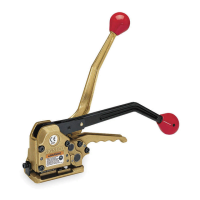
MANUAL COMBINATION STRAPPING TOOL

Questions and Answers

  • G
    Geoffrey MilesAug 1, 2025
    What to do if the joint fails after using the Signode SCM-12?
    • R
      Ronald MorrisonAug 1, 2025
      If the joint fails after using the Signode Tools, or if the joint doesn't look properly made, it could be due to several reasons. It could be that the sealing parts are worn, chipped, or the strap may not be strong enough for the load. Ensure the strap is tensioned properly before operating the sealer handle, and that the straps are inserted correctly, with the bottom strap extending 1" to 1 1/2" past the front of the tool. Also, check if the cutter is cutting the bottom strap and adjust it if needed.
  • M
    Ms. Erin CookAug 5, 2025
    Why is there poor tensioning with my Signode Tools?
    • B
      Brooke DawsonAug 5, 2025
      Poor tensioning with Signode Tools can occur if the feedwheel or clutch plug is packed with dirt or grit. Clean the dirt from the feedwheel if the top strap is slipping or replace it if it's worn. Similarly, clean the dirt from the clutch plug if the bottom strap is slipping, or replace it if necessary. Also, ensure that the strap is carefully aligned when inserted into the tool.
  • M
    Maxwell GutierrezAug 9, 2025
    How to reduce the effort needed to seal straps with Signode Tools?
    • A
      Antonio PaulAug 9, 2025
      If excessive effort is needed to seal straps together with Signode Tools, carefully inspect the sealer drive for worn or broken parts, especially broken needles within the sealer handle assembly. Also, worn dies, punch, or cutter can cause this issue, so replace them as needed. Ensure you lubricate the eccentric shaft, bearing needles, sealer cam, and cam roller.
  • B
    Brandon BaxterAug 13, 2025
    How to improve strap slack removal with Signode Tools?
    • C
      crystalperryAug 13, 2025
      Difficult strap slack removal when using Signode Tools can occur if the strap is not lubricated or waxed adequately, so purchase only lubricated (waxed) strapping. Ensure the strap is inserted and aligned properly in the tool, avoiding it being caught by the outer guide. Inspect the tension assembly’s ratchet wheel and pawls for damage or broken parts.
  • A
    Adam HallAug 18, 2025
    What to do if Signode Tools won't cut off strap after sealing?
    • J
      Jennifer JohnsonAug 18, 2025
      If the Signode Tools won't cut off the strap after sealing, or if the bottom strap is cut too deeply, inspect the cutter for wear or damage and replace it if necessary. If you are using a different gauge (thinner) strap, adjust the cutter blade accordingly. In the meantime, you can manually cut the strap from the package to release tension and de-energize the feedwheel.
  • B
    bowmanjenniferAug 22, 2025
    Why can't I remove Signode Tools from the strap after the cycle is completed?
    • S
      Stacy AlvaradoAug 22, 2025
      If you cannot remove Signode Tools from the strap after the cycle is completed, it might be because the upper strap was not cut off. Inspect the cutter for damage or adjustment. You can manually cut the strap from the package to release tension and de-energize the feedwheel. Another reason could be chipped or worn parts (punches and dies), so inspect and replace worn sealer parts.
  • R
    Robin WashingtonAug 27, 2025
    Why does the feedwheel slip during tensioning with Signode Tools?
    • M
      Morgan PattonAug 27, 2025
      If the feedwheel slips during tensioning with Signode Tools, it is likely due to a flat spot on the feedwheel. Replace the feedwheel.

Summary

General Safety Considerations

Strap Breakage Hazard

Risks associated with strap breakage, including loss of balance and flying strap/tool.

Eye Injury Hazard

Warns about severe eye injury or blindness from not wearing safety glasses.

Cut Hazard

Danger of cuts from handling strap or sharp parts; advises wearing protective gloves.

Tool Specifications

Major Tool Components

Operating Instructions

Apply Tension

Move tension handle between 11 and 2 o'clock positions to tension the strap.

Seal Straps

Move sealer handle forward and pull tension handle to punch through straps.

Remove Tool from Strap

Hold top strap, squeeze handles, and swing tool rear to remove it.

Strap Joint Appearance and Formation

Tool Adjustments

Troubleshooting Common Issues

Changing SCM Strap Size

Signode SCM-12 Specifications

General IconGeneral
ModelSCM-12
CategoryTools
Tensioning ForceManual
Handle MaterialPlastic
Strap Size1/2" (12.7mm)
Blade MaterialSteel
Blade LengthNot applicable
ColorBlack

Related product manuals