24
Using your Surf Chassis with the
Ventura Plus S Car Seat
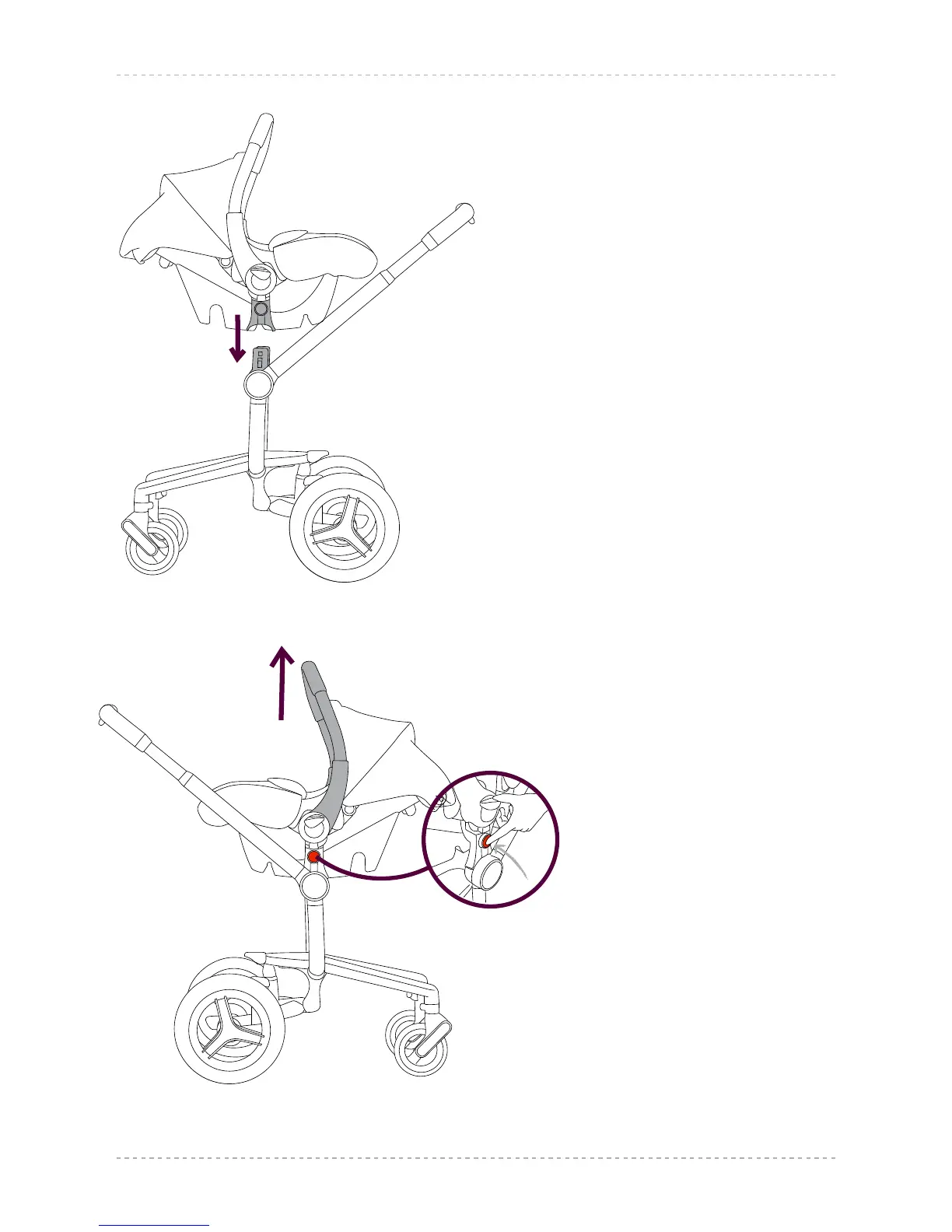
26.1 To attach your Ventura Plus S car seat
to the Surf chassis, hold the car seat
centrally over the attachment post
of the chassis. The locating points
on the car seat will slide over the
attachment posts on the chassis and
‘click’ into place. Gently lift the car
seat to ensure it is fully locked onto
the chassis.
26.2 With the Ventura Plus S car seat
facing you, detach by pressing the red
release
button located on the connection
point on the Ventura Plus S car seat
until it clicks into place.
WARNING: This button is
now unlocked. It will re-lock
automatically when the
seat is re-attached to the
chassis.
Then while pressing and holding the
other black release button, lift the
car seat from the chassis using the
handle. The car seat will now lift clear
of the chassis.
26.1
26.2





 To Next Page